Term
Online calculator
An online calculator is a browser-based tool that calculates a numerical result from inputs and defined rules, such as formulas, rates, multipliers, or conditions.
 Daria Lisovenko29 September 2026≈ 10 min.
What is an online calculator?
An online calculator is a tool you use in a browser. It applies defined rules to calculate a number from inputs. That might be a price, area, material quantity, duration, or another measurable value. On a business website, it often lets visitors estimate an order before speaking to the team.
In short: the user supplies parameters, the calculator applies a model, and the result is a number with a clear unit.
No traditional keypad is required. A calculator can look like a form, with an area field, a material selector, and a delivery switch. The inputs must affect the calculated result. A fixed message such as “Prices from $50” is not a calculator if it does not respond to the inputs.
How an online calculator works
The tool receives numbers, selected options, or values from a reference table and checks whether it can use them. Formulas and conditions produce the on-screen result. Changing an input may update the result immediately. In other calculators, you need to press a calculate button.
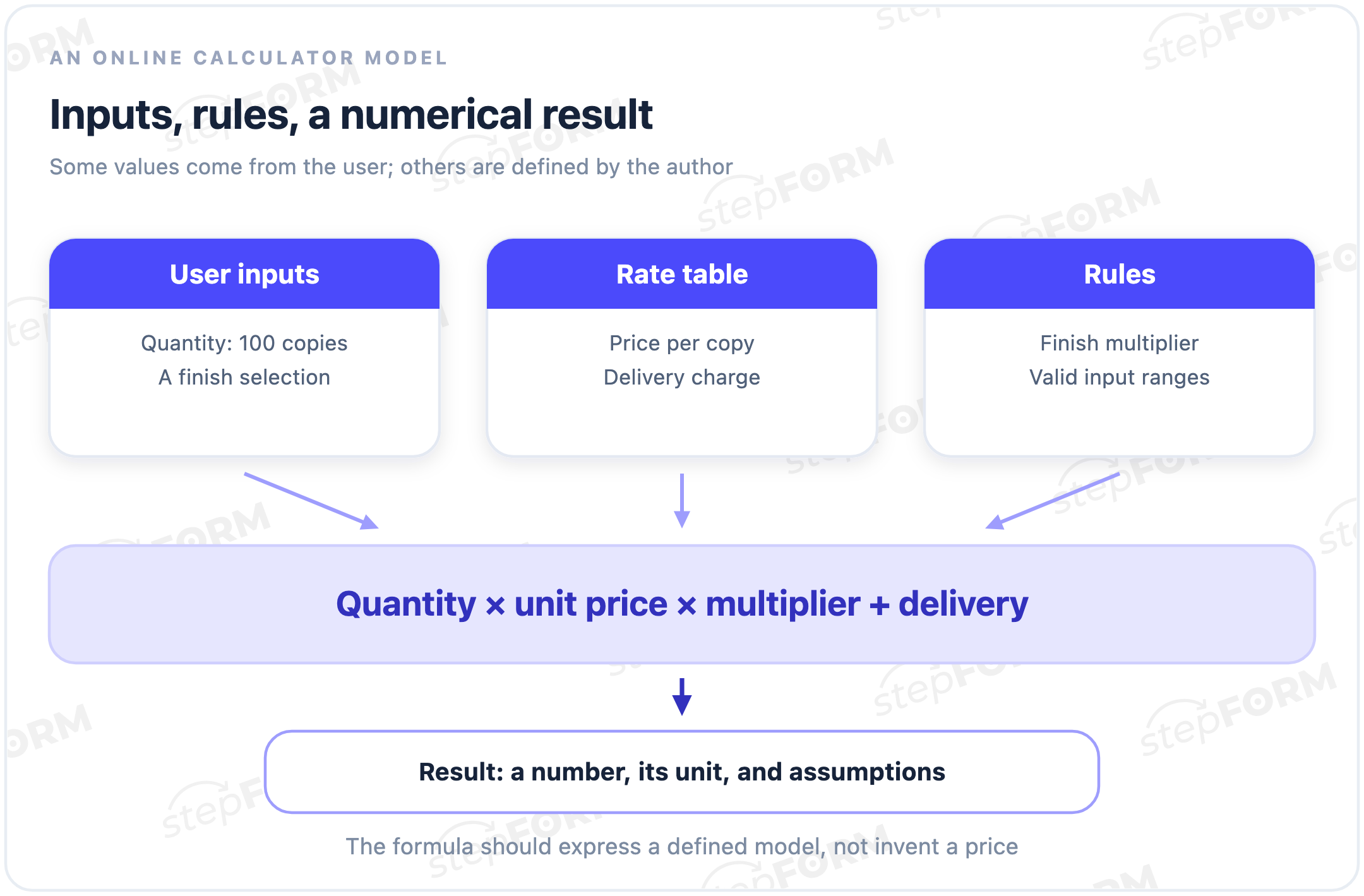
Calculations may run in the browser, on a server, or use an external data source. That changes the implementation, not the definition. Users mainly need to know what is included, where the rates come from, and what the result means.
The parts of a calculation
- Input parameters. Area, quantity, distance, rental duration, or another measure of scope.
- Option values. A selected material or specification may correspond to a rate or multiplier.
- Constants. A fixed delivery charge, call-out fee, or base service cost.
- Formulas and conditions. The order of operations, thresholds, exceptions, and rounding rules.
- A result and explanation. The number, its unit, a breakdown, and any limitations.
A formula expresses the model you choose. It does not choose one for you. If the team disagrees about pricing an order, a polished form will not settle it. Decide whether a surcharge applies to the whole total or one service, and whether delivery is charged once or per item.
An example of an online calculator
Consider a fictional print shop. Each copy costs $0.50, lamination multiplies the printing cost by 1.2, and delivery adds $5. The visitor selects 100 copies with lamination and delivery. These rates are fictional. They explain the arithmetic, not a real price list.
Total = quantity × price per copy × finish multiplier + delivery.
Printing: 100 × $0.50 × 1.2 = $60. Delivery: $5. Total: $60 + $5 = $65.
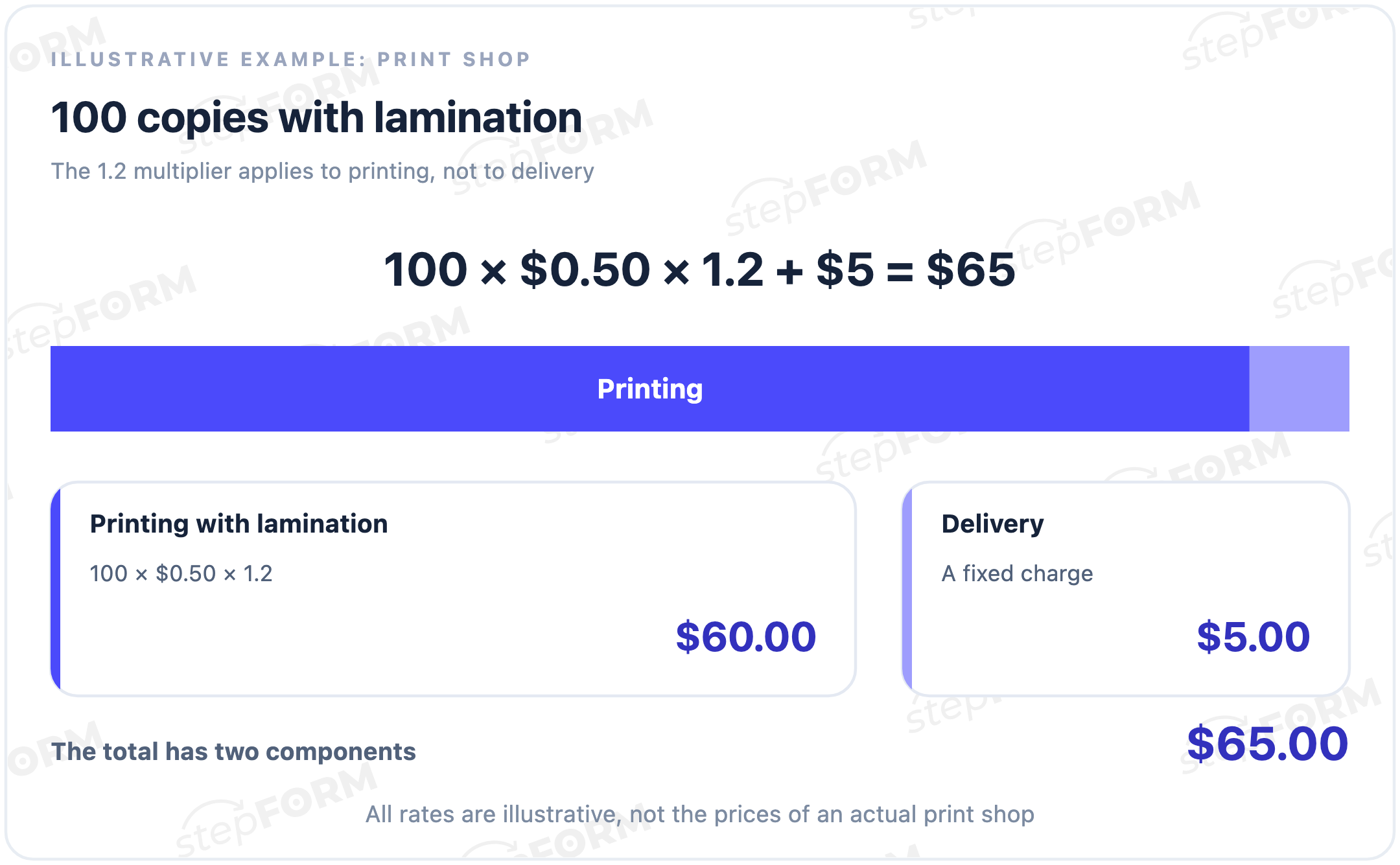
Removing lamination changes the multiplier to 1 and produces a $55 total. Selecting collection instead of delivery then removes the $5 charge, leaving $50. These are three testable scenarios of one model, rather than three unrelated prices.
The expression (100 × $0.50 + $5) × 1.2 would produce $66 because it applies the lamination multiplier to delivery too. The arithmetic works. The business rule is different. Start checking a calculator by agreeing what its formula means, not just hunting for software errors.
Common types of online calculators
| Purpose | Example inputs | Numerical result |
|---|---|---|
| Order price | Quantity, specification, optional services | A total or price range |
| Materials | Dimensions, coverage, allowance | Number of packs or units |
| Rental | Duration, item count, delivery | Cost for the selected period |
| Completion time | Scope and available throughput | An estimated duration |
| Unit conversion | A value and its original unit | A value in another unit |
Calculators do more than price orders. A packaging calculator might round quantities up to whole boxes, while a unit converter keeps fractional values. Present the result in a way that fits the task and model.
An exact number versus a preliminary estimate
Correct arithmetic does not mean complete inputs. A calculator can multiply area by a rate correctly without knowing the surface condition, site access, or additional work required. Two decimal places do not change that. The figure is still a preliminary estimate.
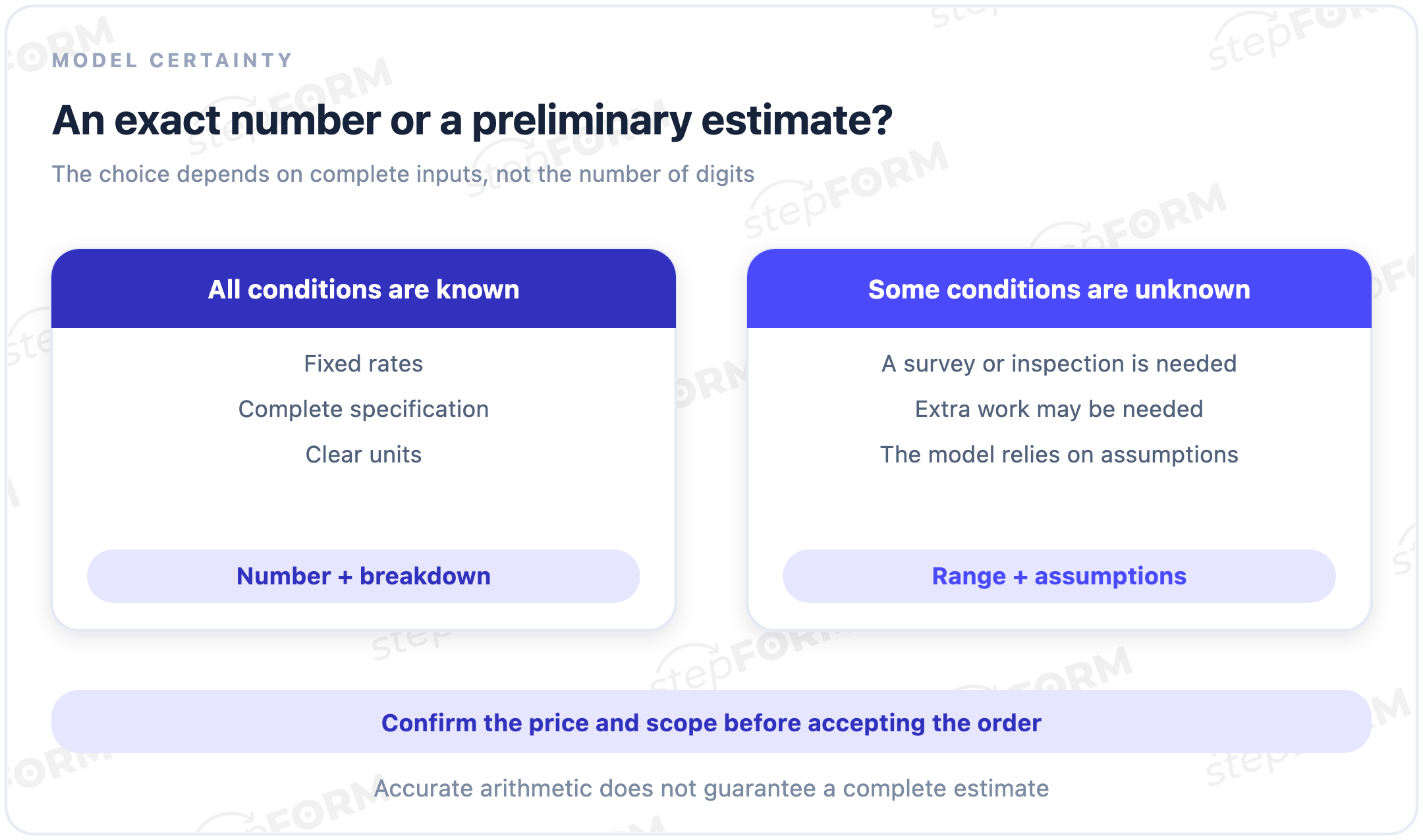
“Estimated total: $65 for the selected print run and delivery. Additional work is not included.”
Call a number the final price when part of the specification and possible extra work are still unknown.
A range needs a basis too, such as lower and upper rates for an unknown parameter. An arbitrary percentage added to the total does not make the estimate more credible. Too little information even for a justified estimate? Ask for clarification or offer an individual quotation.
Units, conditions, and rounding
Numbers need context. An area field should state its unit, a quantity field should make fractional input rules clear, and the output should identify the currency or measurement. Do not silently mix centimetres with metres, a per-item rate with a per-pack rate, or a daily rate with a whole-period cost.
Explain conditions separately: whether delivery and additional work are included, where a rate applies, and whether a minimum order is required. Threshold rules need precise boundaries. A discount starting at 100 copies, inclusive, differs from one starting at 101; the same input can produce a different price.
Rounding is part of the model too. Pack quantities may need to round up, while monetary totals follow the relevant currency and accounting rules. Rounding each intermediate operation can give a different outcome from rounding only the final value. Keep the chosen sequence consistent when recalculating and transferring an order.
Calculator, quiz, or form?
A quiz connects answers to a score, category, or recommendation. A calculator centres on a numerical result. Questions about preferences followed by a suggested service make a quiz; scope parameters followed by a computed price make a calculator.
A lead form collects contact details and context for a follow-up conversation. It might ask for the property’s area, but without a calculated output it is not an online calculator. The tools can work together: match a service, estimate the price, and then offer an enquiry.
The article “Form, Quiz, or Calculator” explores this choice in more detail. The promise made to the user matters more than the name of the block in the editor.
Does the result require contact details?
No. Contact collection is not a defining feature of a calculator. A visitor can receive a number and leave to compare options. Email or phone fields for sending an estimate, arranging a consultation, or placing an order are a separate next step whose conditions should be clear upfront.
For an enquiry, keep the inputs, selected options, result, units, and rate-table or model version. The total alone does not explain how it was calculated. Version information matters especially when someone saved a calculation yesterday and the rates changed today.
A calculation is not an enquiry or a payment. An enquiry needs a successfully stored response and contact details; payment needs separate confirmation of the transaction. A button click or an on-screen number is not enough.
When confirming an order, do not trust only a total supplied by the browser: client-side parameters can be altered. OWASP describes this as parameter tampering. Validate the price and order contents in a trusted system rather than accepting a single hidden field as proof.
Measuring calculator performance
Track views, input starts, valid results, and successful enquiries separately. Moving a slider may update the total repeatedly. Do not automatically count those updates as new visitors or separate completed calculations. Define what each event means first.
For each percentage, name the denominator: people who saw the tool, started entering data, or received a result. The form conversion entry explains why these measures cannot be mixed. Many calculations do not guarantee many useful enquiries. A different field count does not prove improvement either.
Checks before launch
- Calculate reference cases. Work out expected answers independently and compare them with the tool.
- Try every option. Each specification, delivery choice, and additional service should affect only the intended part of the total.
- Check boundaries. Handle blank values, zero, negative numbers, fractions, and discount thresholds according to the task’s rules.
- Change an earlier answer. A removed option should no longer affect the calculation; an outdated result must not appear current.
- Check presentation and delivery. The result is readable on a phone, errors are clear, and a test enquiry includes the inputs and total.
Also check decimal separators, long numbers, and rate-table loading failures. If a rate is unavailable, the tool should not show a convincing result based on an accidental zero. Invalid user input and unavailable calculation data are different states, each requiring a useful explanation.
Common mistakes
- A number without a unit. The user cannot tell whether the result refers to money, metres, days, or a single item.
- Hidden assumptions. Necessary work is excluded without explaining the limitation.
- The wrong order of operations. A multiplier increases delivery when it should apply only to printing.
- Stale values after a change. A removed service remains in the formula or the saved enquiry.
- No owner for the rate table. Website rates drift away from the prices the team uses.
Give someone responsibility for updating rates, reviewing exceptions, and repeating reference calculations. This work continues while the tool is in use. It is not just a developer's task at launch.
Online calculators in stepFORM
The stepFORM calculator builder lets you assemble fields, assign option values and a formula, style the tool, and publish it through a link or an embed. A calculation can be connected to an enquiry and response delivery through available notifications and integrations.
The author defines the formula, rates, precision, and result breakdown. For a step-by-step build, see “How to build a price calculator for your website in one evening”. This glossary entry focuses on the mechanics rather than individual editor controls.
Frequently asked questions
Does an online calculator have to calculate a price?
No. It can calculate area, material quantity, duration, percentages, or another numerical value. Price estimation is one common business-website use case.
How does it differ from a regular form?
A form collects information. A calculator applies rules to parameters and shows a numerical result. It can include an enquiry form, but that is a separate function.
Can a calculator show a range?
Yes, when the range is justified by the model and unknown parameters. Explain the assumptions and which information would help narrow the result.
How many fields should a calculator have?
As many as the calculation and a clear next step require. There is no universal number. A unit converter and a complex order estimate need different inputs.
Should a phone number be required before showing the total?
Not necessarily. Add contact fields for an order, consultation, or estimate delivery. If the result requires contact details, disclose that condition before input begins.
Is the result a final price?
Only when the model accounts for every necessary parameter and condition. Label preliminary estimates as estimates. An exact number does not make a price final.
The key point
An online calculator applies a defined model to turn inputs into a number. Its quality depends on correct rules, clear units, and honest limitations, not a particular field count. Keep contact collection, enquiries, and payments separate from the calculation itself.