Term
Online test
An online test delivers tasks over the internet and evaluates responses against predefined rules. The result may be a score, feedback on errors, or a suggested next learning step.
 Daria Lisovenko29 September 2026≈ 9 min.
What is an online test?
An online test delivers tasks over the internet and evaluates responses against predefined rules. It can check understanding, explain errors, or suggest the next learning step. Participants answer in a browser. Their result appears automatically or after a reviewer evaluates the work.
In brief: a test has evaluation criteria as well as questions. Those criteria connect responses to an understandable outcome.
“Online” describes access, not assessment quality. A five-question self-check about a guide and a formal examination can both open through a link, but they serve different purposes and have different requirements. A polished percentage screen does not prove the tool reliably assesses an entire subject.
How an online test works
The participant selects options or enters responses to the tasks. The system stores the attempt data, checks it against an answer key, or sends it for review using a rubric. The result is then calculated and explained through points, feedback, and possible next steps.
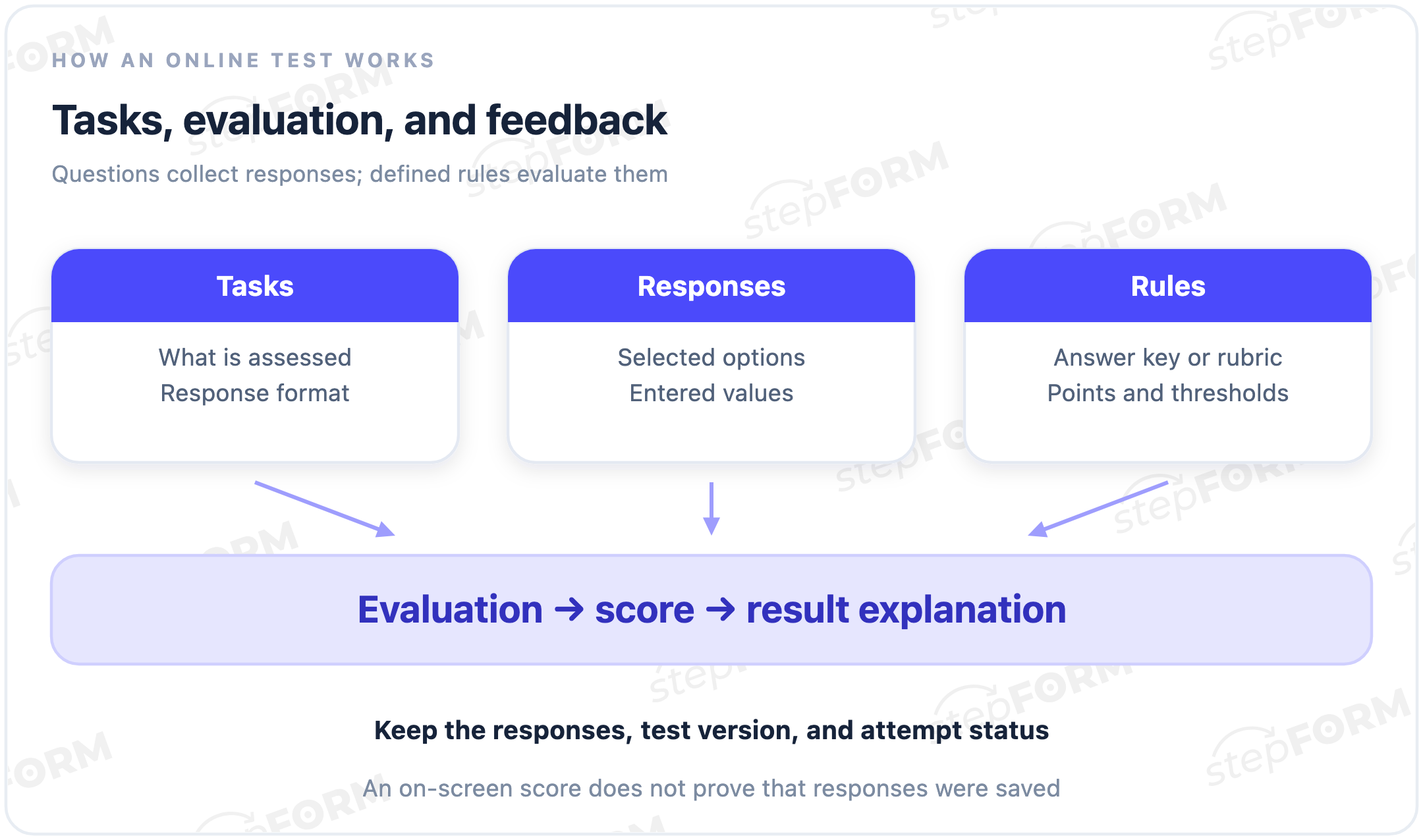
Marking need not be automatic. A single-choice answer is straightforward to check against a key. An extended answer may need a teacher to read it. With mixed marking, some points can appear immediately and the final outcome later. Explain that before the test begins so participants do not mistake a provisional score for the final result.
The components of a test
- Purpose. The specific understanding or action that the tasks are intended to assess.
- Tasks and responses. Prompts, options, input fields, and instructions.
- Answer key or rubric. What counts as correct, partially correct, or incorrect.
- Scoring. Points, task weights, rules for omissions, and percentage calculations.
- Feedback. An explanation of the outcome and a meaningful next step.
Choose tasks that assess the stated purpose. For a test on using a guide, ask questions that require understanding it, not guessing an unfamiliar term. One correct response does not demonstrate mastery of the subject. A broader promise needs more care in selecting tasks and setting evaluation criteria.
Common task formats
| Format | Evaluation | Rule to clarify |
|---|---|---|
| Single choice | Compare the selection with a key | Whether exactly one option is correct |
| Multiple choice | Compare the complete selection | Exact match or partial credit |
| Number | Check a value or acceptable interval | Units, rounding, and tolerance |
| Short text | Compare with accepted responses | Case, spaces, and equivalent wording |
| Extended response | Apply a marking rubric | Who reviews it and when results are final |
A format is not a scoring policy. In multiple choice, awarding a point for every selected option might let someone raise their score by selecting everything. Decide whether to require an exact match, allow partial credit, or apply a penalty. Then test actual answer combinations.
A scoring example
Consider an illustrative self-check about a product guide. Its five tasks have maximum scores of 1, 1, 2, 2, 4. A fully correct response earns the task’s full weight; an incorrect response earns zero. This example has no partial credit and no penalties.
The participant answers tasks one, three, and five correctly. Points earned are 1 + 0 + 2 + 0 + 4 = 7. The maximum is 1 + 1 + 2 + 2 + 4 = 10. The percentage of available points is 7 / 10 × 100% = 70%.
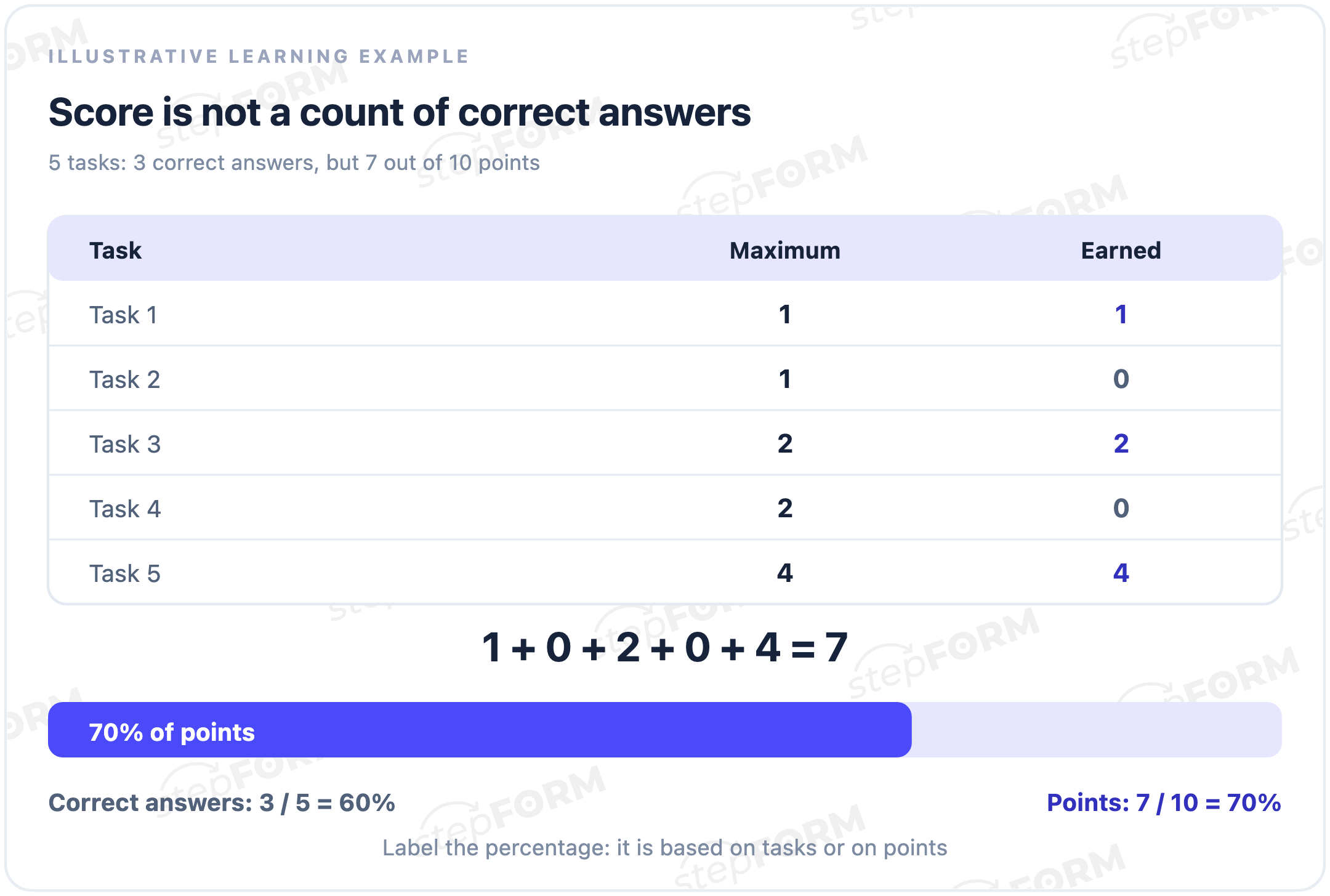
Both percentages are correct. They measure different things. Equal task weights make them coincide, but different weights do not guarantee that. Instead of an unexplained “Your result: 70%”, say “You earned 7 out of 10 points”. Agree what importance each weight represents rather than choosing arbitrary numbers.
From a score to a result
For this example, use three illustrative feedback bands: 0-4 points means review the basics, 5-7 means review errors, and 8-10 means proceed to the next module. These rules belong to this self-check. They are not universal standards of achievement. Seven points leads to feedback on errors.
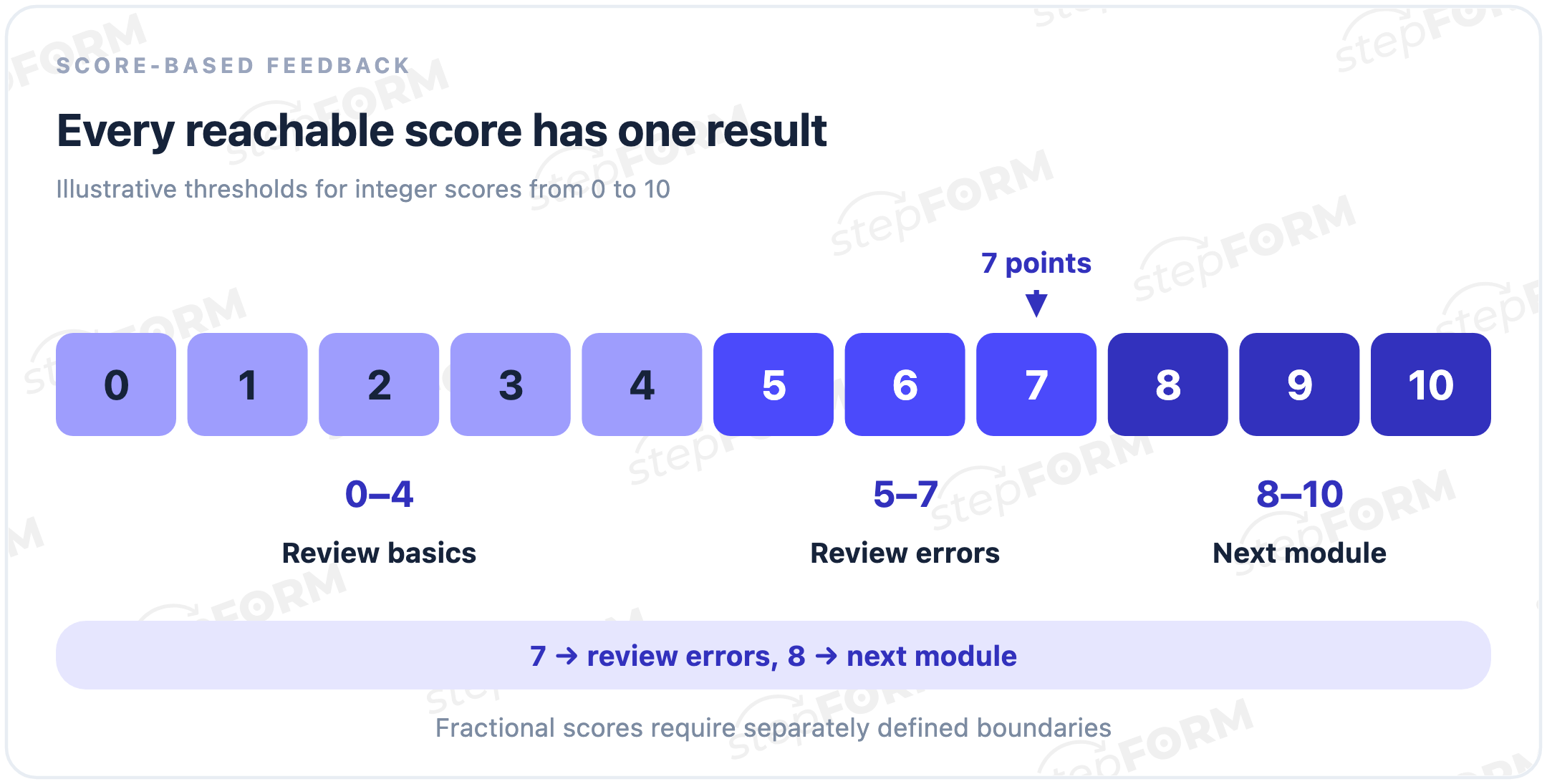
Checking zero and the maximum is not enough. There may be gaps or overlaps between them. Test each boundary, such as 4, 5, 7, and 8. These bands cover integer scores. If partial credit introduces 4.5 points, the wording no longer covers every score. Redefine the conditions, for example with explicit inequalities.
Different routes also need a clear maximum. If one participant sees tasks worth ten points and another sees tasks worth eight, do not silently divide both totals by ten. Define scoring for each route. Even identical percentages do not automatically make different task sets comparable.
Useful feedback after completion
Explain what the number means. In a learning test, the result might include the total, topics to revisit, and a link to the relevant material. Practice feedback can follow each response. A controlled check may withhold explanations until the attempt is complete.
“7 out of 10 points. Review the topics in tasks 2 and 4, then try again.”
“You are bad at using the product” makes a claim about overall ability based on five questions.
This outcome is not a medical finding, a psychological diagnosis, or proof of professional suitability. Important decisions require appropriate methods and additional evaluation. For an ordinary self-check, describe responses and topics rather than making sweeping judgements about the person.
Test, quiz, survey, or calculator?
A quiz is a broader question-based interaction. It may assess knowledge or recommend a service based on preferences, where no answer is right or wrong. An online test can therefore be a quiz, but not every quiz assesses knowledge.
A survey collects opinions or information rather than marking responses against a key. A registration form collects participant details. An online calculator computes a numerical quantity from parameters. A test can use a formula too, but its purpose is to evaluate tasks, not simply to calculate a price or an area.
Attempts, results, and saved data
Opening the page, starting answers, completing tasks, and successfully saving an attempt are separate events. A number can appear in the browser before the record reaches the system. Count completion through an event that confirms the necessary data was saved.
Save responses, the total, the version of the tasks and key, time, and review status. If you allow multiple attempts, decide whether to count the latest, the best, or each separately. Do not silently treat an omitted response as an incorrect one.
Contact details are not an assessment. An email address can be used to send results or enable a follow-up, but should not add points. If contact details are required to see the outcome, disclose that condition before the test begins.
Measuring completion
The share of completed attempts measures something different from the share of correctly answered tasks. One measures progress through the interface. The other measures responses against a key. The form conversion entry helps choose an event and denominator for the participant's journey.
A low score may reflect difficult material, an unclear prompt, or a wrong key. Leaving midway may reflect an error, lost interest, or unsuitable conditions. Neither the number of fields nor the average score explains the cause by itself. Investigate the specific tasks and events first.
Checks before launch
- Tasks and key. Prompts are unambiguous and accepted responses agree with the material.
- Reference totals. All-correct, all-incorrect, and mixed responses produce the expected scores.
- Result boundaries. No reachable total is left without a result or assigned to two results.
- Changed responses. Old points do not remain after a different selection or a return to an earlier step.
- Devices and storage. The test works on a phone and with a keyboard, and responses and totals are actually saved.
An incorrect solution affects marking. An input error prevents submission. Do not confuse them. W3C recommends clear feedback on errors and successful submission. A red border alone is not enough. Explain what to correct and whether the action was completed.
Common mistakes
- Meaningless weights. Arbitrary numbers influence the outcome more than the content.
- Unlabelled percentages. Correct-answer counts are substituted for points, or vice versa.
- Overlapping thresholds. One total triggers two outcomes while another triggers none.
- Premature final results. A provisional score appears to be a completed evaluation.
- Unverified protection claims. Shuffled questions are presented as a guarantee of unaided participation.
Online access does not establish identity or prevent outside help. Timers, attempt limits, and proctoring are separate mechanisms, not defining properties of every test. If they are required, verify their availability and actual behaviour in the chosen system.
Online tests in stepFORM
The stepFORM test builder lets you assemble questions, assign option values and formulas, configure transitions and results, and share a link or embed the form on a website. Responses are available in the dashboard, with notifications and integrations for further handling.
The author is responsible for tasks, the answer key, weights, and the meaning of the outcome. The article “How to create an online test for free” covers the practical build. Check plan availability and specialist requirements separately: the definition of an online test promises neither examination security nor automatic marking of any free-text response.
Frequently asked questions
Does an online test have to award points?
No. It can explain errors or give feedback based on a rubric. You still need evaluation rules. Without them, the tool is simply collecting responses.
Are a test and a quiz the same thing?
The terms overlap. A quiz may check knowledge or recommend an option based on preferences. An online knowledge test evaluates tasks against an answer key or rubric.
Why can the points percentage differ from the correct-answer percentage?
Tasks can have different weights. In the example, three correctly answered tasks out of five is 60% of tasks, while seven points out of ten is 70% of points.
Can a test evaluate text responses?
Yes. Define accepted answers or a rubric for human review. Matching one string does not automatically cover every equivalent wording.
Does every test need a time limit?
Only if it serves the purpose. A timer does not improve the questions or guarantee the absence of outside help. An ordinary self-check may not need one.
What counts as a completed attempt?
An event confirming that tasks were completed and the required data was saved under the test’s rules. A button click or a number in the browser does not guarantee this on its own.
The key point
An online test connects tasks, responses, and predefined evaluation. Its quality depends on the content and marking rules, not just the interface. Understandable points, complete score bands, and honest feedback help participants use the result without turning it into an unjustified label.