Term
Quiz
A quiz uses defined rules to turn answers to a series of questions into a result, such as a score, category, recommendation, or suggested option.
 Daria Lisovenko29 September 2026≈ 10 min.
What is a quiz?
A quiz uses defined rules to turn answers to a series of questions into a result. That might be a score, category, recommendation, or suggested product or service. Knowledge quizzes give feedback on correct and incorrect answers. Recommendation quizzes ask about participants' needs, then suggest matching options.
In short: a quiz connects questions to an outcome. Several screens and a “Next” button do not, on their own, turn a form into a quiz.
On business websites, quizzes often help visitors choose a course, product, service, or package. They do not have to collect a phone number. A quiz can show its result without asking for contact details. Add an enquiry step only when it serves a clear purpose.
How a quiz works
Before asking the first question, explain what the participant will receive and roughly how much effort it takes. They then select or enter answers. Rules decide which questions come next and how to choose the final result. The last screen shows that result and, where appropriate, a relevant next action.
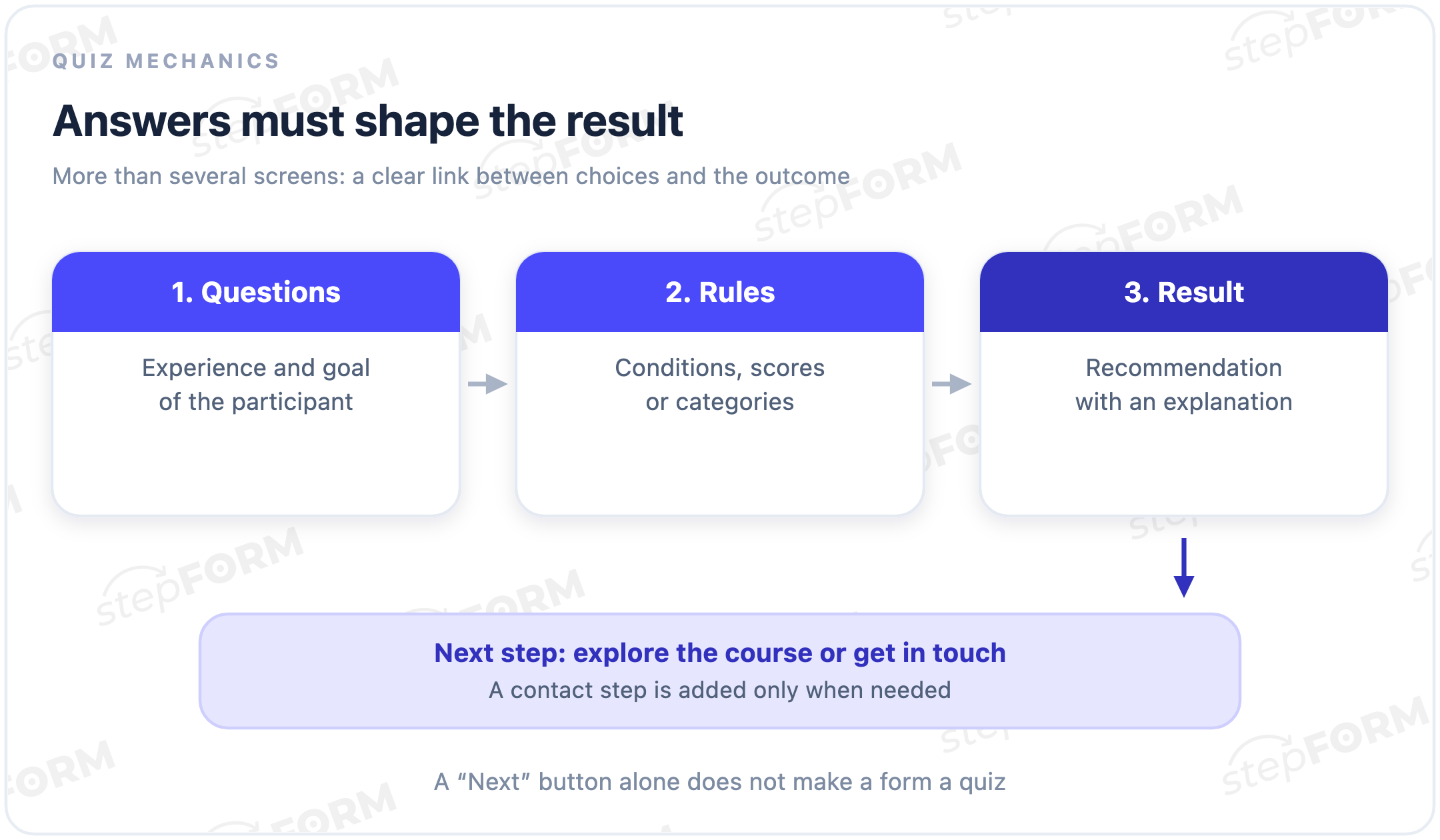
The rules can be simple. A quiz might map an answer combination to one of a few options, add up points, assign a category, or calculate a value. As its author, you should be able to explain every outcome. That includes incomplete answers and combinations with no obvious single result.
The main parts of a quiz
- A promise. What the participant will learn: a preliminary score, a suitable programme, or possible solutions.
- Questions. Inputs that influence the result or are needed to continue the scenario.
- Rules. Branch conditions, category mappings, scoring rules, or formulas.
- A result. A useful answer to the original question, with reasoning and appropriate limitations.
- A next action. Explore a programme, browse a catalogue, retake the quiz, or contact a specialist.
Progress indicators, visual answers, and attractive design can make a quiz easier to use. They do not replace meaningful logic. A name may help personalise a reply without improving the recommendation. If neither the rules nor the later workflow uses an answer, reconsider the question.
Common types of quizzes
| Type | How answers are used | What the participant receives |
|---|---|---|
| Knowledge quiz | Compared with correct answers | A score, mistakes, and explanations |
| Recommendation quiz | Narrow down suitable options | A product, programme, or service |
| Category quiz | Match a predefined group | A category with an explanation |
| Calculation-based quiz | Feed into a formula | A number or range with assumptions |
| Entertainment quiz | Produce a playful score or type | A game-style result |
These categories overlap. A recommendation quiz may include a cost estimate, while a knowledge quiz may suggest topics to revisit. A playful personality category is not a psychological diagnosis. Likewise, a self-made test does not become a reliable assessment of competence merely because it displays a percentage.
Quiz, form, survey, or test?
A regular form collects and transfers information. Splitting its fields across screens changes how people fill it in, but does not necessarily produce a personalised outcome. A quiz processes answers to give the participant an outcome: a score, category, or recommendation. An enquiry form can be an additional step.
A survey primarily gathers opinions or experiences for analysis. A test may assess knowledge against criteria and can also be a quiz. A calculator centres on a numerical calculation. A lead form collects contact details and context so a team can continue the conversation. One experience can combine these functions. Describe it by its main promise to the user.
For example, three screens asking for a name, phone number, and location are still a multi-step enquiry form. Questions about a visitor’s situation followed by a suggested solution make a recommendation quiz. Adding an enquiry step creates a quiz with a lead form, not proof that every participant is ready to buy.
Linear questions and branching
A linear quiz asks everyone the same questions, but can give different results. That is a valid design. Answers may add points or select a category. Branching helps when a later question depends on an earlier answer: it can skip irrelevant questions, at the cost of more routes to test.
Consider an illustrative course-matching quiz about working with data. The first question asks about practical experience. A beginner receives an introductory course recommendation. Someone with experience gets an additional question about their goal: automating reports or refreshing the basics. Each combination points to a predefined programme.
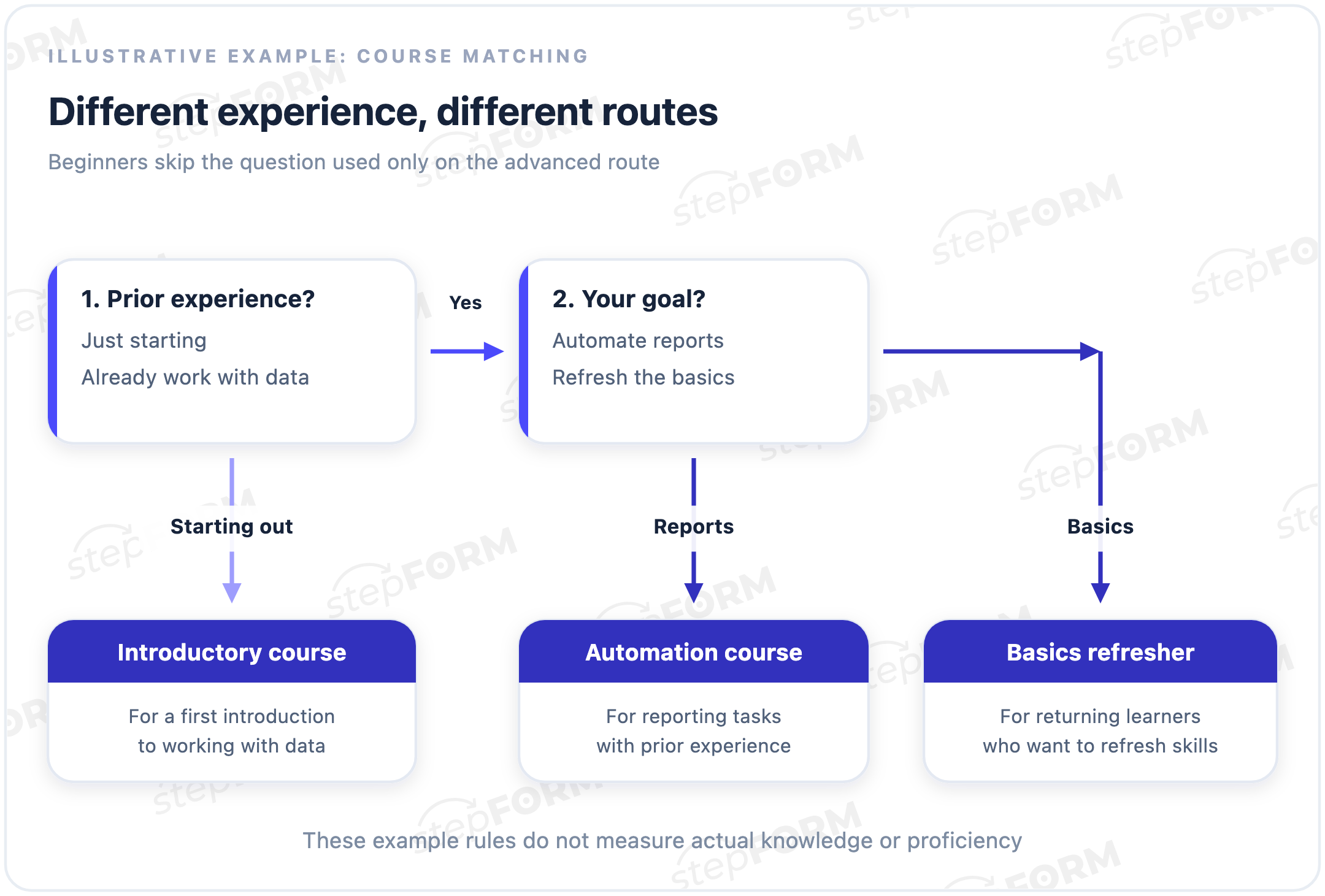
This matches stated preferences; it does not measure actual skills. Assessing knowledge would require different questions and justified criteria. If none of the options fits, offer a consultation or state that there is no match, rather than forcing the participant into the nearest product category.
Designing the result rules
- Define the possible outcomes. Describe who each one suits and which answers justify selecting it.
- Connect questions to decisions. Each question should distinguish options, not merely make the quiz longer.
- Handle conflicts. Decide what happens with tied scores, multiple suitable options, and no matching result.
- Test changed answers. Going back should update the outcome; answers from a route that is no longer relevant should not distort it.
Scoring can be convenient. Each answer weight still needs a reason. Calling someone an “87% match” from an arbitrary total suggests precision the rules may not support. For straightforward recommendations, naming the option and explaining the fit is often clearer than inventing a suitability percentage.
What to show on the result screen
Tell the participant what you recommend, why it fits, and what to do next. In the course example, the screen might suggest a report automation programme, explain the connection to their experience and goal, and link to the course outline.
“You have experience and want to improve reporting, so we suggest the automation course.” The reasons come from the answers.
“Our best course is right for you” for every combination. A match is promised, but the participant’s choices are ignored.
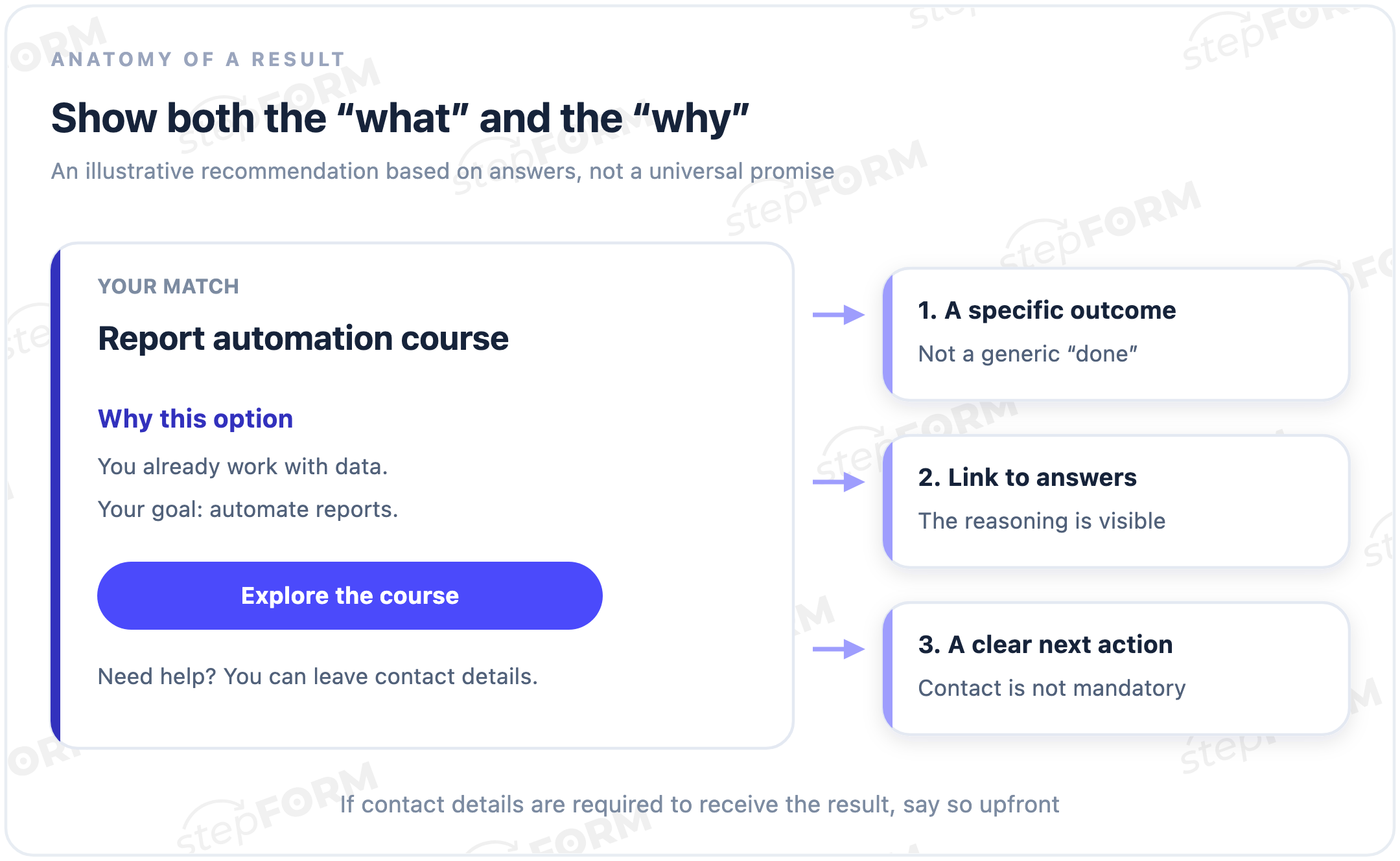
State clearly when an outcome is preliminary. A match should not look like a compatibility guarantee, final quotation, or professional assessment when it is none of those things. Let participants review their answers and understand the limitations before contacting the team.
Where contact details fit
You can ask for contact details after the result to arrange a consultation, before emailing a personalised shortlist, or at another relevant point. The choice should follow the opening promise. If the start screen says “Find your ideal course”, an unexpected mandatory registration step before the result changes the terms midway through the experience.
Make the condition clear: if contact details are required to receive the result, disclose that before the quiz starts. Explain what will be sent and whether the team will follow up.
For enquiries, pass the answers, result, and scenario version to the team with the contact details. Otherwise a team member may have to repeat the entire quiz in conversation. Data collection and consent must meet the requirements that apply to the business. Adding a technical field is not enough.
Measuring quiz performance
Track views, starts, question completion, result displays, successful contact submissions, and enquiry quality separately. “Get my result” can be clicked without the result loading. A submitted enquiry is not a sale. It may be a test, duplicate, or unsuitable request.
Calculate completion against an explicit starting point, such as people who began the quiz. For enquiry conversion, state whether the denominator is views, starts, or participants who reached a result. Mixing these bases makes comparisons misleading. The form conversion entry explains this distinction in more detail.
Compare versions using similar traffic, consistent event tracking, and the same definition of a useful enquiry. There is no universal “good quiz conversion rate”: the offer, audience, acquisition channel, and complexity of the decision all matter.
Checks before launch
- Every route. Each branch reaches its intended result, with no dead ends or hidden required fields blocking progress.
- Back navigation. Changing an answer updates questions and results without retaining an irrelevant selection.
- Edge cases. Tied scores, blank optional answers, and no-match outcomes have explicit behaviour.
- Mobile use. Options, buttons, and errors remain readable; the keyboard does not hide essential controls.
- Keyboard access. Focus moves predictably, and selections and navigation work without a mouse.
- Enquiry delivery. A test response is stored and reaches the intended working channel with its result attached.
Test more than the ideal path. Try invalid input, a slow connection, repeated clicks, and going back after switching branches. The thank-you screen confirms a user-facing step. You still need to check that the record was saved and transferred.
Common mistakes
- The same result for every answer. The experience looks like a recommendation tool, but gives everyone the same promotion.
- Questions that do nothing. Participants spend time answering, yet neither the match nor the next action changes.
- Unsupported precision. An informal category is presented as a reliable diagnosis or guaranteed outcome.
- A hidden contact requirement. The terms for receiving the result become clear only after the questions are complete.
- Complexity for its own sake. Many branches make testing harder when a short linear sequence would solve the task.
Quizzes in stepFORM
The stepFORM quiz builder lets you assemble questions, configure logical conditions and calculations, style an experience for your website, and publish it through a direct link or an embed. Responses can be used in a workflow through notifications and integrations.
The builder does not decide which offer suits a customer. The author defines the matching criteria, result messages, and route checks. For a practical comparison of enquiries, recommendations, and numerical estimates, see “Form, Quiz, or Calculator”.
Frequently asked questions
Is a quiz the same as a multi-step form?
No. A multi-step form divides fields across screens. A quiz processes answers to produce an outcome for the participant. Quizzes often use multiple steps, but that is not a requirement.
Does a quiz need correct answers?
Only when assessing knowledge. In a product or course recommendation quiz, participants describe their circumstances. Options are checked for suitability, not marked right or wrong.
Can a quiz work without branching?
Yes. Everyone can answer the same questions, with the result based on an answer combination or score. Add branching when it removes questions that do not apply.
Does a quiz have to collect a phone number?
No. It can show the result without collecting any contact details. Add phone or email fields for a specific action, such as a consultation, booking, or delivery of a resource.
How many questions should a quiz have?
Enough to support a justified result. There is no universal number. A question that changes neither the recommendation nor the next action only adds effort.
Will a quiz always generate more enquiries than a form?
No. A quiz helps when someone needs guidance choosing an option. For a visitor who already knows what to order, extra questions can be an obstacle. Compare outcomes on your audience and consider enquiry quality as well as volume.
The key point
A quiz connects questions and rules to a useful result. It can check knowledge or guide a choice when the answers genuinely affect the outcome. Contact collection, branching, and presentation should serve that task. Before launch, test every route and what happens to the data afterwards.