Term
Conditional logic
Conditional logic changes a form's next step according to the answers: which questions appear, which page opens or which result the person reaches. Each branch needs a condition and an action, with a fallback route for answers that match none of the rules.
 Daria Lisovenko8 October 2026≈ 8 min.
What is conditional logic?
Conditional logic changes what happens next in a form according to the answers. One person sees questions about a flat, another about an office, but after their respective follow-up questions both reach the same contact step. Other names include branching logic and logic jumps.
The form author defines routes instead of sending everyone through one sequence. An “Office” answer to a question about property type might select a branch whose action opens another page or displays an extra field. The available actions depend on the form builder. The term does not imply that every tool supports every option.
In brief: a question controls the next step only when its answer is part of a rule. Several pages with a “Next” button do not, by themselves, create branching.
Conditions, actions and fallback routes
A rule has two main parts: a condition describing the answer or combination of answers to check, and an action defining what happens when it matches. “If Office is selected, open the office questions” contains both parts. “Show suitable questions” is too vague to test.
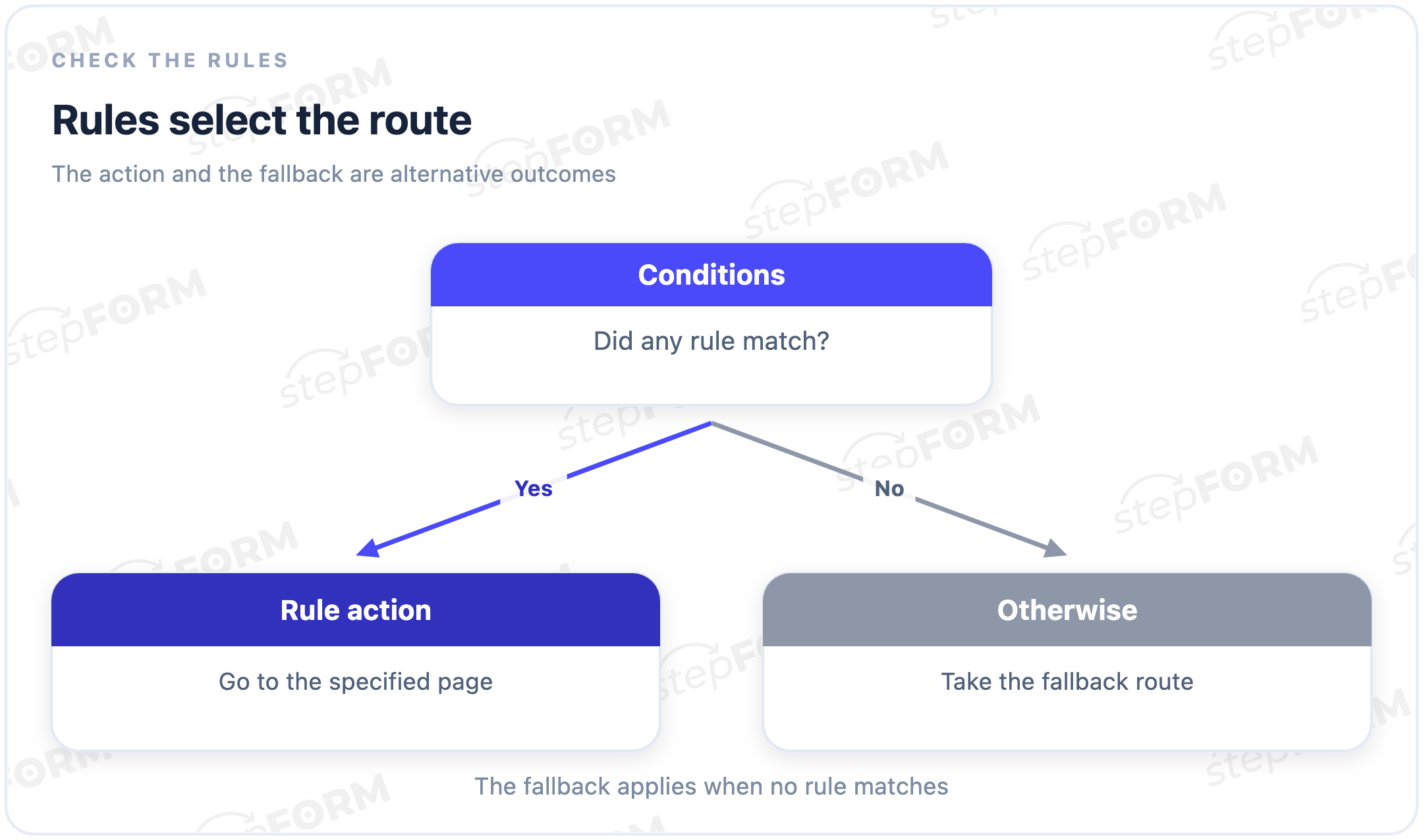
Where does someone go when no condition matches? Decide on this fallback, or otherwise route separately. For example, a visitor selects “Other” and describes the property in their own words. Without this path, the author could test two familiar branches and miss a third option that leads to an irrelevant question or a dead end.
A fallback does not have to end the form. Sometimes it should open a shared step, sometimes ask for more details. Choose the action according to what the enquiry needs. If there is not enough information to prepare an offer, submitting early will merely move the missing questions into a later conversation with the customer.
Two matching rules can cause a different problem if they call for different actions: which one wins? Do not assume the builder always chooses the first or the last. Check how that tool handles the conflict, then test the answers that trigger it. Where possible, make conditions mutually exclusive if the person needs exactly one route.
What can change when a condition matches?
| Mechanism | What changes | Example |
|---|---|---|
| Conditional field display | The questions on a page | “Window cleaning needed” reveals a question about the number of windows |
| Page jump | The route through the form | “Office” opens the office section and skips the flat section |
| Result selection | What the person sees after answering | Different tasks lead to different recommendations |
These are applications of conditional logic, not a feature list for every service. Showing a field does not require a separate page, whereas a page jump can skip an entire section, and selecting a result need not change the questions at all. People may answer the same questionnaire but receive different outcomes.
Keep branching separate from calculation. A formula can calculate a cleaning price without changing the route, and a form can ask different follow-up questions for flats and offices without calculating a price. In a test, points describe the outcome of answers, while a jump rule determines the next step. These mechanisms can work together, but they need separate checks.
Example: a cleaning enquiry
This is a fictional enquiry for a cleaning company. The first step asks for the property type: flat, office or other. A single long list of questions is awkward here because the author needs different details: employees' working hours are irrelevant to a flat owner, and residential room count does not describe an office cleaning job.
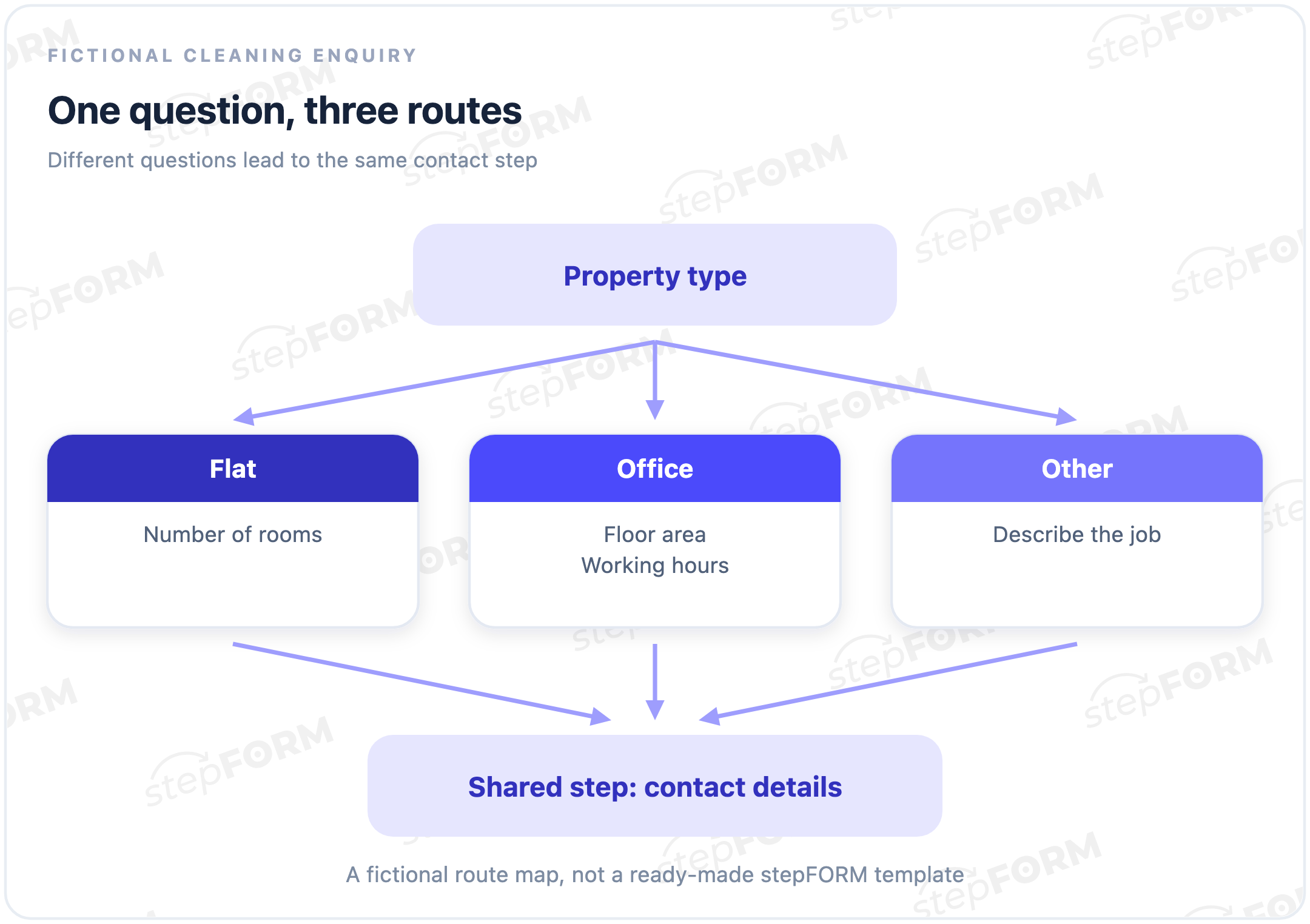
The flat branch asks for the number of rooms. For an office, the company needs the area and working hours so it can discuss a suitable cleaning time, while “Other” leads to a description of the task. Contact details are collected after the selected section rather than copied into every branch, which makes consistent labels and requirements easier to maintain.
In this map, “Other” is the fallback for two page-jump rules. Check the route again if you later add “Warehouse”: the new answer does not mean that its follow-up questions are already configured. A branch needs a purpose beyond occupying a place on the map.
The map explains a route, not a ready-made stepFORM template. Nor does it prove that enquiries will increase. If every customer answers the same questions, an ordinary linear form may be simpler. Use branching where an answer actually changes the information needed or the action that follows.
Writing conditions without ambiguity
Start with a short rule you can check by hand: “property type equals Office”. For a combination of answers, write each check separately. If an offer requires both an office and regular cleaning, use AND. For other rules, decide whether all conditions must match or one match is enough.
AND requires both connected checks to be true. OR accepts at least one, including both at once. With a single-choice question, “Flat AND Office” cannot work because a person cannot select both answers, so two acceptable property types need a different combination of conditions.
When a chain mixes AND and OR, the evaluation order matters. In stepFORM, the Russian documentation on logic jumps describes sequential evaluation from top to bottom: A OR B AND C means (A OR B) AND C. Do not import the usual AND precedence from programming languages into the form settings. The English documentation does not describe this order.
Check a long chain on paper first. Try answers that fail the final requirement and compare the expected action with the actual one, rather than inspect the settings with one convenient set of answers. The order of operators within a chain does not establish the priority of two separate, conflicting rules.
What to check when an answer changes
Testing the first run is not enough. A visitor may go back and change Flat to Office, where they need different questions. If they previously entered three rooms, do not treat that answer as a current description of the office without checking.
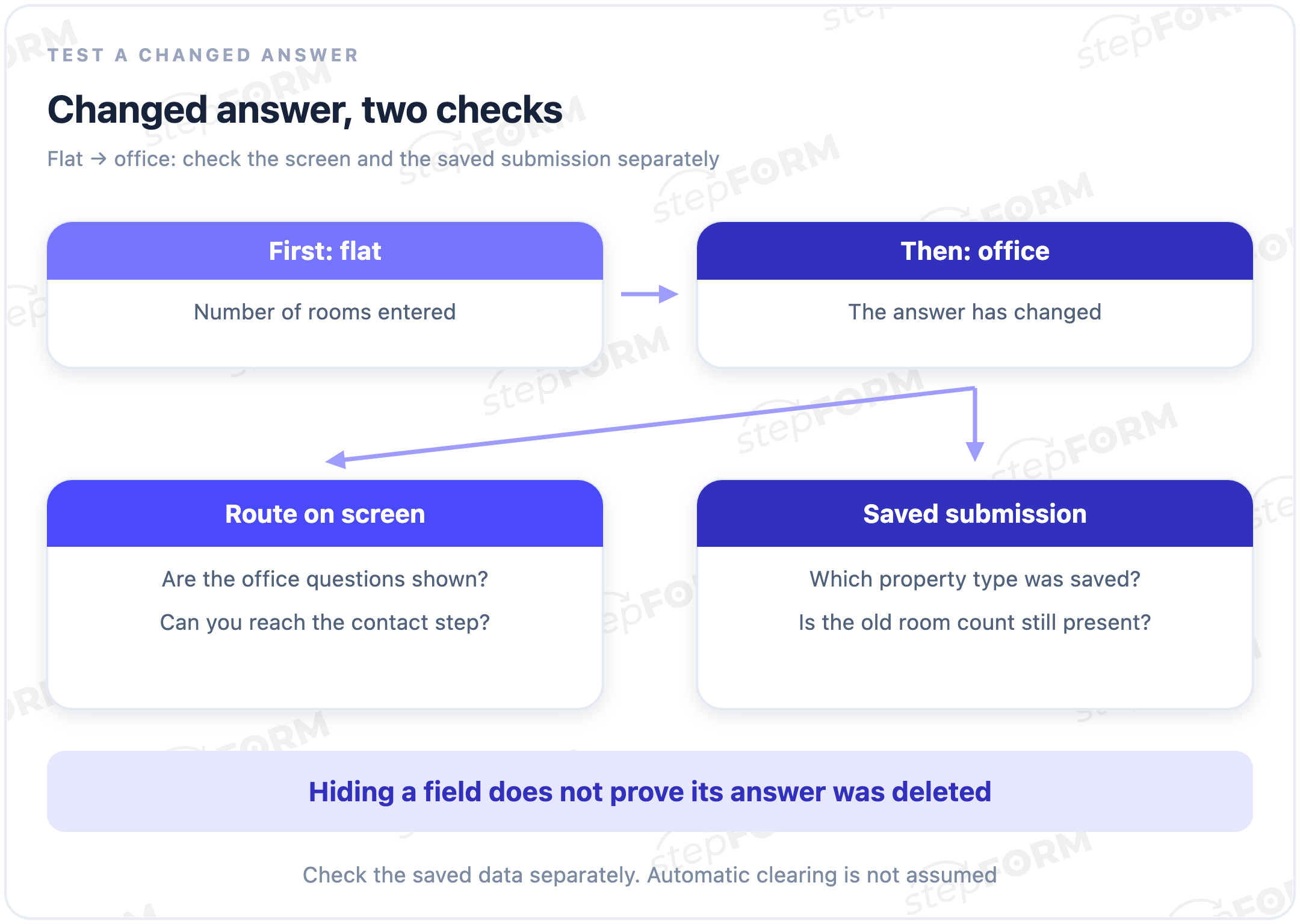
Check two results: the screen the person sees and the data the company receives. A question can disappear from the screen while its previous answer remains, depending on the implementation, so hiding it does not prove that the data has been deleted. Submit a test enquiry after changing branches and check whether an outdated value is being treated as part of the new request.
Hiding a field does not protect its data. Do not put secret information in a form on the assumption that a condition will prevent visitors from seeing it.
| Test scenario | Expected route in our example | What to check |
|---|---|---|
| Flat selected at the start | Room count, then contact details | No required office questions |
| Office selected at the start | Area and working hours, then contact details | No requirement to enter residential room count |
| Other selected | Task description, then contact details | The fallback route does not end in a dead end |
| Flat changed to Office | Office questions replace flat questions | The old room count is not used as a current answer |
| No property type selected | The author defines acceptable behaviour in advance | If the question is required, an accidental jump does not let the person skip the answer |
Repeat these checks after changing answer options or page order. The destination page may still exist after a section is renamed or reworked, but that does not mean it still makes sense for the answer that triggers the jump. Review the rule as well.
Conditional logic in stepFORM
In stepFORM, answers can control page jumps and element display. If no condition matches, the “In other cases” setting can direct a jump or submit the form. Write down the expected routes before building. The documentation covers the settings.
For a questionnaire with different sets of questions, use the stepFORM quiz builder. Start with one branch and check every answer, including what happens on the way back, before you add further conditions. If a branch does not change the questions needed or the result, a separate route probably is not needed.
Frequently asked questions
Does every multi-page form have branching?
No. If everyone visits the pages in the same order, the route is linear. Branching starts when a condition changes the next step or the questions shown.
Does every hidden field need its own page?
Not necessarily. Conditional field display can change the current page without a jump. Check the capabilities and limitations of that display in your chosen builder.
Why have an “In other cases” route?
It defines what happens when none of the conditions matches. In the fictional enquiry, it opens a description of another property. Without a fallback, some valid answers may lead to an unsuitable step.
Are answers from a skipped branch deleted automatically?
Do not assume this is a general property of branching. Change the original answer, follow the new route and inspect the saved enquiry. A question disappearing from the screen does not prove that its data has been cleared.
Does branching guarantee a higher conversion rate?
No. It can remove irrelevant questions, but a wrong route can prevent submission. Assess the effect through completions and suitable enquiries, not the number of branches created.
Further reading
- Setting up logic jumps in stepFORM: page jumps and fallback actions.
- How to create an online quiz: building and checking a quiz in practice.