
Form, Quiz or Calculator?
Compare website forms, quizzes and price calculators by visitor intent, question flow, result, setup effort and the next sales action.
Guides  Daria Lisovenko
15 September 2026
Reading time ≈ 14 min.
Daria Lisovenko
15 September 2026
Reading time ≈ 14 min.

Use a form when a visitor already knows what they need and is ready to share contact details or requirements. Use a quiz when they still need help choosing and their answers should lead to a recommendation. Use a calculator when the main unanswered question is price, quantity or another number. Combine them only when the journey genuinely needs more than one of these outcomes.
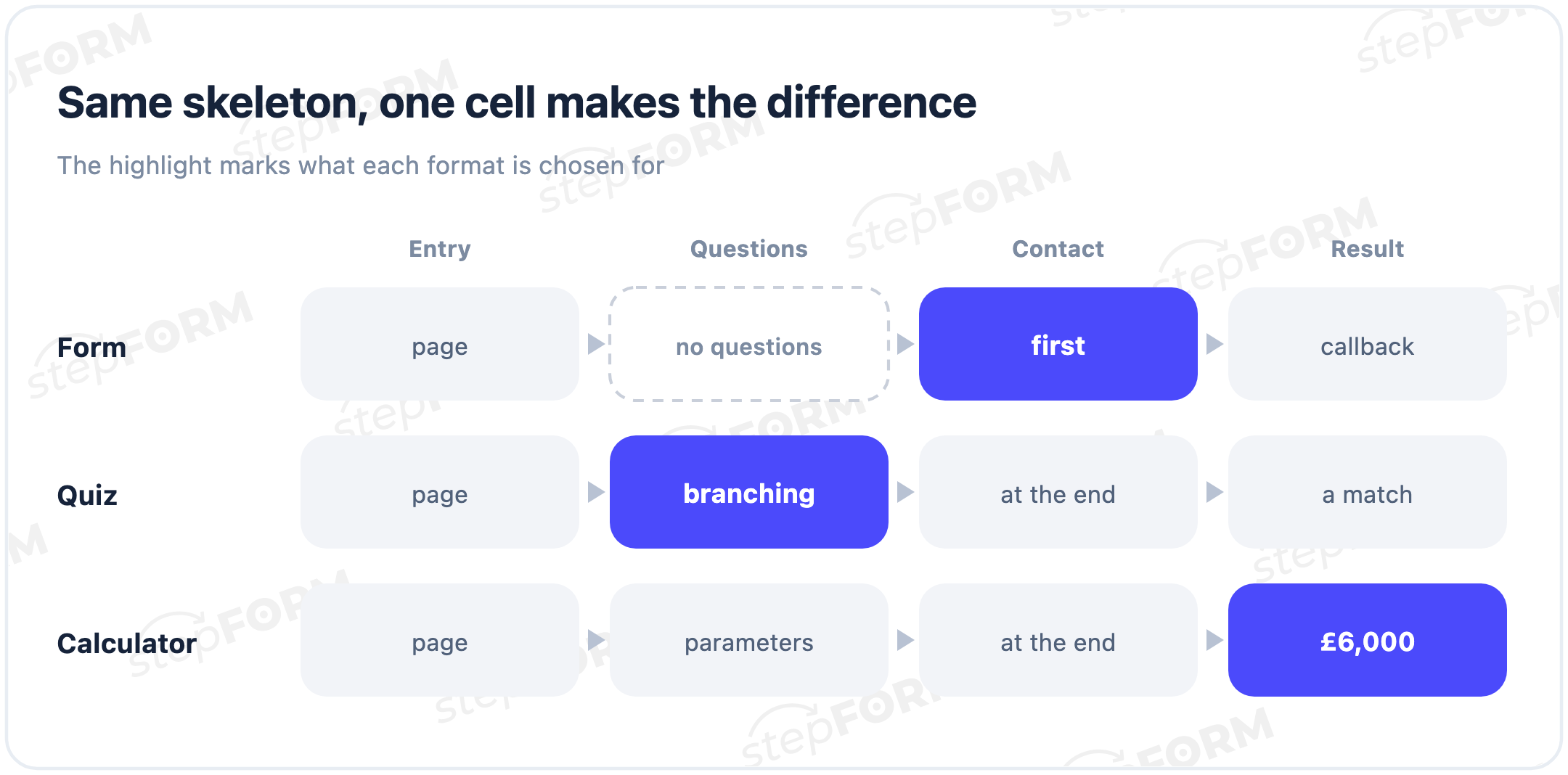
The distinction is not the number of screens or the style of the buttons. You can place the same fields on one page or split them into steps. That does not turn a form into a quiz. The format is defined by the result the visitor receives and the logic used to produce it.
The short answer
| Format | When to use it | What the visitor gets | What the business gets |
|---|---|---|---|
| Form | The decision is already made | Confirmation of an enquiry or booking | Contact details and structured information |
| Quiz | The visitor needs help choosing | A recommendation or appropriate route | Needs context and a qualified enquiry |
| Calculator | The visitor needs to estimate a price or quantity | A number, range or breakdown | Input parameters and a calculated value |
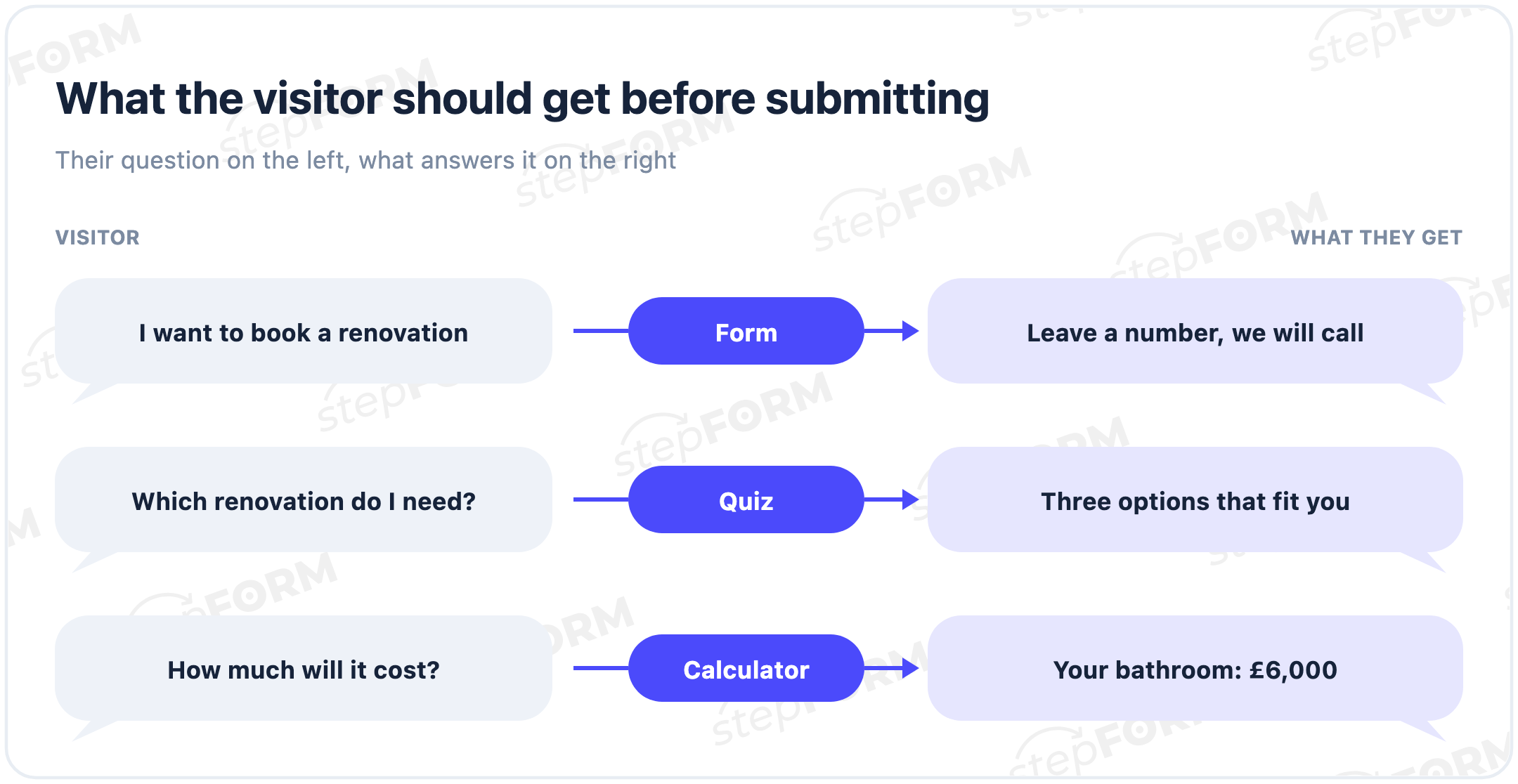
Start by naming the question that prevents the visitor from acting. If they know the service and want to book, give them a short form. If they cannot tell which plan or product fits, guide them with a quiz. If they are testing the budget, provide a calculator. If they must choose a configuration before pricing it, combine a quiz and calculator, then collect the contact at the point where it is needed.
Start with the visitor's unanswered question
Teams often begin with “we need a quiz because it feels more engaging” or “our competitor has a calculator”. That selects a component before defining the job. A better starting point is a one-sentence description of the visitor's situation:
- “I have chosen the service and want someone to contact me.”
- “I see several options and cannot tell which one is right.”
- “I roughly know what I need but not what it will cost.”
A form removes the first obstacle, a recommendation removes the second and a calculation removes the third. This framing also keeps unnecessary questions out of the journey. A field should stay only if it changes the route, recommendation, amount or action after submission.
When a form is enough
A form works best after a decision has been made. The visitor has read the service page, seen the offer or understood the terms and is ready to move forward. The interface does not need to recommend an option or calculate an amount. It only needs to collect the minimum information required for the next action.
Typical form jobs include:
- requesting a callback;
- booking a consultation or product demo;
- reserving a known service for a chosen date;
- sending a project brief or file;
- asking a support question;
- providing contact details to receive a resource.
For a consultation request, a name, contact method and short description of the problem may be enough. Company size, job title, budget and acquisition source can be useful to sales, but every required field asks the visitor to do more work. Decide whether each detail is genuinely needed before the first conversation.
A form can be multi-step and conditional. Choosing “Call me” might reveal a phone field, while “Email me” reveals an email address. It is still a form because the outcome is a submitted enquiry, not a recommendation.
Choose a form when the next action is known and the answers do not change the offer. The stepFORM form builder can collect fields, organize a longer request into pages and send the data without custom development.
When a quiz earns its place
A quiz is useful when the visitor cannot confidently choose among several options. Its questions reduce the decision space, hide irrelevant branches and lead to a recommendation. The visitor receives value before speaking to a salesperson: they know what fits and why.
Good quiz use cases include:
- selecting a plan based on team size and required features;
- finding a course based on a goal and current skill level;
- choosing a product model for specific conditions;
- identifying the right type of service from a few symptoms;
- routing a customer to the appropriate department.
A useful quiz is not merely a long questionnaire hidden behind Next buttons. Each meaningful answer should affect a branch, recommendation or offer. If every visitor answers the same ten questions and sees the same final message, the experience is a multi-step form with quiz styling.
On the result screen, explain how the recommendation relates to the answers: “This plan fits a five-person team because you need shared access and approvals.” Avoid withholding the promised result behind “Enter your phone number to find out”. Deliver the value first, then invite the visitor to save the recommendation, discuss it or continue.
If the selected option also needs a price, the quiz can feed a formula. Our guide to a website quiz with price calculation explains that combined journey. For a pure recommendation flow, start with the stepFORM quiz builder.
When a calculator is the right tool
A calculator answers with a number. The visitor enters area, quantity, term, configuration or other parameters, and a formula returns a price, range, saving, material requirement, payment or delivery estimate.
A calculator is a good fit when:
- the result can be reproduced using clear rules;
- the inputs materially change the amount;
- the visitor needs a price range before speaking to sales;
- the business can explain the main parts of the calculation;
- the estimate creates a natural path to an enquiry or payment.
For cleaning, the amount might depend on floor area, number of rooms and add-on services. Delivery may depend on distance, weight and service level. A loan estimate uses the amount and term to return a payment. In each case, the output comes from a formula rather than a subjective recommendation.
If the final price requires an inspection, return a range instead. State what it includes and which conditions may change it. False precision, such as quoting 387,426 for a site you have not inspected, is less credible than an honest interval.
Do not use a calculator when a manager will set the price manually without reference to the submitted inputs. The visitor then completes extra work without receiving the promised answer. Our website price calculator guide covers inputs, formulas and boundary testing. You can build the calculation in the stepFORM calculator builder.
Decision matrix
| Criterion | Form | Quiz | Calculator |
|---|---|---|---|
| Visitor state | Ready to act | Choosing among options | Checking budget or quantity |
| Primary outcome | Submitted enquiry | Recommendation | Number or range |
| Core logic | Data collection and validation | Branches and selection rules | Formulas and constraints |
| Best next action | Contact, book or send | Save or discuss the match | Get the estimate, order or pay |
| Main risk | Too many fields | Questions do not affect the result | Opaque or incorrect formula |
| What to test | Validation and lead delivery | Every branch and result explanation | Boundaries, rounding and exceptions |
Why the number of screens is not the deciding factor
A single-page form can include a calculation. A multi-step calculator can present its choices as cards. A quiz can end with a conventional contact form. This is why the format may be impossible to identify from a screenshot alone.
Look for three signals. Does an answer change the route? Does the flow produce a recommendation? Does it calculate a value with a formula? If none applies, it is a form. If answers select a route and option, it is a quiz. If parameters compute a number, it is a calculator. If both mechanisms operate, it is a hybrid.
Splitting fields into steps solves a separate problem. It can group related inputs, show progress and reduce visual overload. It does not create a useful outcome by itself. Five polished cards before a phone field do not turn an enquiry form into an adviser.
When to combine formats
A hybrid is justified when the visitor needs different outcomes in sequence. For a renovation service, the flow might first select a room type and package, then estimate a price range, then collect an address and contact for an inspection.
- The quiz removes choice uncertainty. Answers select an appropriate service or configuration.
- The calculator removes price uncertainty. The formula uses that selection, size and any extras.
- The form turns the result into an action. The visitor sends the estimate, books a time or creates an order.
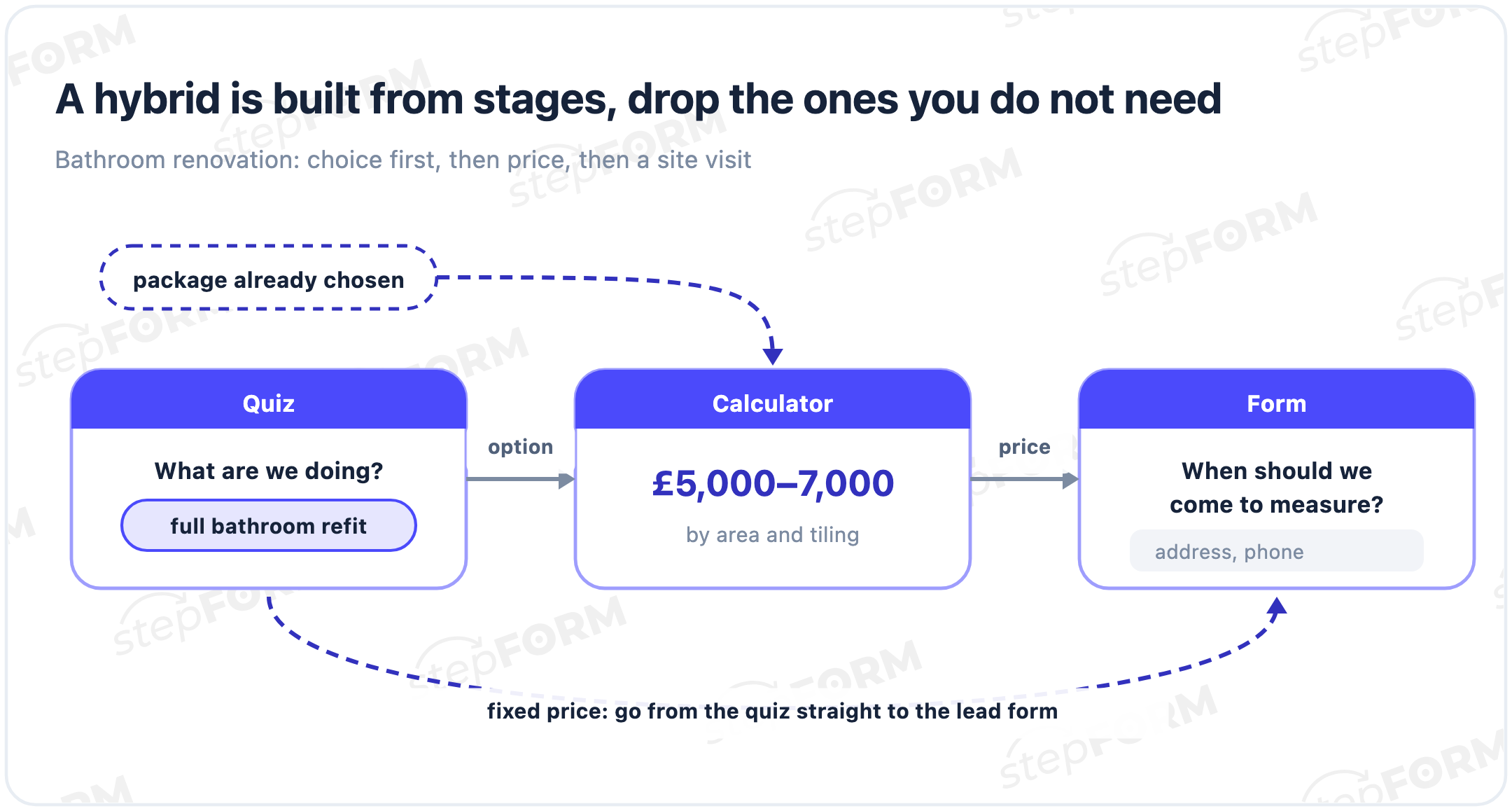
You do not have to use the full sequence. If the customer has already chosen a package, begin with the calculator. If pricing is fixed, move from the quiz directly to a form or checkout. If the result can be delivered without contact details, do not place a form in front of it merely to grow a lead list.
Three worked business scenarios
B2B consultation: form
On a page for a specific service, the visitor understands what the conversation will cover. Ask for a name, business contact and short description of the problem. After submission, confirm the expected response time and deliver the enquiry to the right team. A quiz would only lengthen the route if there is no recommendation to make.
Service package selection: quiz
A company has four packages whose suitability depends on team size, support frequency and reporting requirements. Three or four questions remove poor fits. The result shows a recommendation, two reasons for it and one button to discuss the selected plan.
Configurable service: calculator or hybrid
The price depends on volume, urgency and options. If visitors understand those parameters, lead with a calculator. If they first need to select a method or package, add a short recommendation stage and pass its output into the formula. Ask for contact details to save the estimate or confirm the order.
Four common wrong choices
A quiz for three contact fields. A name, phone number and comment do not produce a recommendation. A short form is faster and more honest.
A form for a complex decision. A dropdown containing twenty similar services makes the customer perform the company's internal classification. A few diagnostic questions may route them more accurately.
A calculator without a calculable price. If answers simply go to a manager, call the result a request for a quote. Do not promise a number the interface cannot provide.
Every mechanic at once. Selection, pricing, registration, file upload and payment in one flow may look powerful, but it creates a long journey. Keep only what is required before the next action.
Seven questions before opening the builder
- What does the visitor already know? Have they selected the service, understood the differences and gathered the required inputs?
- What must they receive before sharing contact details? Confirmation, a recommendation, a price, a range or no additional result.
- Which answers change the route? These are candidates for conditions and branches.
- Which answers change a number? They need variables, formulas, constraints and test cases.
- What single action follows the result? An enquiry, booking, call, purchase or payment.
- Which data is genuinely required before that action? Everything else can be requested later.
- How will success be measured? Consider lead quality, result views, checkout starts and confirmed orders, not only submissions.
The answers should fit on one page. If the team still disagrees about the format, return to the first two questions. The conflict is often about assumptions concerning visitor readiness, not interface design.
How to build the chosen flow in stepFORM
Start with the smallest useful version. For a form, create the fields and a clear confirmation after submission. For a quiz, add options, routing conditions and a meaningful result for each important branch. For a calculator, assign variables, build the formula and test minimum, typical and maximum inputs.
Then configure lead delivery, integrations and analytics. Complete the flow on a phone, intentionally leave required fields empty, move backwards and submit test data. For calculations, also check zero values, discount thresholds, incompatible options and rounding.
stepFORM supports forms, quizzes and calculators. You can begin with one core journey, then add conditions, formulas and actions after its logic has been verified.
What to measure after launch
For a form, track form starts, validation errors, submissions and the share of enquiries the team considers qualified. For a quiz, add the first answer, drop-off by step, result views and clicks after the recommendation. For a calculator, track the first input, successful calculation, result view, estimate request and confirmed action.
Do not compare the completion rate of a short form with that of a detailed calculator as if they were equivalent. They demand different effort and serve different decision stages. Judge each against its job: does the form deliver useful enquiries, does the quiz help people choose, and does the calculator provide a clear, sufficiently accurate estimate?
If visitors leave before the first interaction, the entry promise may be unclear or the first question too demanding. If they reach the result but do not continue, examine the result's usefulness and the next-action copy. If enquiries arrive but do not fit the business, refine the logic instead of adding fields without a hypothesis.
Frequently asked questions
Can one page contain a form, quiz and calculator?
Yes, but they do not have to become one long flow. A page might contain a quick calculator and a separate consultation form. Give each component a clear job and next action.
Is every multi-step form a quiz?
No. Multiple screens only organize fields. A quiz uses answers to select a branch, recommendation or result. If everyone follows the same route and receives the same outcome, it is a multi-step form.
What should I show when an exact price is impossible?
Show a range or order of magnitude and explain what may change the final amount. The next action can be an inspection or a manually prepared quote. Do not imply precision the business cannot support.
Which format is fastest to launch?
A short form is usually fastest because it does not require branches or formulas. Launch speed should not replace the job, though: a form cannot select the right plan or calculate a price.
Which format works best on mobile?
Any of them can work when tap targets are comfortable, labels are short, the keyboard matches the data type and no step requires horizontal scrolling. Test the actual flow on a narrow screen, including errors and back navigation.
How can I tell after launch that I chose the wrong format?
Look beyond completion. If a form collects questions the page should answer, improve the content. If a quiz does not change the choice, simplify it to a form. If a calculation does not help a decision, inspect the formula, breakdown and next action.


 Dmitry Molchanov