How to create an online test for free
Building a working online test with questions, scoring and result screens on a free plan. What is included, where the limit sits and when free stops being enough.
How-to  Dmitry Molchanov
15 September 2026
Reading time ≈ 13 min.
Dmitry Molchanov
15 September 2026
Reading time ≈ 13 min.

A test takes an evening and no money, as long as you know where the free boundary sits. Inside a builder the whole mechanism is free: questions, branching, scoring, personal results and publishing. What you pay for is volume and what happens to the lead afterwards. Below is the step-by-step build and an honest map of the limits.
What you can actually do for free
"Free" means different things at different builders. Somewhere it is a three-day demo, somewhere a stripped version missing half the features. In stepFORM the zero plan has no expiry date and the mechanics are not cut down: the test is built in full, with all the logic and scoring.
- All 17 question types, including image choice and number input
- Branching logic: an answer leads to its own next question
- Scoring and option weights
- Formulas for an exact calculation
- Several different result screens for different answers
- Publishing: a link, embedding on a site, working on a phone
- Handing leads to a CRM
- Taking payment inside the test
- Removing the "Made in stepFORM" line
The free plan is limited by volume rather than by features: 5 forms and 50 responses a month. For testing an idea that is plenty, for a flow of leads it is not.
Step zero: decide what the test has to find out
The most expensive mistake happens before the builder. Someone opens the editor, starts inventing questions, and then has no idea what to show at the end.
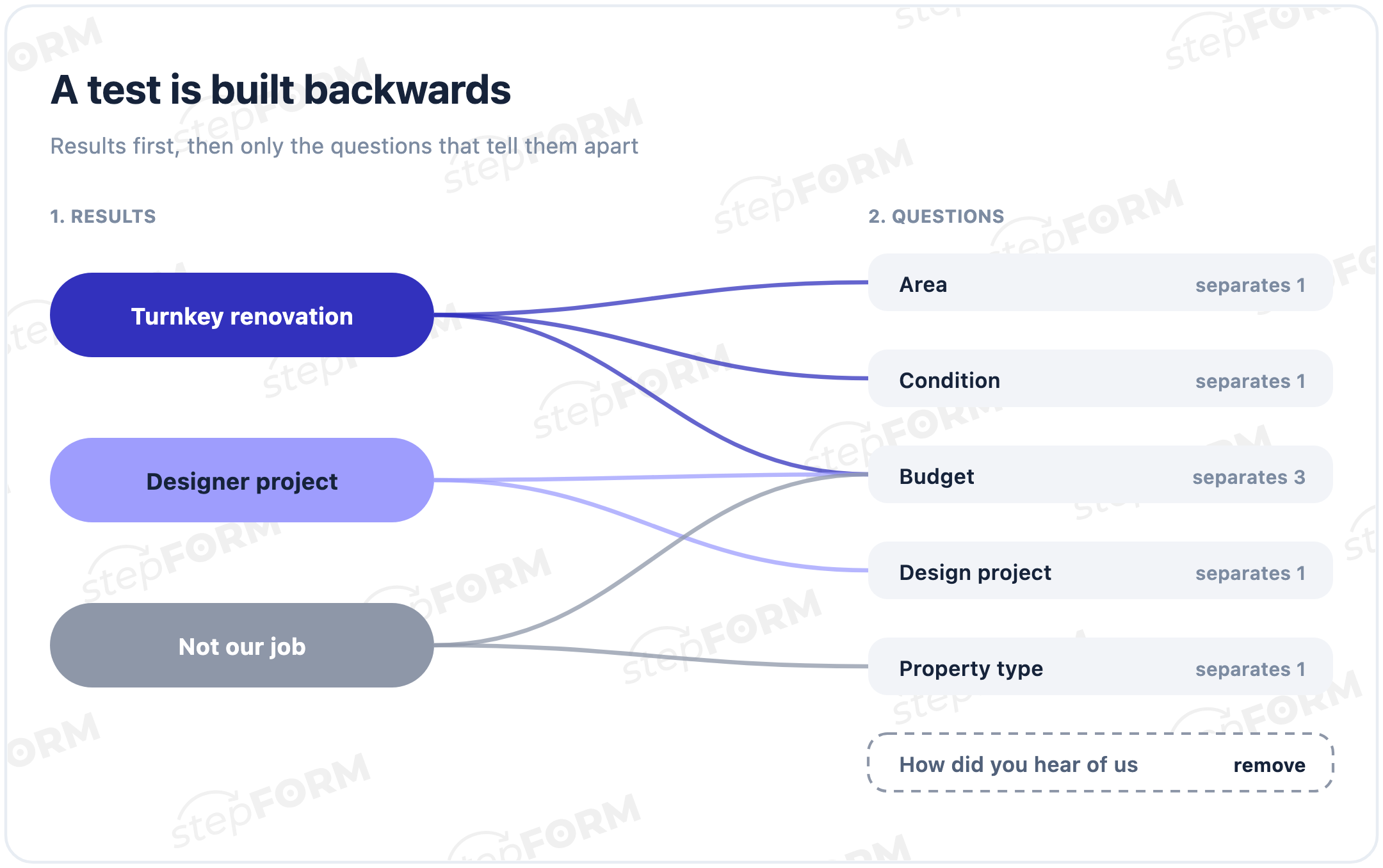
The order is the other way round. First decide what result the person will see and what you will do with it. There are usually three or four: "option A suits you", "option B suits you", "your case we quote individually". Then work backwards from the result: which answers should bring a person to each one. Those answers become your questions.
Checking yourself is easy. Take each question and ask: if I remove it, does the result change for anyone at all. If not, the question is dead weight.
Which questions work in a test
A question in a selling test does one of three things: qualifies, segments or engages. Everything else is ballast.
Qualifying questions separate the targeted from the accidental: budget, deadline, scale, city. They go closer to the end, when the person is already involved.
Segmenting questions sort people into groups you have different offers for: personal or business, beginner or experienced, first order or repeat.
Engaging questions belong at the start so the person makes the first click. Usually an easy image choice with no wrong answer.
Wording matters too. "What is your budget" sounds like an interrogation, "what figure are you working towards" sounds like a conversation. Give answer options as ranges rather than exact numbers: people slot into a range easily and fear missing an exact figure.
And one rule that saves a lot of editing later: do not ask what you can find out yourself. City is detected automatically, so is the traffic source, and the device even more so. Those questions only make the test longer.
Six steps to build it
- Create a form and pick the type. In a builder a test is the same as a form, just with scoring and several result screens. Start from scratch or take a template from the catalogue and rewrite it.
- Add the questions. One per screen: people go through that more willingly than a long survey. Open with an easy image choice, move number inputs and contacts towards the end.
- Set the weights. Every answer option carries its own number. The total decides which result the person lands in. If you need an exact figure rather than a segment, a formula replaces the scoring.
- Set up the branching. A condition of the form "if this answer is chosen, show this question". People simply never see the irrelevant branches, so the test feels short even with a big question set.
- Write the result screens. Each score band gets its own text: what you understood about the person, what you offer and why to leave a contact.
- Publish and check it on a phone. The test opens at a direct link or embeds into a site. Walk through it yourself down two different paths and make sure you land in different results.
Scoring: how not to get lost in the weights
Scoring is the one place where beginners reliably trip. The principle is simple: an answer option adds its number to a running total, and at the end the total falls into one of the bands.
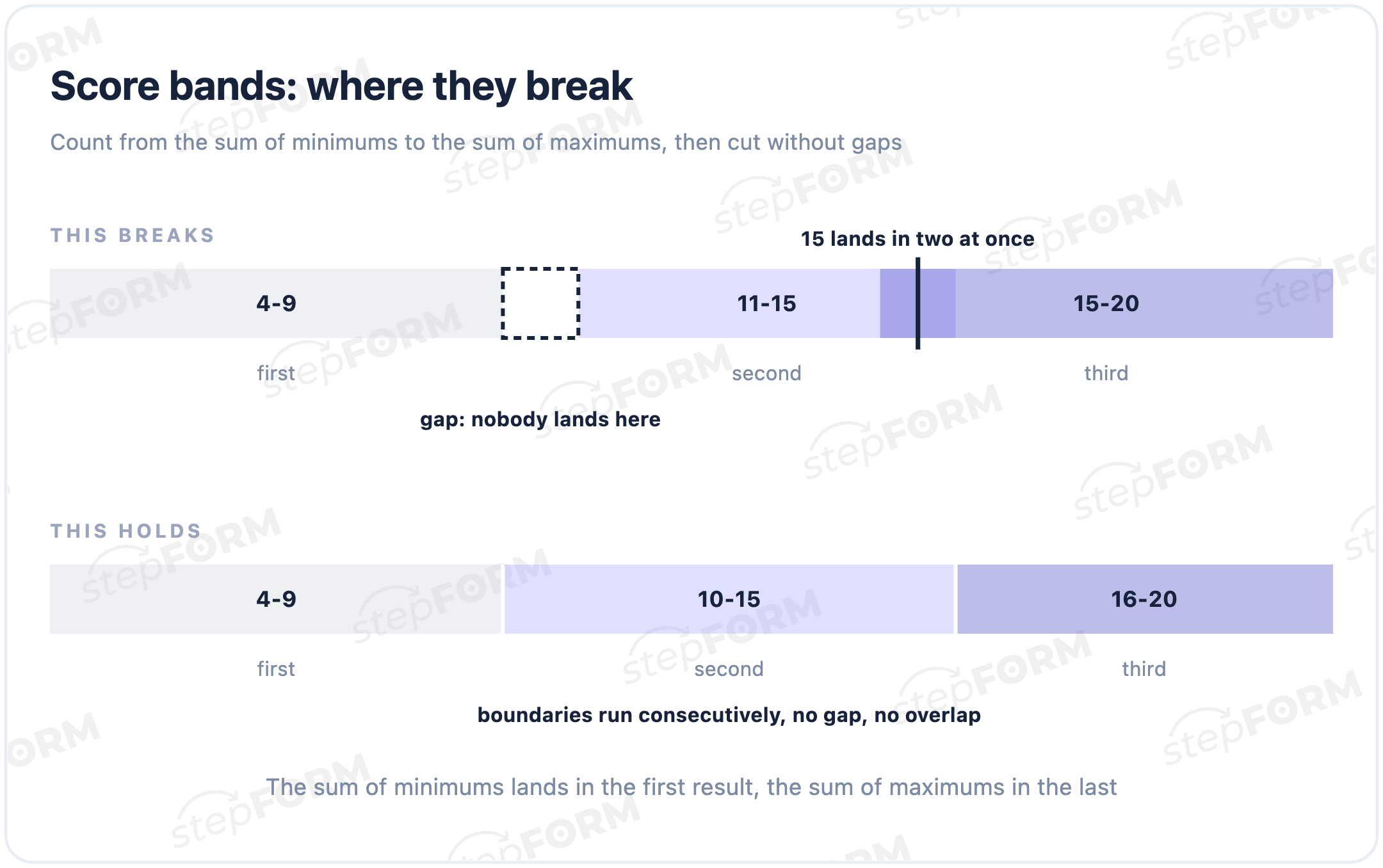
For the bands to line up, work out the boundaries in advance. Add up the maximum scores across all questions, that is your ceiling. Add up the minimums, that is the floor. Then cut the stretch into as many parts as you have results.
An example with four questions, maximum 5 points each. Ceiling 20, floor 4. Three results sit neatly as 4-9, 10-15 and 16-20. What matters is that the bands neither overlap nor leave gaps: if an uncovered value sits between the second and the third, a person with that total sees nothing at all.
A full example: a renovation studio
To keep this concrete, here is one test from start to finish.
The problem. A studio renovates flats. Plenty of enquiries, but half come from people whose budget is half the minimum order. A manager spends a day on conversations that go nowhere.
The results. Three of them: "standard turnkey renovation", "designer renovation", "your job is below our minimum order, here is who we would suggest instead". The third is the real value: it politely filters out the wrong fit before the call.
The questions. Property type as images, area as a number, current condition, whether a design project is needed, a budget range, the deadline.
The scoring. Area and budget carry the most weight, condition and deadline less. The total splits into three bands whose boundaries come from the floor and the ceiling.
The result for the middle segment. "Judging by your answers, a turnkey renovation without a design project suits you. For your floor area expect 900,000 to 1,200,000. Leave a phone number and we will send a breakdown by works and free dates for a site visit."
Building this takes an evening, writing the texts included. The filtering starts working on day one, because a person with a small budget now gets an honest answer on screen instead of three days later by phone.
The result screen is what all of it was for
A test ends with an offer, not a figure. A screen saying "Your result: 14 points" is useless, there is nothing to do with it.
A working result has three parts. The first names the person's situation in their own words: "judging by your answers, the deadline matters more to you than the price". The second gives a concrete solution: which option fits and why that one. The third explains why to leave a contact right now: to send a detailed breakdown, to hold the terms, to tailor it to the task.
On the free plan contacts are collected by ordinary fields inside the test and sit in your account. They will not travel to a CRM automatically, but you can export them and hand them to a manager.
When free stops being enough
The boundary runs through what you do with the leads, not through features.
Testing an idea, a test for social media or a newsletter, an internal survey for the team, a one-off campaign, under fifty attempts a month, leads handled by hand.
The test sits on the site permanently, more than fifty attempts, leads have to reach the CRM without manual transfer, you need payment inside the test, the builder's branding is in the way.
You can do the arithmetic on a napkin. Fifty attempts a month at roughly half completion give around twenty people who reach the result, and a smaller share of those leave a contact. So the free plan means a handful of leads a month. If your average deal is worth more than a monthly subscription and the limit runs out mid-month, the question is no longer about money but about how many leads you lose while the limit is closed.
A sensible order: build the test for free, get it to the point where it brings leads, and only then pay so that the flow does not have to be sorted by hand. Doing it the other way round does not help: a paid plan will not improve badly written questions.
Where to put the test so people take it
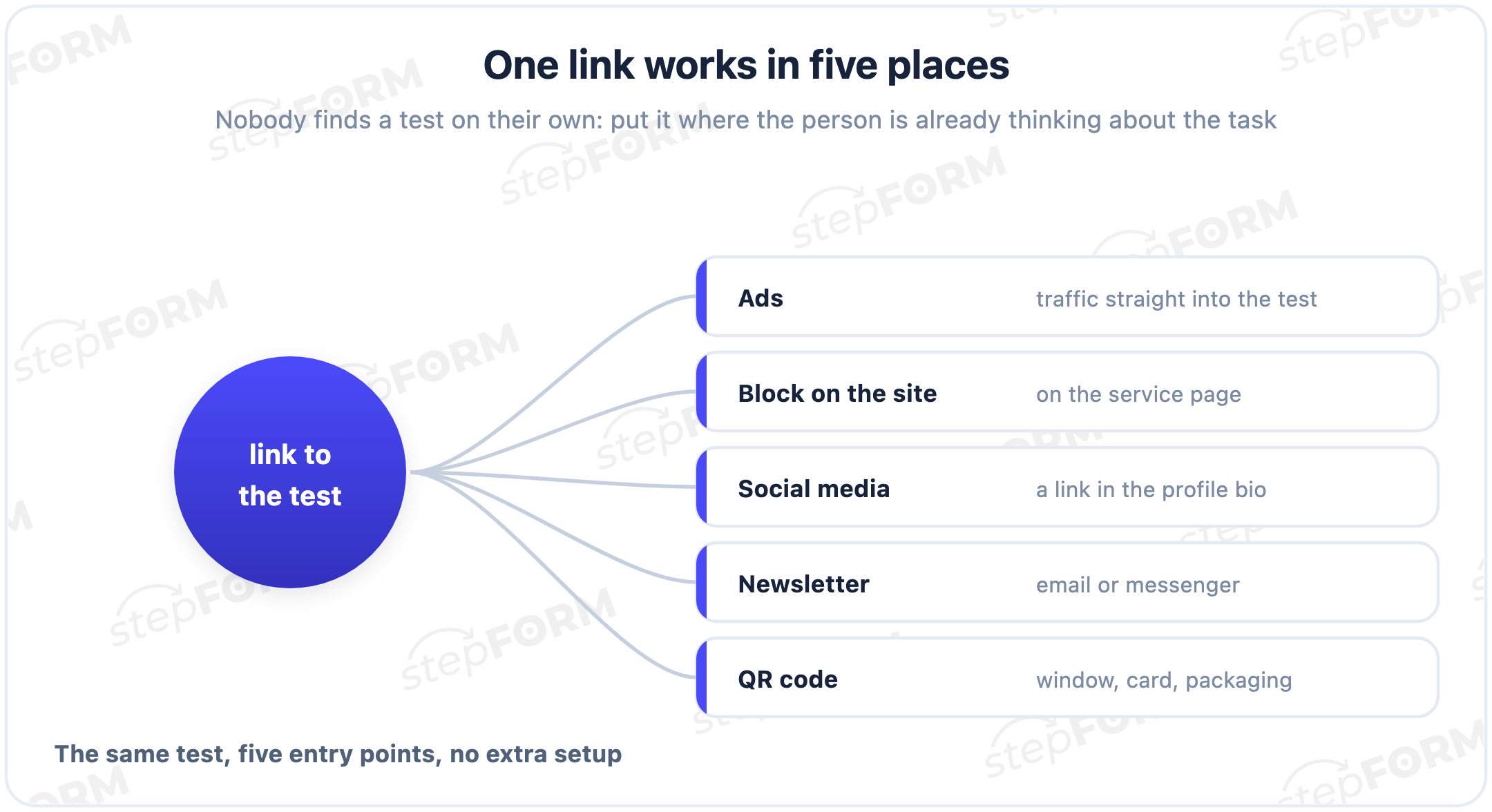
Publishing is not enough: nobody finds a test on their own. There are several places where it works, and they do not compete.
A direct link is the simplest route: put it in ads, in a profile bio, in a messenger or a newsletter. No website is needed at all, the test opens as a page in its own right.
A block on the site goes where a person wonders whether the service fits them: on the service page under the description, on the home page below the first screen. A popup works, but only in response to an action, not on a timer three seconds after arrival.
Offline deserves its own mention. A QR code on a shop window, a business card or packaging leads to the same test. For a small business that is often the only way to collect contacts without building a site.
What to watch in the first week
Three numbers, all visible in the account without separate analytics.
Completion. How many of those who opened it reached the result. If people abandon at the same question every time, it is either heavy or asks for data they do not have to hand.
Share leaving a contact. Out of those who reached the end. This usually sags because of the result screen rather than the questions: it is unclear why a phone number is needed.
Spread across results. If nine out of ten land in the same segment, the scoring is off and the band boundaries need moving.
Four mistakes visible in the first week
Too many questions. Twelve screens feel thorough and read like a clinic form. Five to eight is enough, the rest gets clarified in conversation.
Contacts at the start. Asking for a phone number before the person has received anything loses most of them. A contact is exchanged for a result, not requested before it.
One result for everyone. If the final screen is the same whatever the answers, all the scoring work was wasted. People notice immediately.
The test leads nowhere. Published and forgotten. A test is an instrument, not a page: it belongs in ads, in a profile bio, in a newsletter, somewhere visible on the site.
How it looks in stepFORM
Everything described above is built in the test builder without programming: questions are dragged with the mouse, weights sit on the options, logic is set by conditions, results are written as text.
Registration is free and open-ended, no card required. The zero plan gives 5 forms and 50 responses a month with the mechanics intact. Once the test starts bringing leads, CRM handover and payments can be switched on with a paid plan; current figures are on the pricing page.
If you want a ready frame, the template catalogue has assembled tests for different niches: take one whole and rewrite the questions instead of building the logic from scratch. That saves about half the evening.
Start small: three results, six questions, one clear offer at the end. Launch it to a small audience, see where people drop, and edit against facts rather than guesses.
Frequently asked questions
Is the free plan really open-ended?
Yes, the zero plan has no time limit and no card is needed at registration. The only restriction is volume: 5 forms and 50 responses a month.
Does a response mean an attempt or a lead?
An attempt. If someone opens the test and abandons it at the second question, the response still counts. That is why a first launch is better aimed at a small audience.
Can I use scoring and different results on the free plan?
Yes. Scoring, formulas, branching logic and several result screens are available without paying. What stays paid is CRM handover, payment acceptance and removing the branding.
How many questions should the test have?
Five to eight. More questions give more precise data, but noticeably fewer people reach the end, and you get fewer leads in total.
How do I collect contacts without a CRM?
Contact fields work on any plan and the answers are stored in your account, where you can export them and pass them to a manager. Automatic CRM handover comes with a paid plan.
How is a test different from a quiz?
A test grades and segments: it counts scores and returns a level or a type. A quiz leads towards a recommendation or a calculation. The mechanics are shared, the difference is what happens to the answers at the end.
Can I embed the test on my site for free?
Yes, publishing and embedding are available on the zero plan. A "Made in stepFORM" line stays on the page and can be removed on a paid plan.
What happens when the 50 responses run out?
Wait for the next month or move to a paid plan. If the limit runs out regularly, that is a good sign: the test works and it is time to stop sorting leads by hand.
 Daria Lisovenko