How to build a quiz landing page: step by step, with data
What a quiz landing page is, which five screens it needs and how to build one in an evening. stepFORM data: a quiz of 2 to 5 screens gets twice the leads of a plain form.
How-to  Daria Lisovenko
24 September 2026
Reading time ≈ 13 min.
Daria Lisovenko
24 September 2026
Reading time ≈ 13 min.
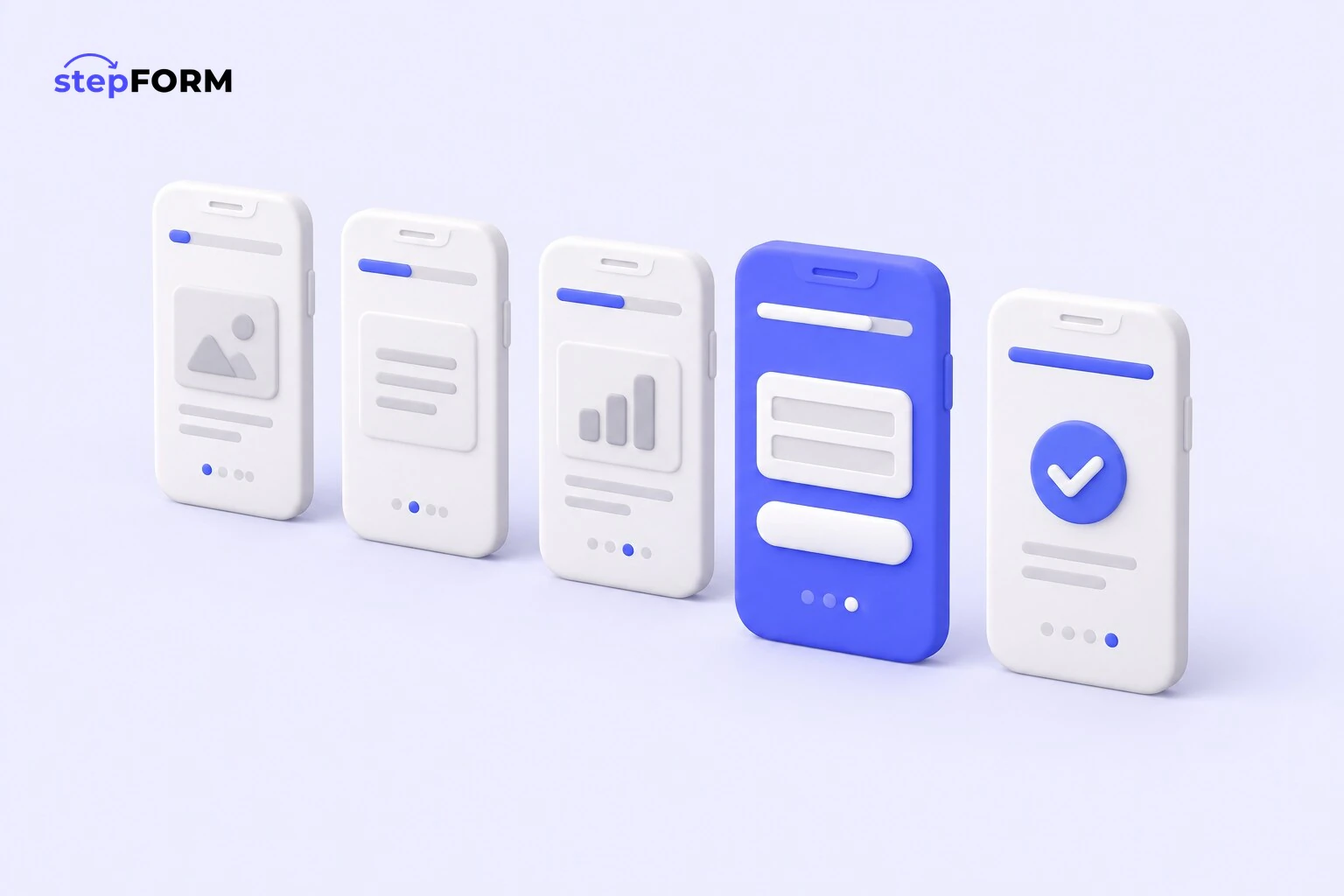
A quiz landing page is a standalone page made entirely of a quiz: a start screen with an offer, a few questions, a contact form and a thank-you screen. You build it in a quiz builder, publish it at a direct link and, if you like, put it on your own domain. No developer needed, and the first version fits into an evening.
The format grew out of expensive ads. Someone clicks an ad and, instead of a long page to read, lands straight in a conversation: what kind of kitchen, how long, where to send the quote. We checked how this plays out on our customers' forms. A typical quiz of two to five screens turns 5.9% of opens into leads, while a typical one-page form manages 2.8%.
What a quiz landing page is, and how it differs from a sales page
In short, it is a landing page with everything stripped out except the quiz. Here is how it compares with its two neighbours:
| Format | What is on the page | What you need to launch | When it fits |
|---|---|---|---|
| Sales page with a form | Copy about the service, reviews, a form at the bottom | A website or site builder, time for copywriting | When the decision needs a lot of explaining |
| Sales page with a quiz | The same page with a quiz embedded as a block | An existing site and the quiz embed code | When you already have a site with traffic |
| Quiz landing page | Only the quiz: start, questions, contact, thank you | A quiz builder | Ads, social media, QR codes, a fast launch |
A quiz landing page does not replace your company website. It has no sections, no portfolio, no map. It has one job: turn a click into a lead. That is why these pages usually sit next to the main site. If you want the basics first, see what a quiz is.
When a quiz landing page works, and when it does not
The format shines where the price cannot be named upfront, yet the visitor wants it right now.
- Services priced by parameters: fitted kitchens and furniture, renovation, windows, building work, travel, courses
- Cold traffic from ads and social media, where people know nothing about you yet
- Testing a new offer or niche before you have built a website for it
Where it loses: a simple product with a known price sells through a "Buy" button, and questions only get in the way. Expensive business solutions are chosen over weeks, and they need case studies, documents and a real salesperson. Most importantly, if nobody handles the leads the same day, no quiz will save you.
What a quiz landing page is made of
A good quiz landing page fits into five screens. Here is what that looks like for fitted kitchens.
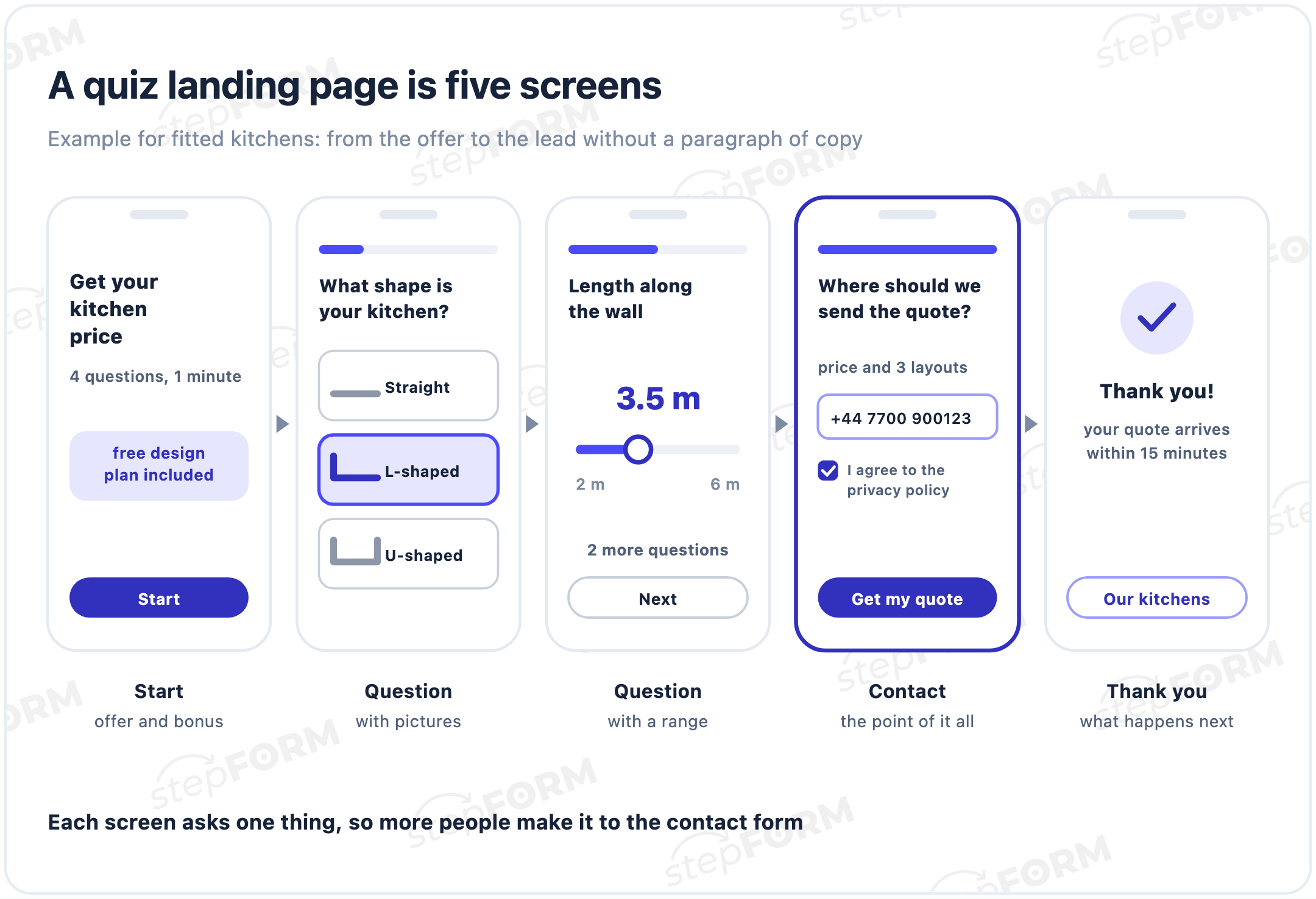
- Start screen. One line on what people get, how long it takes ("4 questions, 1 minute") and what comes on top: a bonus, a discount, a shortlist. The "Start" button sits right below.
- Questions. One per screen, easy ones first. Picture choices and ranges work best: tapping "L-shaped" is easier than describing a layout, and picking "3 to 4 metres" is easier than naming an exact figure.
- Contact. One or two fields and a reason to fill them in: "we will send the price and three layouts". Consent to the privacy policy goes under the button.
- Thank you. What happens next and when: "your quote arrives within 15 minutes". Add a link to your portfolio or social media so people do not close the tab straight away.
There is also an invisible part. When someone shares the quiz link in a messenger or on social media, a title, description and image appear. In stepFORM you set them, together with the favicon, under form information on the Publication tab. Without them the link looks like a string of characters and gets fewer clicks.
How to create an online quiz for freeQuiz landing page examples for different niches
The structure stays the same, while the offer, questions and bonus change. Five starting points:
| Niche | Start screen | Questions | Bonus |
|---|---|---|---|
| Fitted kitchens | Get your kitchen price in a minute | Kitchen shape, length, door finish, timing | Free design plan |
| Home renovation | See what your renovation will cost | Property type, size, scope, start date | Itemised estimate as a PDF |
| Travel | We will find a holiday within your budget | Where, when, how many people, budget | Three options by message |
| House extensions | What will your extension cost | Storeys, floor area, materials, timing | Project catalogue |
| Language school | We will match you to the right group | Goal, level, format, preferred time | Free trial lesson |
Look at the headlines. Each promises something people take away: a price, a shortlist, a group. "Take our survey" or "Answer a few questions" promise nothing and give people no reason to tap "Start".
How many questions to ask: stepFORM data
We took stepFORM customers' forms with a phone or email field that had at least 100 opens and 5 leads in 90 days. For each form we calculated the share of opens that ended in a lead and grouped the forms by number of screens. So that one customer with a dozen quizzes could not skew the result, we took the median within each account first, then across accounts.
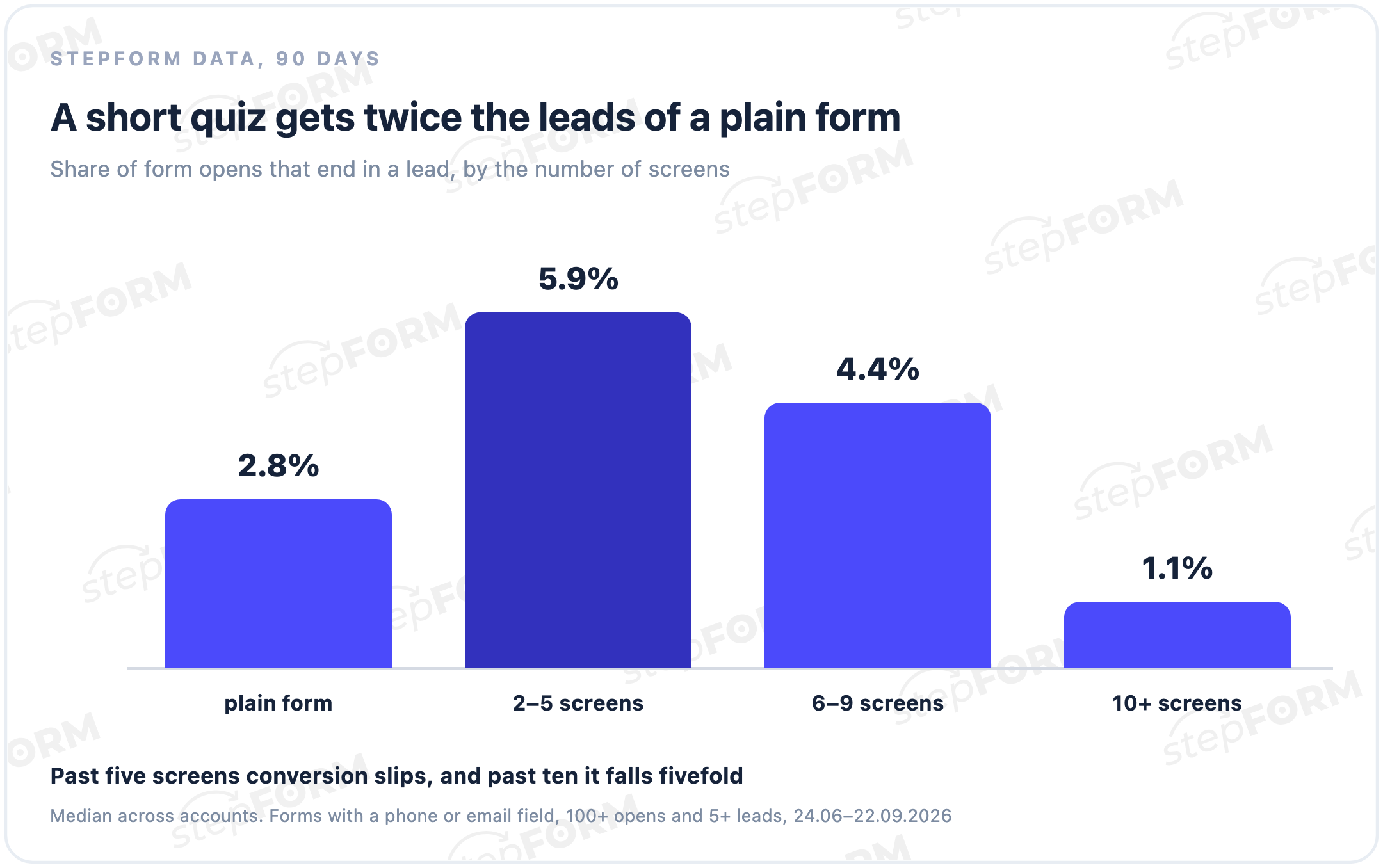
The picture is clear. A quiz of two to five screens collects leads twice as often as a plain form: the first easy questions draw people in, and they reach the phone field already engaged. After that, every extra screen costs attention. Six to nine screens convert less, and quizzes of ten screens or more drop to 1.1%, a fivefold fall.
These are live forms, and there is no control group. Niches, traffic and offers differ, so treat the numbers as a guide. The takeaway matches experience, though: three to five questions and a contact field, and let your sales team ask the rest on the phone.
How to build a quiz landing page in stepFORM
- Create a form from a template or from scratch. Templates are grouped by niche: renovation, building, real estate, events and more.
- Build the start screen: an offer headline, how long it takes, the bonus and a button.
- Add questions one per page: pictures, lists or sliders. Branching logic can send people to their own questions if, say, they want a wardrobe rather than a kitchen.
- Calculate a price if you need one. A formula takes the answers and shows the total at the end, as explained in our guide to a quiz with price calculation.
- Make the contact screen. Turn on an input mask for the phone field and enable the privacy policy consent in the submit button settings.
- Set up the thank-you page: show a message, show a message and open a link, or go straight to a link. What to write on it is covered in a separate guide.
- Fill in the form information: title, description, image and favicon for social media, messengers and search.
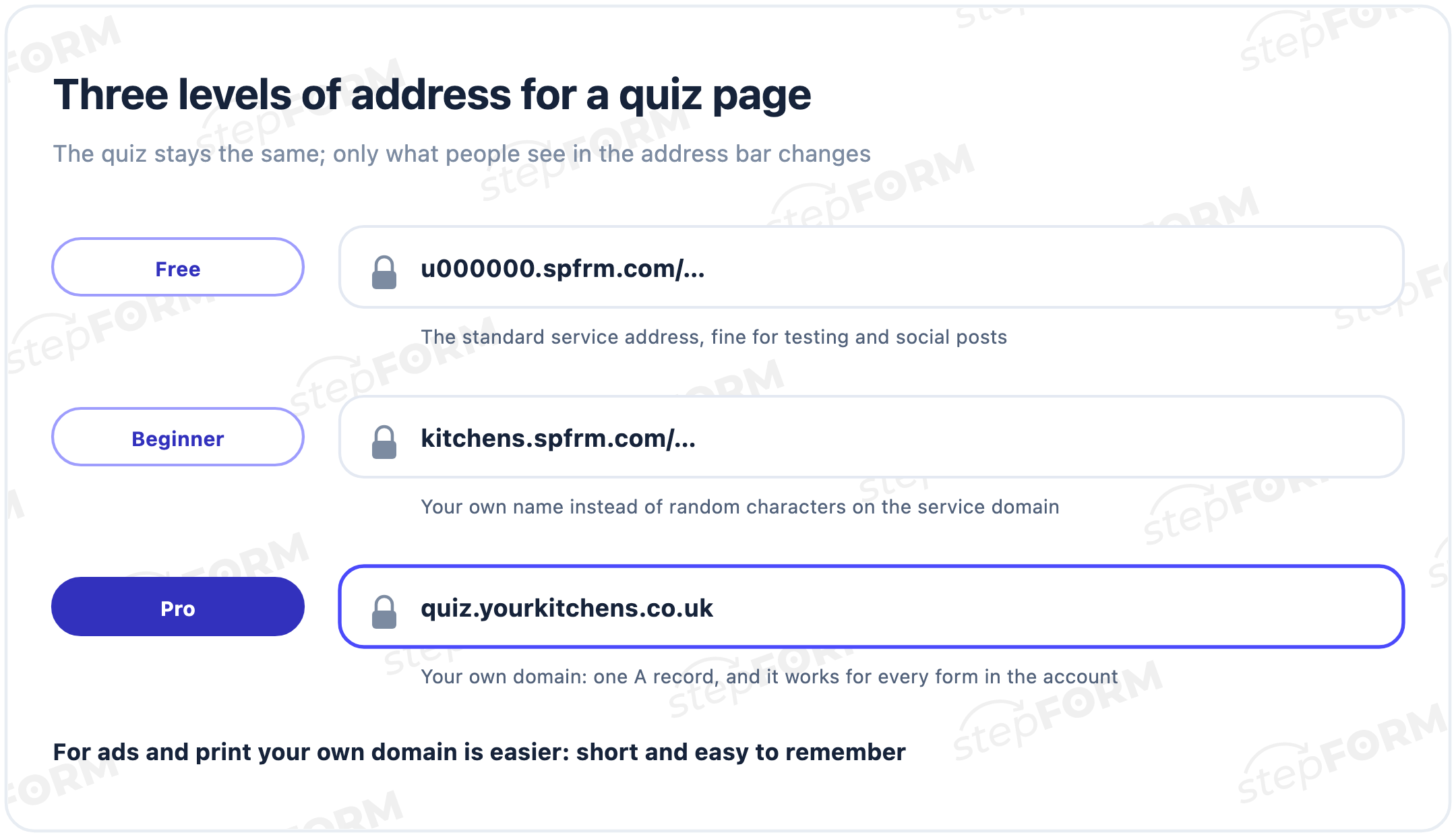
- Choose the address. The standard one works right away, a custom name on the service domain comes with Beginner, and your own domain with Pro.
- Connect notifications and analytics. Email alerts work on the Free plan, Google Analytics, auto-replies and Bitrix24 come with Beginner, Telegram and webhooks with Pro.
- Test it on a phone. The preview has desktop, tablet and mobile modes. Then send yourself a test lead and time how long the alert takes.
Connecting a custom domain takes two steps. On the Publication tab, in the Link section, choose "Connect custom domain", then add one A record at your registrar with the IP address stepFORM shows. The record can take up to 72 hours to update. You attach one domain per account and it applies to every form, so a subdomain such as quiz.yoursite.com works well.
Running ads to a quiz landing page: what to set up first
Quiz landing pages are almost always built for ads, so do four things before the first impression.
- Connect Google Analytics and set a goal for form submission
- Use Google Tag Manager if you run other tracking tags
- Add UTM tags to your ad links so reports show which campaign brought each lead
- If you need the tags inside the lead itself, pass them into a hidden field with the Code element, which is a Pro feature
Without a submission goal, the ad platform sees only clicks. With one, it sees leads and can optimise towards people who left a phone number.
How to tell whether your quiz page works
A week after launch, work out the share of opens that ended in a lead: divide the number of leads in your stepFORM account by the visits in your analytics. Our medians give you a benchmark. Below 2.8%, the quiz is doing worse than a plain form, and the first things to check are its length and the offer on the start screen. Above 5.9%, you are in the top half of short quizzes, and your money is better spent on traffic than on tweaks.
What a quiz landing page costs
If you build it yourself in a builder, you only pay for the plan.
- Free. 5 forms, 50 responses a month, three pages per form, the standard address and the stepFORM badge. Enough to test an idea.
- Beginner, $14 a month. 20 forms, 200 responses, ten pages, no badge, a custom name on the service domain, Google Analytics and Bitrix24.
- Pro, $26 a month. 50 forms, 1,000 responses, your own domain, Telegram, webhooks, SMS and payments.
Annual billing brings the price down to $11.20 and $20.80 a month, and every new account gets seven days of Beginner. Your own domain is paid for separately at a registrar. All limits are on the pricing page.
You can also order a quiz page from an agency. It makes sense if you need complex design or have no time at all. But an agency will most likely use the same kind of builder, so it pays to make the first version yourself and keep the budget for ads.
Common mistakes
- A quiz that is too long. Ten screens or more bring five times fewer leads than two to five. Anything that does not affect the price can wait for the phone call.
- Asking for contact details first. A phone field on the first screen scares people off: they have received nothing yet.
- No promise. If the contact screen does not say what people get, the phone field looks like a trap.
- A thank-you screen with no next step. People do not know when to expect a call, so they contact your competitors too.
- Nobody receives the lead. In our data a third of lead forms have no notification set up at all, and leads sit in the dashboard. We covered the fix in our guide to building a sales funnel.
- Never tested on a phone. About 60% of quiz opens happen on phones. A button pushed off the screen costs more than a weak headline.
Frequently asked questions
What is a quiz landing page?
A standalone page made entirely of a quiz: a start screen with an offer, a few questions, a contact form and a thank-you screen. It is published at a direct link and used in ads, social media or QR codes. You do not need a regular website for it.
How is a quiz landing page different from a regular landing page?
A regular landing page explains the service with copy and offers a form at the end. A quiz landing page asks questions straight away and gives a quote or a shortlist in return. It is faster to build, but it does not replace a full website with a portfolio and contact details.
How many questions should a quiz have?
Three to five questions plus the contact form. In stepFORM data, quizzes of two to five screens turn 5.9% of opens into leads, while quizzes of ten screens or more manage only 1.1%.
Can I build a quiz landing page for free?
Yes. The stepFORM Free plan gives 5 forms, 50 responses a month and three pages per form, with the standard address and the stepFORM badge. A custom address and no badge come with the Beginner plan.
How do I put a quiz page on my own domain?
On the Publication tab, in the Link section, choose "Connect custom domain" and add an A record at your registrar with the IP address stepFORM shows. The update can take up to 72 hours. Your own domain is available on Pro, and one domain per account applies to all forms.
What conversion rate should a quiz landing page have?
In stepFORM data, the median share of opens that end in a lead is 5.9% for quizzes of two to five screens and 2.8% for a plain form. Treat it as a benchmark: results depend on the niche, traffic and offer.
Do I still need a regular website?
Not to start running ads: a quiz landing page works on its own. But a website with a portfolio, reviews and contact details builds trust, so it is worth adding later and linking to it from the thank-you screen.
How do I run ads to a quiz landing page?
Put the quiz link in your ad, add UTM tags and connect Google Analytics with a submission goal. Before launch, send a test lead and check that the notification arrives.