What Is a Quiz and How Is It Different From a Form
A quiz is a short set of questions that recommends something and then asks for a contact. Here is how it differs from a form, what it is made of and when it works.
Guides  Daria Lisovenko
27 April 2024
Reading time ≈ 7 min.
Daria Lisovenko
27 April 2024
Reading time ≈ 7 min.
A quiz is a short sequence of questions on a website that recommends something based on the answers and asks for a contact at the end, so it can send the result. Unlike an ordinary form, it gives the visitor something useful before asking for a phone number.
The word carries two meanings in English, and mixing them up causes most of the confusion. A trivia quiz tests what you know and has right answers. A marketing quiz has no right answers: it asks what you need and matches you to an option. This guide is about the second one.
The short version
A visitor lands on a page, sees an offer along the lines of "find your house plan in one minute", answers five to seven questions and receives a shortlist, an estimate or a recommendation. The contact details come after they have invested a little time and seen that the answers are relevant.
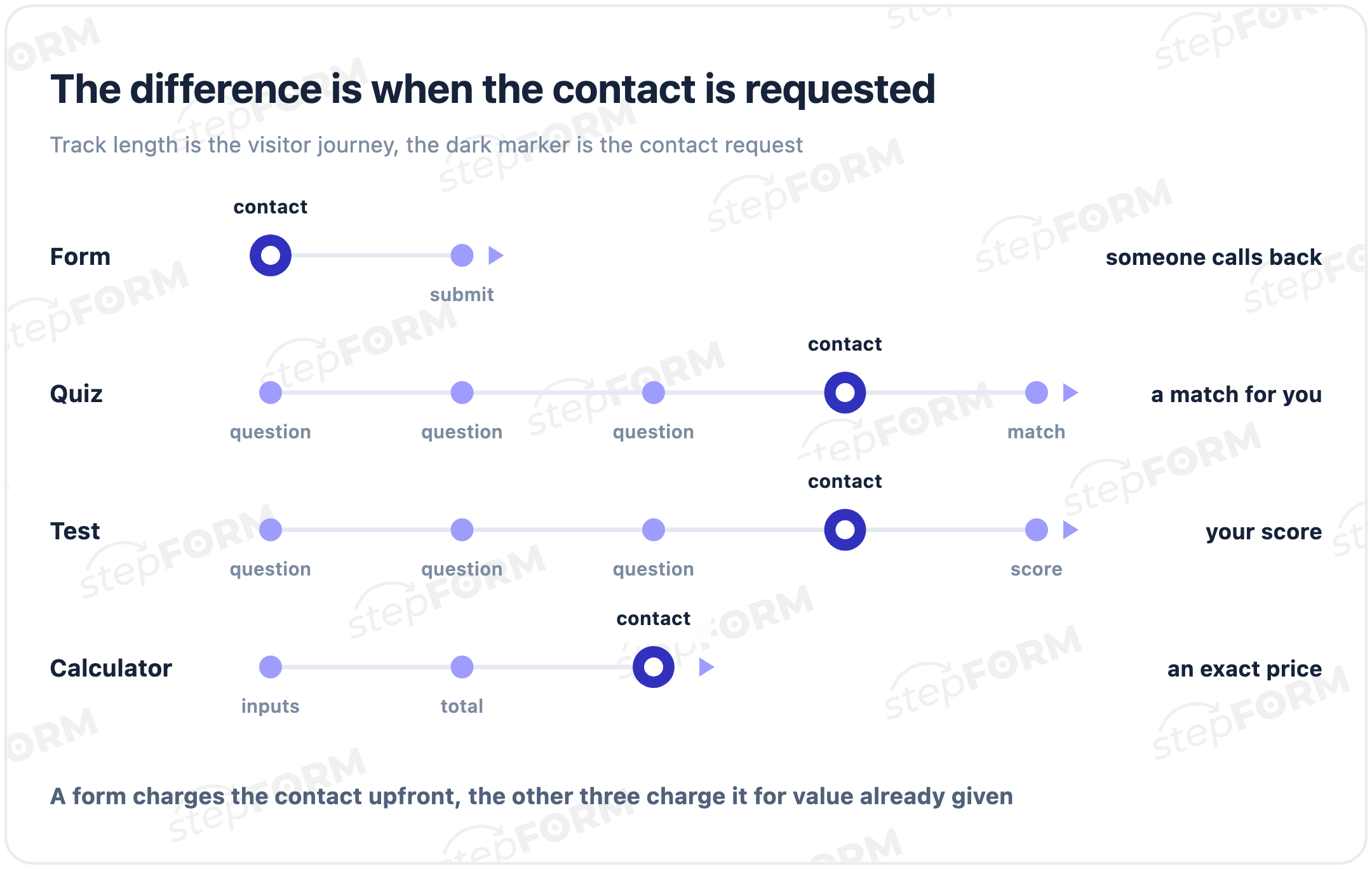
An ordinary form works the other way round: hand over your number first, someone will call you later. That is why quizzes are usually completed more willingly, and also why they take more work to build.
Quiz, form, test and calculator
These four look alike on screen, get used interchangeably, and that is where bad decisions start.
| Tool | What it does | What the visitor gets | When to pick it |
|---|---|---|---|
| Form | Asks what you need to know | A promise of a callback | The person already knows what they want |
| Quiz | Guides through questions and matches | A shortlist or a recommendation | The person is still choosing |
| Test | Scores answers against right ones | A score or a grade | Training, assessment, entertainment |
| Calculator | Computes from a formula | A concrete number | Price genuinely depends on parameters |
The line between a quiz and a calculator is blurry, because a quiz often ends with a price. A detailed comparison of all three sits in the guide on choosing between a form, a quiz and a calculator.
What a quiz is made of
Almost every working quiz is built from four screens.
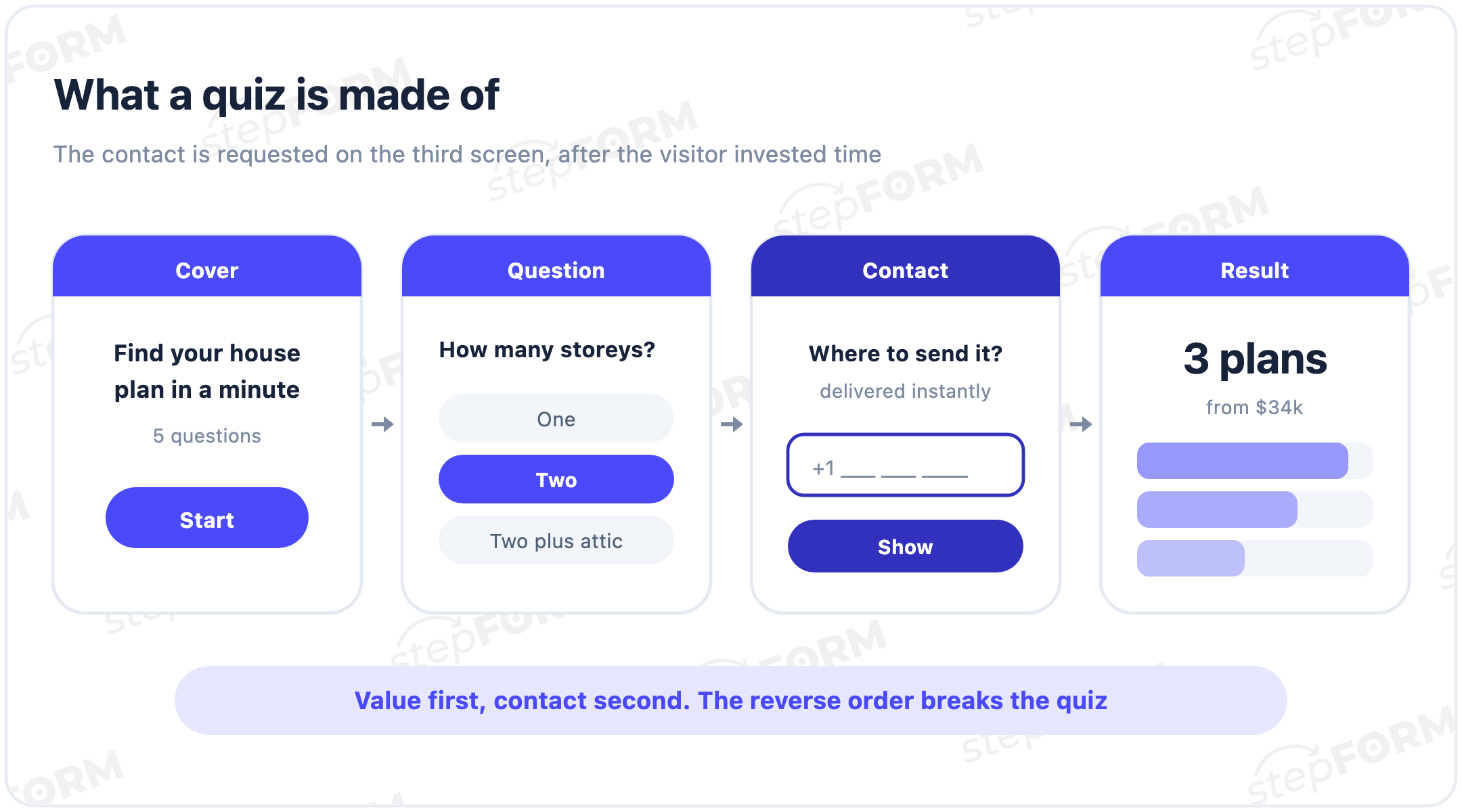
- The cover. Explains why the next minute is worth spending, by naming what the visitor gets at the end. Without a clear promise nobody starts.
- The questions. One per screen, answered with a single tap. Free text fields slow everything down.
- The contact. Where to send the result. This is the step that turns a quiz into a lead.
- The result. A shortlist, an estimate or a recommendation. Skip it and the visitor feels tricked.
How many questions to ask
Every article repeats the same advice: no more than ten. We looked at how forms and quizzes built in stepFORM are actually structured.
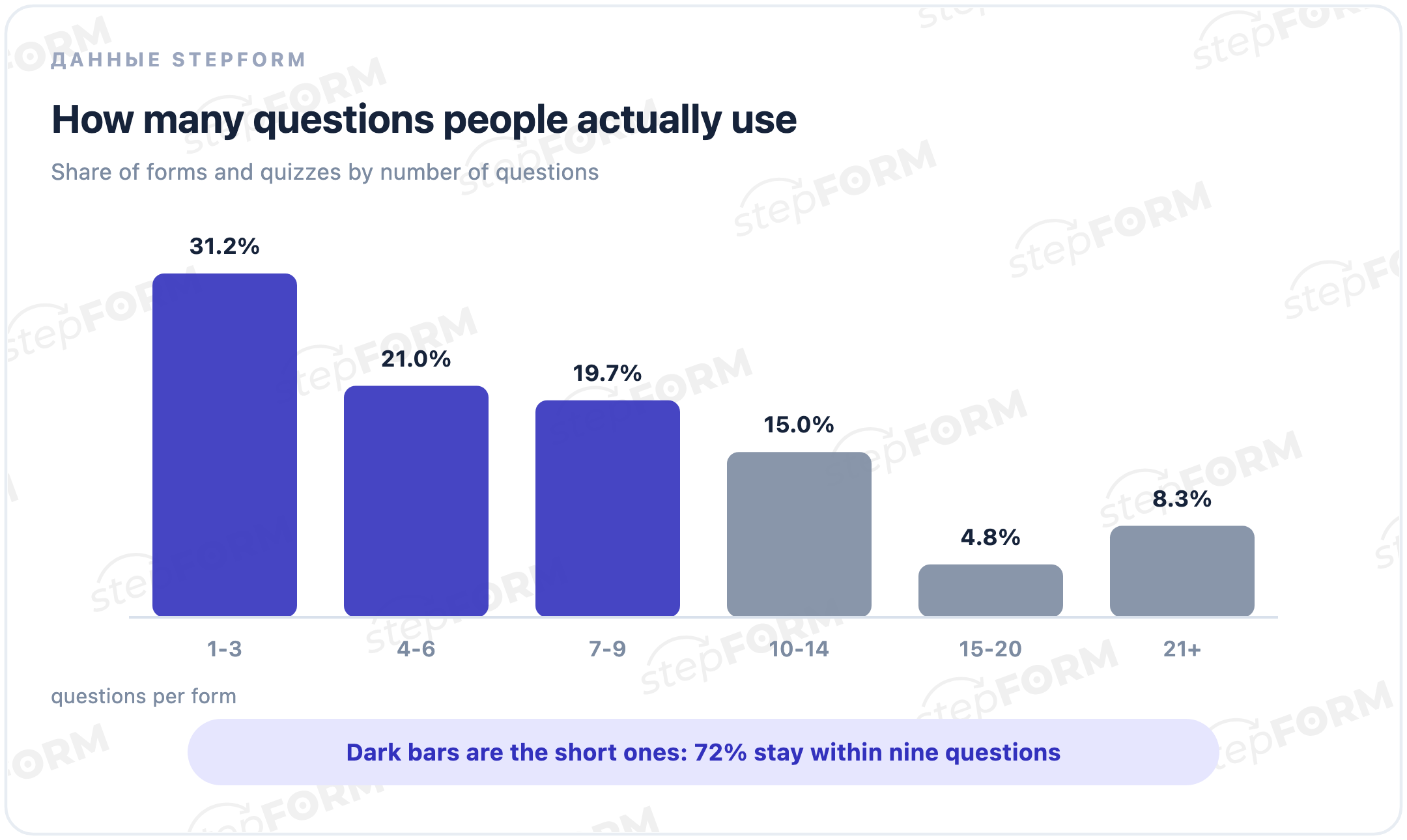
72% stay within nine questions and a third manage with three. The median is six. So the usual advice points the right way but still overshoots: a typical working quiz is about half that length.
Long ones exist too, roughly one in twelve runs past twenty questions. Those are rarely website quizzes; they are internal briefs and intake forms, where the person is already committed to finishing.
What a quiz looks like in practice
Definitions only go so far, so here are four concrete setups. In every one the promise on the cover matches the result at the end.
| Business | Promise on the cover | What it asks | What it shows at the end |
|---|---|---|---|
| Home building | Find your plan and a price range | Storeys, area, material, plot, timing | Two or three matching plans with a range |
| Renovation | Estimate your renovation in a minute | Area, type, condition, bathrooms | A breakdown by type of work |
| Custom furniture | Price your kitchen to your measurements | Dimensions, fronts, worktop, appliances | A price and a production time |
| Online school | Find the right course to start with | Experience, goal, time available | A recommended course and a plan |
Notice what is missing: no questions about age, gender or how they heard about you. Those do not affect the match, so they only lengthen the path. If you need that data, take it from the traffic source rather than from the visitor.
The other shared trait is that none of these has a single fixed price. That is the clearest signal a quiz belongs: when the price is the same for everyone, there is nothing to match.
When a quiz helps and when it gets in the way
The choice is complex, there are many options, and the price depends on parameters. Renovation, construction, custom furniture, travel, education. The visitor needs help deciding and will spend a minute to get it.
The product is simple and the visitor arrived with a specific intent. Extra questions only irritate; a short form or a single button converts better.
There is a third case worth naming: a quiz placed where a calculator belongs. If somebody wants a price and the price follows a formula, do not make them answer seven questions only to read "our manager will contact you".
How to build one
- Write the promise first. One sentence about what the visitor receives at the end. It is the single most important decision in the whole quiz.
- List only the questions that drive the match. If an answer changes nothing in the result or the routing, cut it.
- Make the answers tappable. Images or short labels instead of text inputs.
- Design the result screen. A shortlist, a price range, a recommendation. It has to appear on screen, not just in an email.
- Test it on a phone. Most quizzes are completed on mobile, and long option labels break there first.
You can assemble this in the stepFORM quiz builder: questions, branching, price formulas and lead delivery are configured without code.
Common mistakes
- The promise on the cover matches what actually appears at the end
- Every question affects the result or the route through the quiz
- The result is visible on screen, not only sent by email
- Asking for a phone number on the first step, which defeats the point
- Adding questions "for analytics" that change nothing
- Promising an estimate and delivering a thank you message
Frequently asked questions
What is the difference between a quiz and a test?
A test has correct answers, scores them and grades the person. A quiz has no correct answers: it matches the person to an option based on what they told you. They look alike; the difference is what happens on the final screen.
How many questions should a quiz have?
In our data 72% of forms and quizzes stay within nine questions and a third use three, with a median of six. Aim for five to seven and keep only the questions that change the result.
Is a quiz the same as a quiz landing page?
No. The quiz is the sequence of questions and can be embedded in any page. A quiz landing page is a dedicated page with little else on it, which makes sense for paid traffic where other page elements distract.
Does a quiz need to calculate a price?
Not necessarily. A number makes the result feel more substantial than a promise to call back. But when the price depends on a site visit or a survey, showing an honest range and explaining what moves it works better than a fake precision.
Does a quiz suit every business?
No. It wins where the choice is complex and the options are many: renovation, construction, furniture, travel, education. If the product is simple and the visitor came for one specific thing, a short form performs better.
Can I make a quiz for free?
Yes, a quiz can be built and published in a builder without programming. Limits usually apply to the number of leads and to integrations, so check the current terms on the pricing page.
 Dmitry Molchanov