Thank-you page after a form: what to write and how to set it up
What to put on a thank-you page after a form: five elements, copy examples for common cases and goal tracking. stepFORM data: 65% of lead forms keep the default message.
Guides  Daria Lisovenko
26 September 2026
Reading time ≈ 12 min.
Daria Lisovenko
26 September 2026
Reading time ≈ 12 min.
A thank-you page is the screen or page people see right after submitting a form or paying. A good one does three things: confirms the request arrived, says when and how you will get in touch, and offers one next step. Everything else, from a bonus to goal tracking, is built around those three.
We looked at what stepFORM customers' lead forms show after submission. Almost two thirds keep the default "Thank you! Your information has been successfully submitted!", and fewer than one form in a hundred says when to expect a reply. Fixing that takes about ten minutes.
Why a thank-you page matters
It feels as if the form's job is done once the request is sent. In reality, this is the second when people decide whether to wait for your call.
- If they can see the request was received and when you will call, they will not submit twice or contact a competitor "just in case"
- The call goes more smoothly: they expect it, know your number and have measurements, photos or questions ready
- Their attention is still on you, which makes it the best moment to offer a next step: a catalogue, a channel, a chat
- For ads, this is where a lead is counted. Without a submission goal, ad platforms see only clicks and learn from those
Someone choosing a kitchen, a renovation or a course rarely sends just one enquiry. They usually contact two or three companies and wait to see who answers first and most clearly. A thank-you screen with a specific time works like a promise, and at that moment you already stand out from everyone who showed "information submitted".
What to write on a thank-you page: five elements
Take an enquiry for a fitted kitchen and compare two screens after it. On the left is what most forms show, on the right a screen that makes the next step clear.
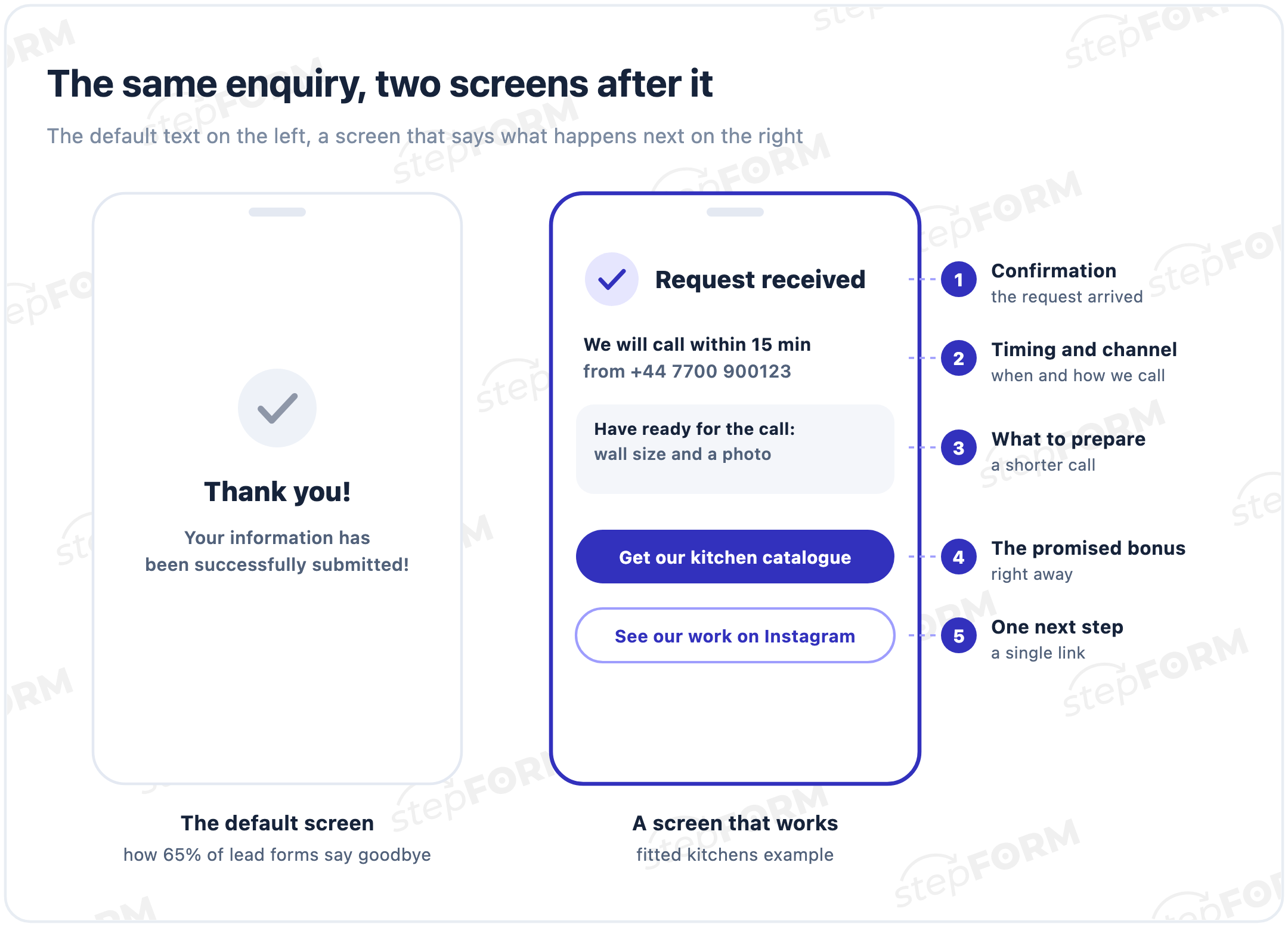
- Confirmation in plain words. "Request received", "You are booked for 2 pm", "Payment successful". "Your information has been successfully submitted" reads like a system message.
- Timing and channel. "We will call within 15 minutes from +44 7700 900123". If the request came in at night or at the weekend, say so: "we will call on Monday before 11 am". "As soon as possible" promises nothing.
- What to prepare. Wall measurements, a photo of the room, an order number. The call gets shorter and your team can quote faster.
- The promised bonus. If the start screen promised a checklist, a discount or a catalogue, hand it over right here as a link, not "we will email it".
- One next step. A channel, your portfolio, a chat or adding an event to the calendar. One button. Give people five and they may click none of them.
What to leave out: a long story about the company, a list of every service you offer and "your opinion is very important to us". People have already taken the main action. Now they want to know what happens next.
Why your website form gets no leadsThank-you page examples for common cases
Six templates you can adapt by swapping in your own details:
| Case | Headline | Message | Next step |
|---|---|---|---|
| Service enquiry | Request received | We will call within 15 minutes from +44 7700 900123. Have the wall measurements and a photo of the kitchen ready. | Get our kitchen catalogue |
| Appointment | You are booked | See you on 12 October at 2 pm at 5 Forest Road. Reception will confirm the time by phone today. | How to find us |
| Webinar sign-up | Your seat is saved | The live session starts on 3 October at 7 pm. The link arrives by email an hour before. | Add to calendar |
| Order after payment | Payment successful | We are packing order no. 1042. Delivery tomorrow between 10 am and 6 pm, and the courier will call ahead. | Track the order |
| Trial lesson | Your trial lesson request is in | A teacher will message you today before 8 pm to find a time that suits you. | See the course plan |
| Feedback | Thanks for your feedback | We read every response. If something went wrong, a manager will contact you within a day. | Follow our updates |
Every example follows the same pattern: what happened, what happens next and when, where to go now. Only the details change.
What forms actually show: stepFORM data
We took stepFORM customers' forms with a phone or email field that received leads in the last 90 days and checked the settings of the screen shown after submission.
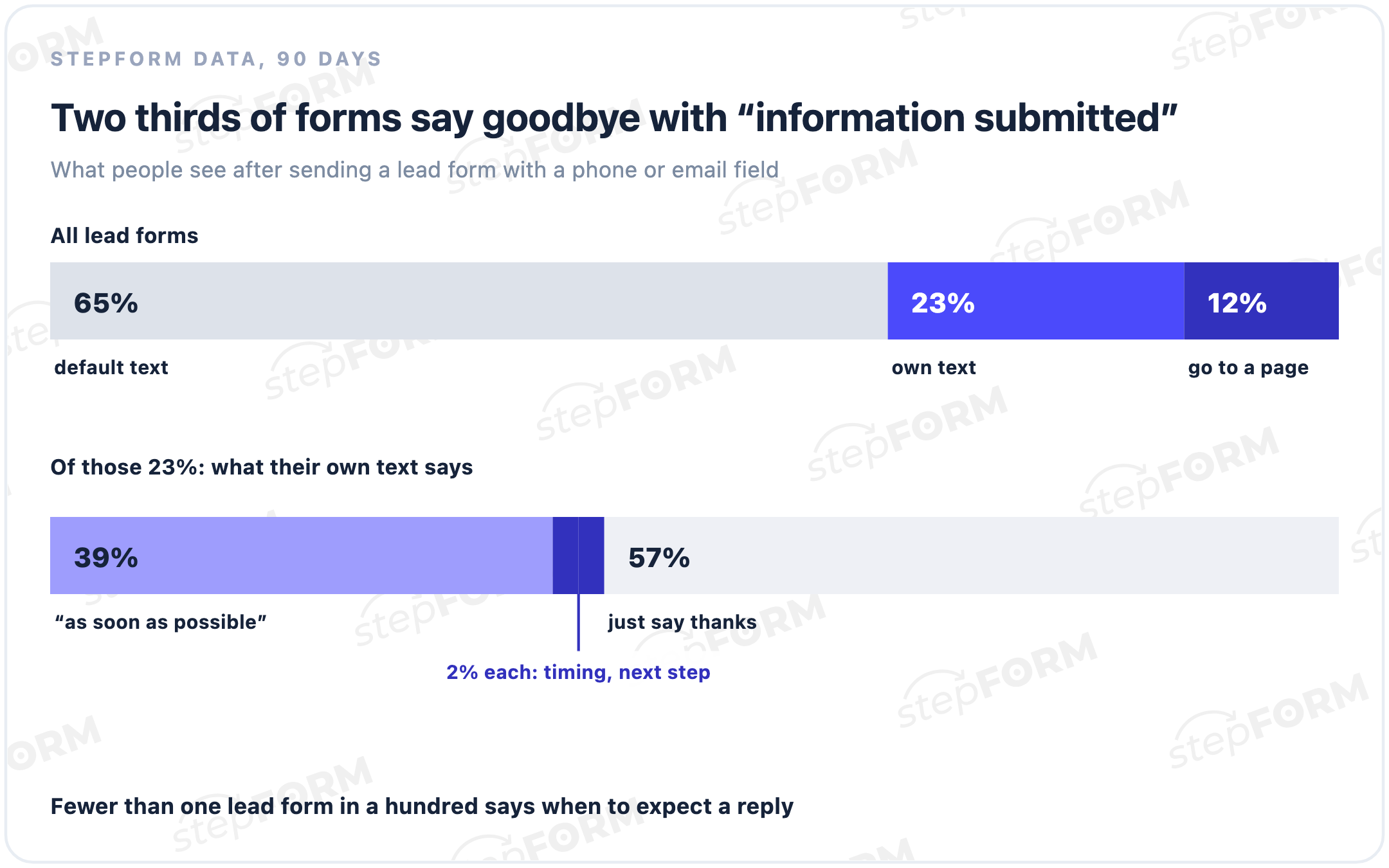
65% of forms keep the default text. Another 23% write their own, but most of the time it is a politer version of the same: "Thank you, we will contact you shortly". 39% of custom texts say exactly that, while only 2% give a time and 2% offer a next step. 12% of forms send people on to their own page, and that is the only group where the thank-you screen definitely leads somewhere.
The thank-you screen is easy to overlook. It sits inside the submit button settings, and once a form goes live only customers see it, because owners rarely send themselves a request. So the first thing worth doing after reading this is to submit your own form and look at the result through a customer's eyes.
We also checked the email that goes to the person after submission. 12% of lead forms turn it on. The rest rely on people remembering where and when they left their number.
How to set up a thank-you page in stepFORM
The thank-you screen is on by default in every form, and until you change it, people see the default text. The setting lives in the submit button: open the settings of the submit button and find the thank-you message section.
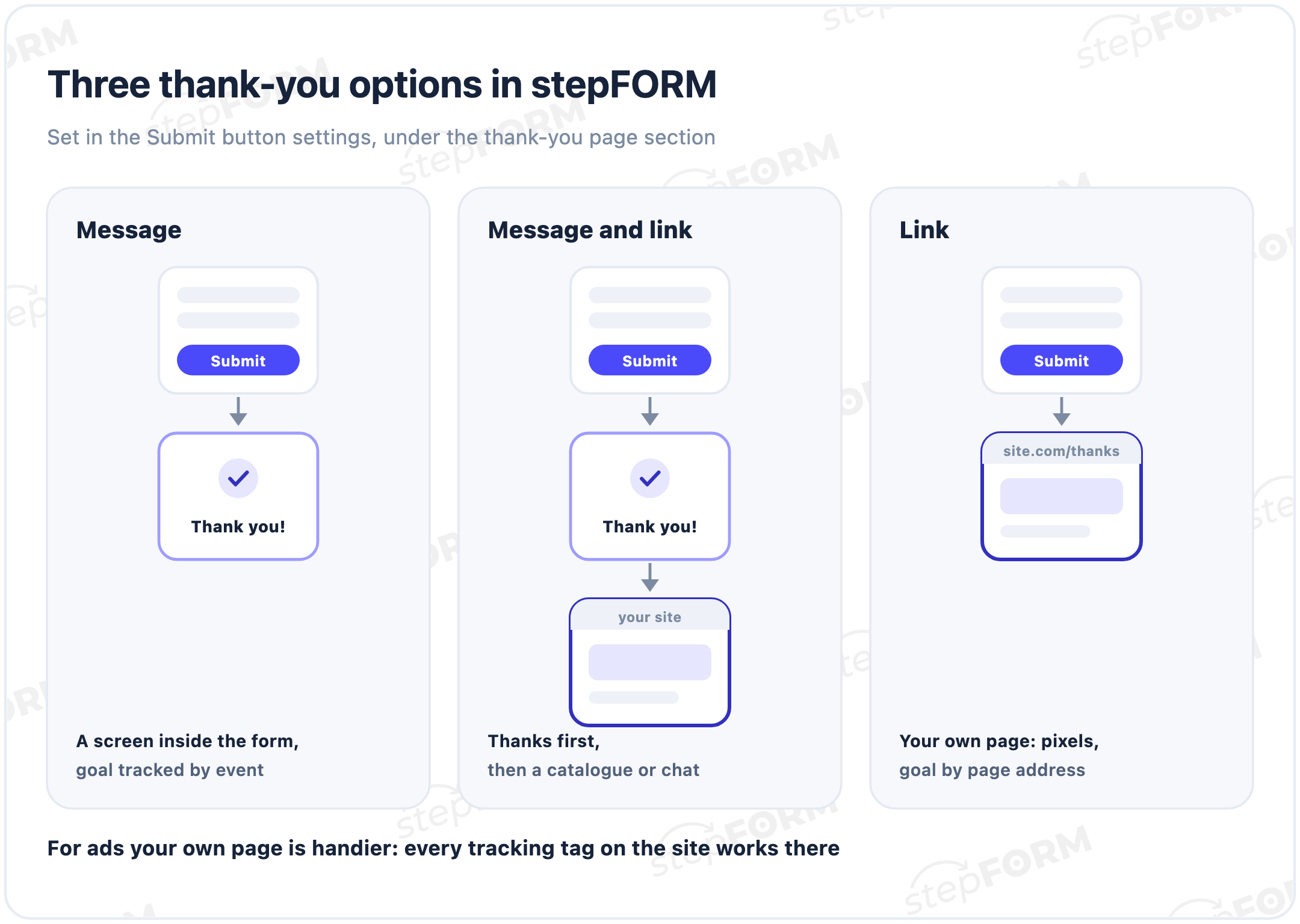
- Show a message. Good when the form is embedded in your site. Write a headline and message using the five elements above.
- Show a message and open a link. People see the confirmation first, then land in your catalogue, channel or chat. Works well for quizzes that promise a bonus.
- Open a link. People go straight to your page, say site.com/thanks. This is the handiest option for ads, because every tracking tag and pixel on your site works there.
If you want the confirmation to stay with people after they close the tab, turn on an email with their answers. Auto-replies come with the Beginner plan, and all limits are on the pricing page. For payments through Stripe, the payment settings let you set separate pages for successful and unsuccessful payment.
How to count leads: a goal in your analytics
A thank-you page is also where a lead gets counted. Without a goal, ad platforms only see clicks, so they go looking for more people who click. People who leave a number look no different to them. There are two ways to do it, depending on where the thank-you appears.
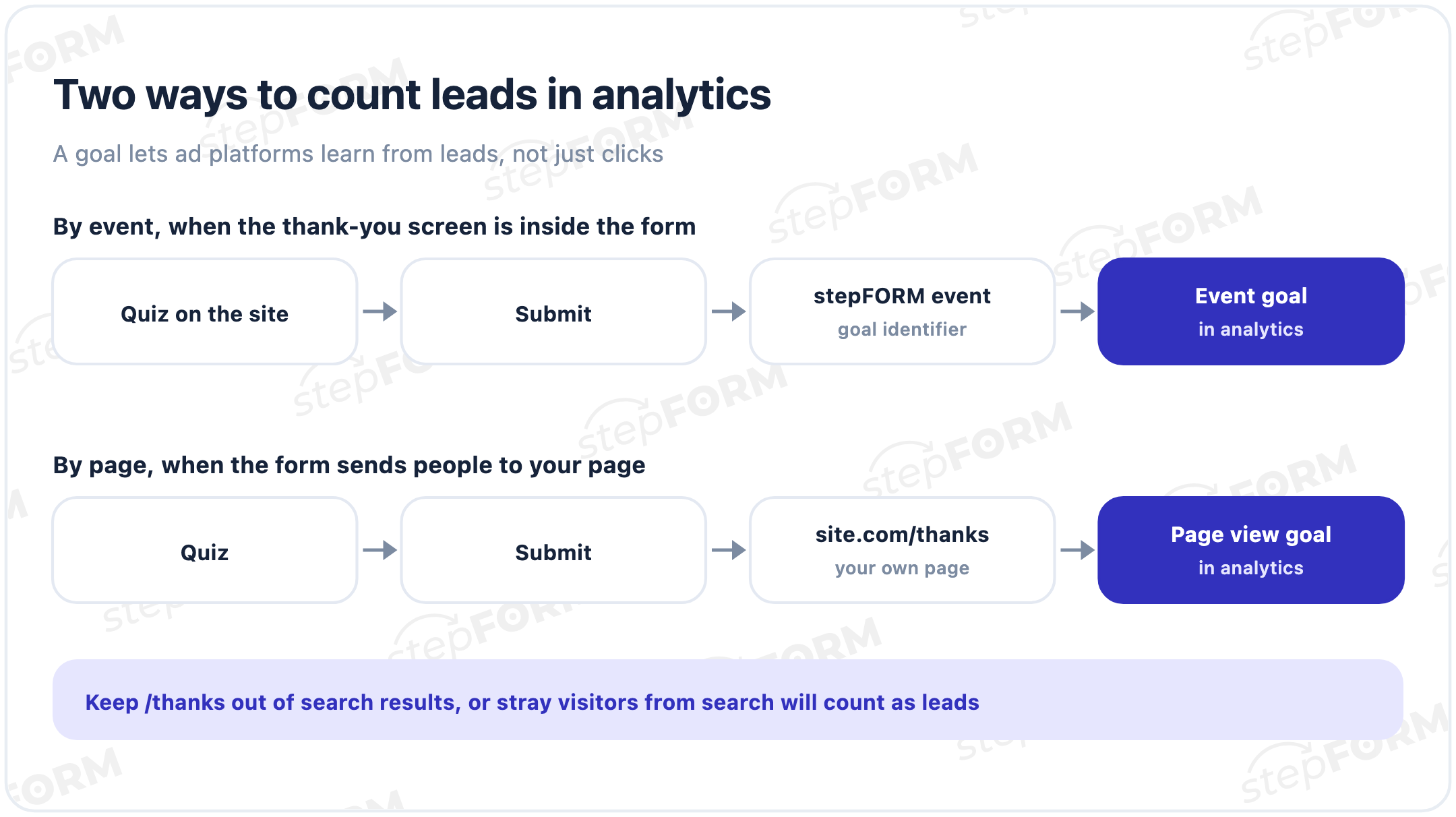
- By event. If the thank-you screen is inside the form, connect Google Analytics in the form settings and set up an event goal with the identifier stepFORM shows. The Google Analytics integration comes with the Beginner plan.
- By page. If the form sends people to your own page, track views of the page whose address contains /thanks. In Google Analytics 4 that means creating an event for those page views and marking it as a key event.
A thank-you page after payment
After paying, people feel more anxious than after an enquiry: the money has gone, the product has not arrived yet. So specifics matter most here. The order number, what is happening right now, when delivery or access will come, where the receipt went and how to reach support if something is wrong.
A failed payment needs its own page: say briefly that the payment did not go through and no money was taken, and add a "Try again" button. A bare "Error" page with no way out leaves the customer one option: closing the tab.
Check your thank-you page in one minute
Submit your own form from a phone and answer six questions:
- Is it obvious, without reading small print, that the request was received
- Is the reply time given in minutes, hours or days rather than "as soon as possible"
- Is it clear who will call or write and how: a number, a messenger, an email
- Is there a hint about what to prepare for the conversation
- Is the promised bonus handed over right on the screen
- Is there exactly one button for where to go next
If the answer to two or more is "no", rewrite the screen. It is the cheapest fix in the whole funnel: the ads, the site and the form stay the same, and only three lines of text change.
Common mistakes
- System language. "Your information has been successfully submitted" makes sense to software. People need "request received".
- "As soon as possible" instead of a time. For one person that means an hour, for another a week. Give minutes or hours.
- A dead end. A screen with no link at all: people close the tab, and the only next contact is your call.
- Five buttons at once. A catalogue, a channel, reviews, offers and a blog together work worse than one clear button.
- "We will email your bonus". If you promised it, hand it over now. An email can go missing, and the bad impression stays.
- A thank-you page in search results. Your goal starts counting stray visitors and your ad reports stop telling the truth.
- No lead goal. Ads optimise for clicks, and the sales team wonders why there are so few leads.
Even a perfect thank-you page will not help if nobody receives the lead. In our data a third of lead forms have no notification set up at all. The fix is in our guide to building a sales funnel.
How to build a quiz landing pageFrequently asked questions
What is a thank-you page?
A screen or separate page people see after submitting a form or paying. Its job is to confirm the request arrived, say what happens next and when, and offer a next step.
What should a thank-you page say?
Five things: a plain confirmation, the reply time and channel, what to prepare for the call, the promised bonus and one button with a next step. For example: "Request received. We will call within 15 minutes from +44 7700 900123".
Do I need a separate page, or is a screen in the form enough?
If the form is embedded in your site and you do not run ads, a screen in the form is enough. For ads a separate page is handier: every tracking tag and pixel on your site works there, and you can set a goal on the page address.
How do I track a thank-you page as a conversion?
If the form sends people to your own page, track views of the page whose address contains /thanks and, in Google Analytics 4, mark that event as a key event. If the thank-you screen is inside a stepFORM form, set up an event goal with the identifier from the form settings.
Should a thank-you page be hidden from search engines?
Yes. If the page shows up in search results or in your menu, people will land on it without submitting anything, and your goal will count conversions that never happened.
What should a thank-you page say after payment?
The order number, what is happening now, when delivery or access will come, where the receipt went and how to contact support. A failed payment needs its own page with a button to try again.
Can I send an email after someone submits a form?
Yes. stepFORM can send the person an email with their answers; auto-replies come with the Beginner plan. It complements the thank-you screen well: the confirmation stays with them after they close the tab.
Why is "as soon as possible" a weak promise?
It promises nothing: for one person it means an hour, for another a week. A specific time removes anxiety and makes it less likely that the person contacts a competitor in parallel.