Build a Quiz That Calculates Prices and Accepts Payments
Plan the questions, branching, pricing formula and result screen, then connect a website quiz to your lead flow and online payment provider.
Guides  Daria Lisovenko
15 September 2026
Reading time ≈ 14 min.
Daria Lisovenko
15 September 2026
Reading time ≈ 14 min.
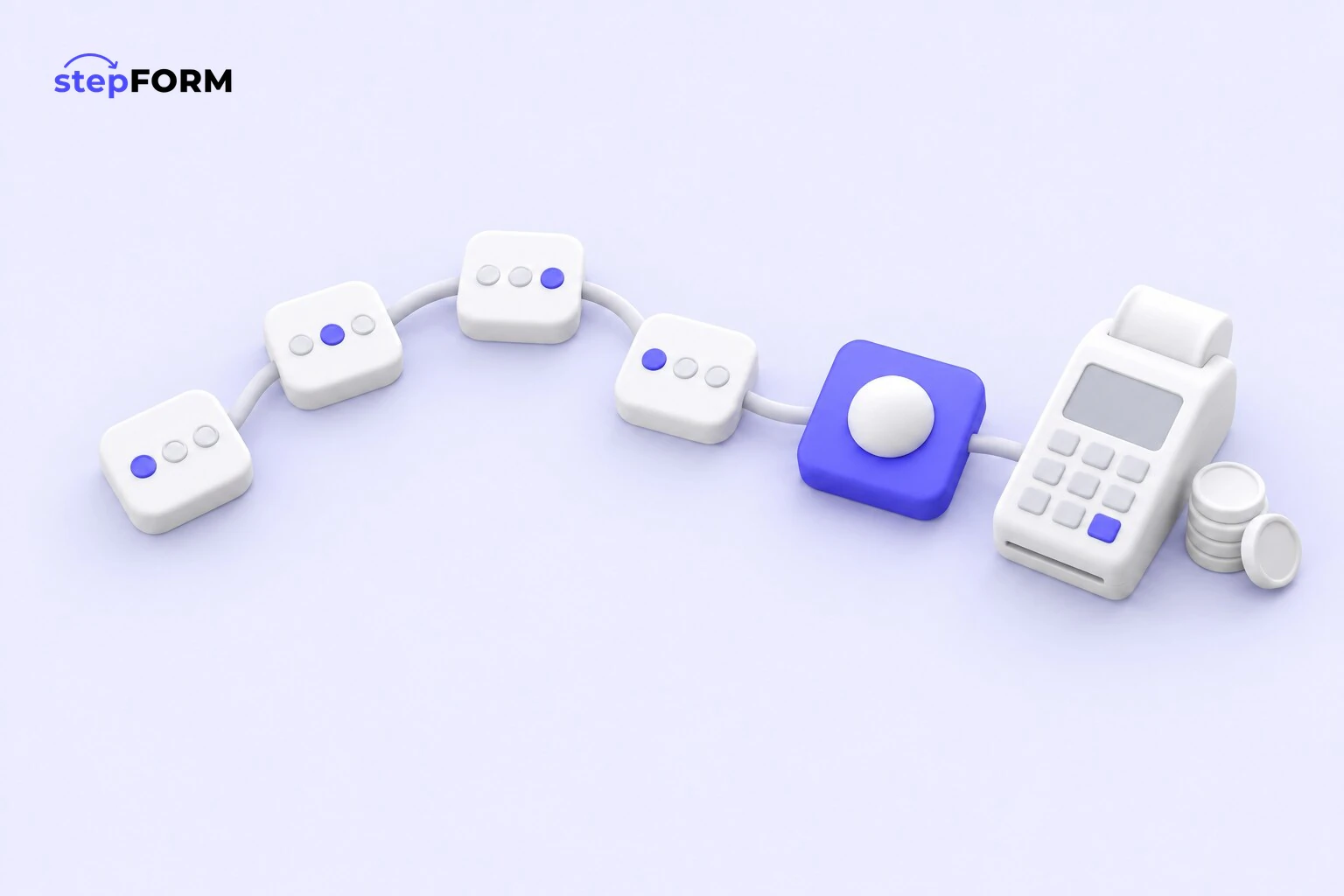
A typical lead quiz ends with a promise to call back. A pricing quiz uses the same answers to select an offer, calculate a price, range or deposit, and send the configuration to the sales team.
The example uses a fictional children’s party service. Work backwards from the booking: calculate one order, decide when to ask for contact details and connect the result to checkout.
What makes a pricing quiz different
A lead form collects information. A calculator asks for numbers and returns an amount. A quiz helps someone choose, so answers can change the next question and the recommendation. Combine them to narrow the options, price the chosen package and show the next step.
Imagine a party organiser’s website. A parent may not know the names of the packages. They do know the child’s age, the number of guests, the venue and the activities they want. The quiz translates those answers into a package, extra guest fees, a photographer and a travel charge. The last screen shows an estimated total and a booking button.
This format works when three conditions are true:
- A few answers can narrow the offer. The recommended programme might depend on age, venue and group size.
- The price follows known rules. The business has rates, package multipliers, add-ons and a minimum charge.
- The result has a natural next step. Book a date, pay a deposit, request a site visit or send the configuration to a sales rep.
If an engineer must inspect every project before any useful estimate is possible, show a range and request a review. If you sell three fixed services, a price table and a buy button may be enough. A quiz earns its place when the questions change the recommendation.
Start with the result, not the first question
A common mistake is to start building in the editor. Someone adds attractive cards, a name field and a phone field. An hour later there is a colourful questionnaire, but nobody can say what it should calculate or why a visitor should finish it.
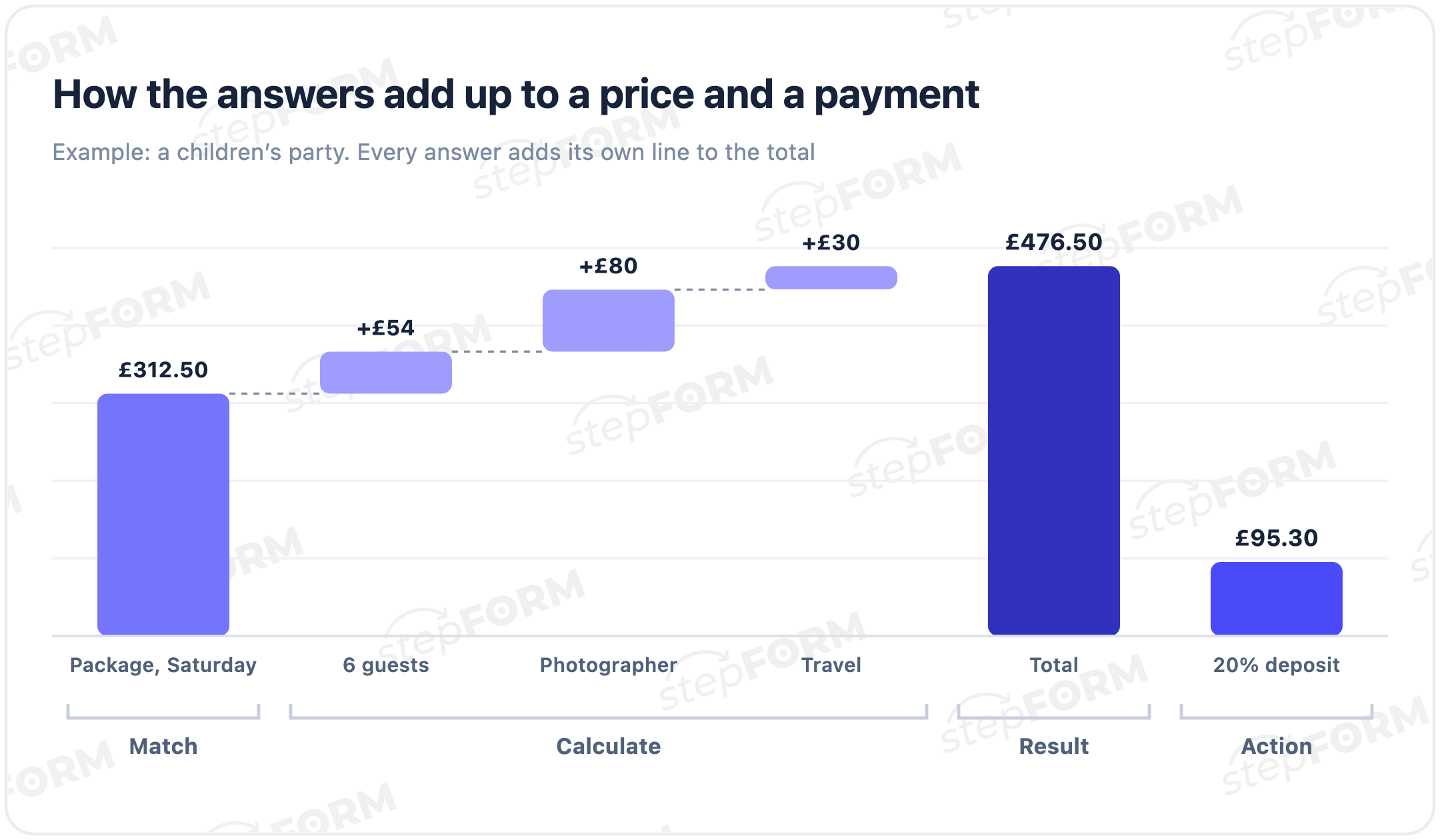
Write the final message first. For example: “For sixteen children, the Extended package is the best fit. The estimated price is £476.50. A £95.30 deposit submits the booking request; the date is confirmed after an availability check.”
Now break that sentence into inputs. Age selects the programme. Guest count changes the extra fee. Location may add travel. Optional services appear as separate lines. A date is required for availability, and contact details are needed to confirm the booking.
This rule keeps the sales wish list under control. Budget, how the visitor found you and their preferred call time can usually wait until after the first estimate.
The flow from first choice to payment
A pricing quiz has four parts. Each should answer a different question.
- Recommendation. Two or three simple questions identify a suitable option. Cards and buttons make the opening steps quick.
- Calculation. Fields send quantities, prices and multipliers into the formula. Branching hides questions that are irrelevant to the selected path.
- Result. The visitor sees the recommendation, the amount and a short breakdown. The screen states whether the price is final or estimated.
- Action. There is one main next step: pay, leave a deposit, send an enquiry or receive a detailed quote.
As a starting point, keep the phone field off the opening screen. The visitor has received no value from the quiz yet. Let them make two easy choices first. Show that a concrete result is coming, then ask for contact details where they are needed for the next action. Test this approach separately for visitors who arrive ready to enquire.
Show progress when the quiz has several pages. The W3C guidance for multi-page forms recommends logical stages and a clear progress indicator. “Step 3 of 6” tells visitors how far they have come.
A six-question party booking quiz
Our example uses six steps. The prices are invented to demonstrate the logic.
| Step | Question | How the answer is used |
|---|---|---|
| 1 | How old is the child? | Keeps programmes suitable for that age |
| 2 | How many children are coming? | Calculates the fee above ten guests |
| 3 | How long should the programme run? | Recommends a package and supplies a multiplier of 1, 1.25 or 1.5 |
| 4 | Which extras would you like? | Adds a photographer, cake or decorations |
| 5 | Where will the party take place? | Adds travel outside the standard area |
| 6 | Date and contact | Creates the lead and opens the booking step |
The first answer may never enter the formula. Its job is to control the branch. A programme for teenagers should not appear for a four-year-old. The third answer selects a package and its multiplier based on the preferred duration. The extras question may not change the route, but every selected service changes the total.
Ask for the date near the end. Choosing one takes more thought than tapping an image. If an exact date is not essential to the estimate, offer an “I have not decided yet” option. Visitors should not have to invent an answer to continue.
A short introduction to marketing quizzesBuild branches without creating dead ends
Branching should shorten the route, not turn the quiz into a maze. Draw it on paper first: every opening answer must point to a valid result or useful alternative.
If a chosen option is unavailable, offer a valid alternative or a manual review. Never end a branch with a blank result.
Keep pricing and eligibility separate. One condition decides whether a service is available; another adds a travel fee. Test every path with a sheet listing the start, visible screens, expected result and permitted action.
Turn the selected answers into a price
Our example begins with a base price of £250. The Standard package keeps it unchanged, Extended multiplies it by 1.25 and Maximum by 1.5. The base includes ten children. Each additional guest costs £9. A photographer adds £80, while a venue outside the normal area adds £30.
The formula is:
Total = base price × package multiplier + extra guests + add-ons + travel.
Extra guest fee = max(0, number of children − 10) × £9. This prevents the fee from becoming negative when ten or fewer children attend.
For sixteen children, the Extended package, a photographer and travel, the calculation is:
£250 × 1.25 + 6 × £9 + £80 + £30 = £476.50.
If the business takes a 20% booking deposit, a second formula provides the amount:
£476.50 × 0.2 = £95.30.
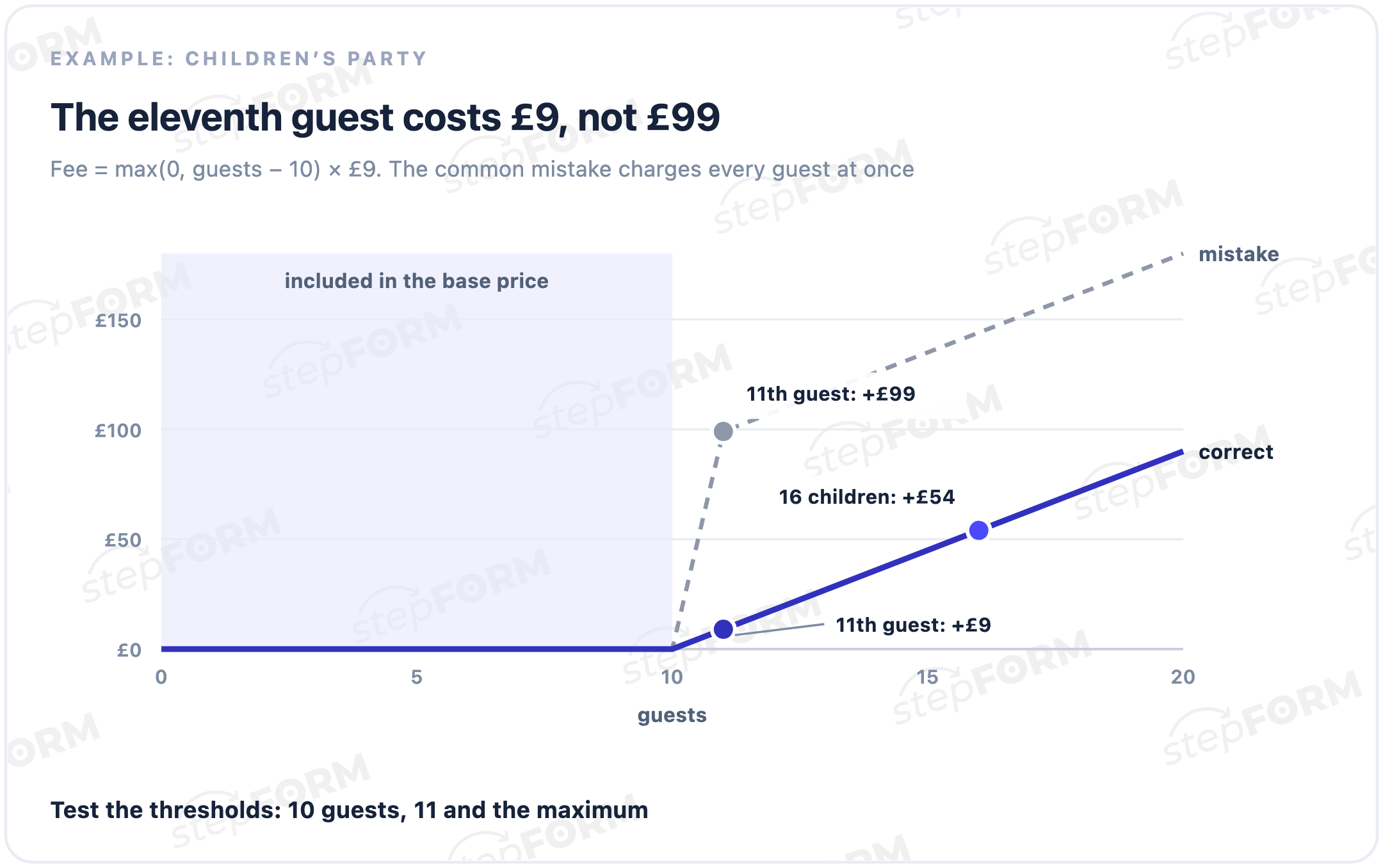
Keep rates separate from the long expression. You should be able to change the photographer’s fee without taking the entire formula apart. Test zero, the minimum, the maximum, empty values and incompatible options. Check the thresholds carefully: the eleventh guest should add one extra guest fee, not fees for all eleven people.
Not every answer needs a numerical value. Age can switch the branch, the date can be stored in the lead and a free-text note can go to the organiser. The formula calculates the price. It does not need to act as a database.
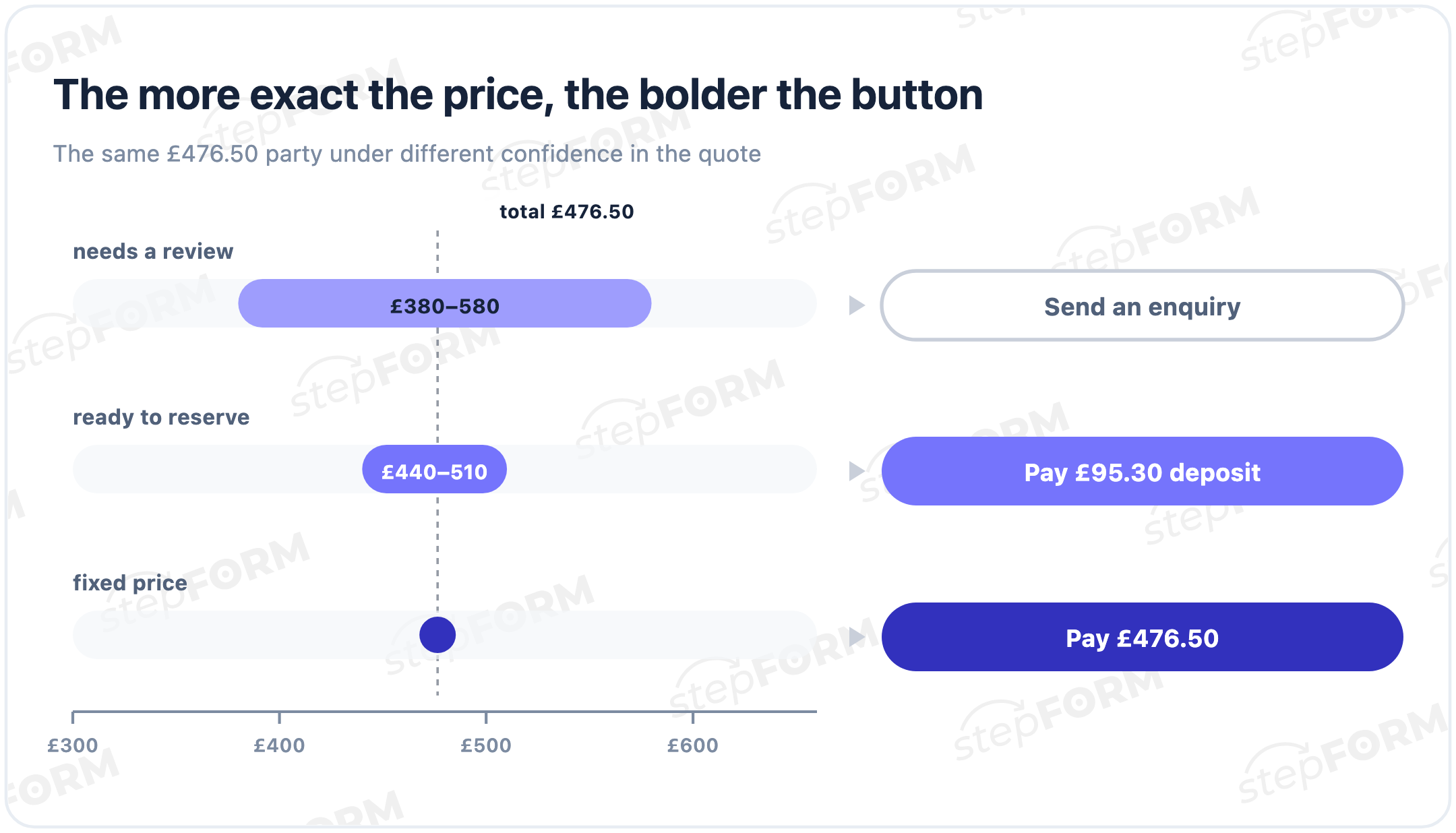
Choose a fixed price, a range or a deposit
The right result depends on how standardised the service is.
Use it for packages, rentals by a known tariff, standard delivery and goods with a defined price. The amount can go straight to the basket.
Use it for renovation, manufacturing and work that requires a survey. Show the likely budget and list the conditions that can change it.
A deposit can work when the estimate is accurate enough to reserve time or begin preparation, but taking the full amount would be premature. Say what the payment secures: a date, an appointment, a place in a class or the start of production.
Do not disguise uncertainty with precise digits. A quote of £476.53 looks exact even when nobody has checked the venue. Round an estimate to a sensible unit and explain why it may change.
Make the result screen useful
The result should answer five questions without a sales call:
- what has been recommended;
- how much it costs and whether the price is final;
- which major items make up the amount;
- what is included and what still needs confirmation;
- what happens after the button is pressed.
For the party example, show the programme, guest count, price lines, total and deposit. If payment reserves a date only after a manual check, say so beside the button. Make sure this promise matches the business’s cancellation and refund policy.
Keep one main action on the screen. Five equally bright buttons for paying, calling, messaging, downloading and restarting make the visitor choose how to proceed all over again. Secondary contact methods can remain as less prominent text links.
Connect payment without losing the order
Payment comes at the end, but plan it alongside the calculation. The provider needs the correct amount and order reference. The business needs the selected configuration.
Do not collect card details in quiz fields. Use the provider’s secure hosted page or protected component. Your pages should never log card numbers or security codes.
The stepFORM quiz builder supports calculations, a basket and payment integrations. The English product page currently lists Wallet One, Stripe and PayPal. Availability can depend on country, plan and provider terms, so check the current product and pricing pages before a client launch.
Run a successful and a failed payment test. Check the amount, saved answers, order record, confirmation and the ability to retry without completing the quiz again.
A return to the website does not by itself prove that money was received. Treat the provider’s confirmed status as the payment result. If a webhook updates the order, make the handler safe against repeated notifications so one payment cannot create two bookings.
Seven mistakes that break the flow
Questions added out of curiosity. If an answer changes neither the package nor the amount, ask it after booking.
Contact details before any value. The first screen asks for trust before the quiz has provided any value.
The same route for everyone. Branching should remove irrelevant questions and offers, not decorate an otherwise fixed form.
A total with no explanation. The visitor cannot see why a £250 package became a £476.50 order and assumes the number is arbitrary.
Charges revealed after payment begins. Travel, minimum order and required services belong in the result, before the action button.
No recovery after a failed payment. The button disappears or answers reset. Test failure as carefully as success.
Testing only on a desktop. Complete the quiz with one thumb on a phone. Check long choices, the numeric keyboard, the back button, validation and the result after rotating the screen.
Measure the steps, not page views
Page views cannot explain whether the flow works. Track a short sequence of events:
- quiz opened;
- first choice made;
- result shown;
- primary result button pressed;
- payment started;
- payment confirmed or lead created.
Inspect exit steps separately for mobile and desktop. Low result views point to the questions. Result views without button clicks point to the quote or promise. Failed payments point to the integration or provider requirements.
Do not merge leads and payments into one generic conversion. A consultation suits complex work; a standard ticket should usually proceed to payment.
Build the flow in stepFORM
Build the quiz in stepFORM using pages, fields, conditional jumps, formulas and actions. Start with the page structure:
- Create the pages. Keep one logical group on each screen: recommendation, quantities, add-ons, contact and result.
- Add options and values. The visitor sees package names, while the formula receives a price or multiplier.
- Set the branches. Hide questions that do not apply to the selected service.
- Build the totals. Calculate the full price, range, discount or deposit as separate values where appropriate.
- Write the result. Show the recommendation, the price breakdown and one primary action.
- Connect the basket and payment. Pass the intended formula and test successful and failed payments.
- Publish. Embed the quiz on a website or open it through a direct link.
Formulas are available in the service, while advanced calculation, the basket and payment integrations may depend on the plan. Check the current pricing page before promising a feature in a customer project.
Start with one service and six steps. Run ten completed orders through the formula and compare them with manual quotes. Connect payment only when every difference has a clear reason.
Frequently asked questions
How is a pricing quiz different from a calculator?
A calculator mainly returns an amount from supplied parameters. A quiz first recommends a suitable option and can change the path based on each answer. They can work together: the recommendation sets the configuration, then the formula calculates its price.
How many questions should the quiz contain?
Keep the questions that affect the recommendation, price or fulfilment. Five to seven steps are often enough for a first version. The sales team can collect remaining details after the lead is created.
When can the result show a fixed price?
Use a fixed price when a price list covers the service and the quiz collects every significant parameter. Show a range when a survey or manual review can still change the amount.
Must visitors enter a phone number before seeing the price?
No. You can show an estimated result first and request contact details for booking, saving the quote or receiving a full specification. The right position depends on the value already delivered and the action that follows.
Can the quiz take a deposit instead of full payment?
Yes. Calculate the deposit separately, such as 20% of the total, and use that value for payment. Explain what the deposit secures and how the remaining balance will be handled.
Which payment providers work with stepFORM?
The English quiz page currently lists Wallet One, Stripe and PayPal. Provider availability can change by country and plan, so verify the current integration list and provider terms before launch.
What happens when a visitor changes an earlier answer?
Recalculate the result and update the basket. Test that the old configuration does not remain as a duplicate item and that payment uses the latest total.
How should the formula be tested?
Run completed real orders through it, then try zero, minimum, maximum, empty and incompatible values. The result should match a manual quote, and any error should be explained on the step where it occurs.
What should be measured after launch?
Track the first choice, result view, primary button, payment start and payment confirmation or lead creation. Split the flow by device and inspect the exact exit step instead of relying on one overall conversion rate.