How to add a contact form to your website: fields, copy, setup
How to add a contact form to your website without a developer: which fields to ask for, where enquiries go, spam protection and consent. Step by step in stepFORM.
How-to  Daria Lisovenko
27 September 2026
Reading time ≈ 12 min.
Daria Lisovenko
27 September 2026
Reading time ≈ 12 min.

A contact form is the block on your website where visitors leave a phone number or a question, and the enquiry lands in your inbox, a messenger or a CRM. You can build one without a developer in a form builder: add the fields, set up notifications and paste the code into your site. The whole job takes 15 to 20 minutes, and three decisions matter most: which fields to ask for, where the enquiry goes and how you handle consent.
We looked at how stepFORM customers' lead forms are built, taking forms that received enquiries in the last 90 days. Half ask only for a phone number, and in almost half we found no consent to data processing at all.
Which fields a contact form needs
The rule is simple: ask only for what you need in order to reply. For a callback, that is a phone number. For a question or a quote, add an email and a comment. Everything else your team can learn in the conversation.
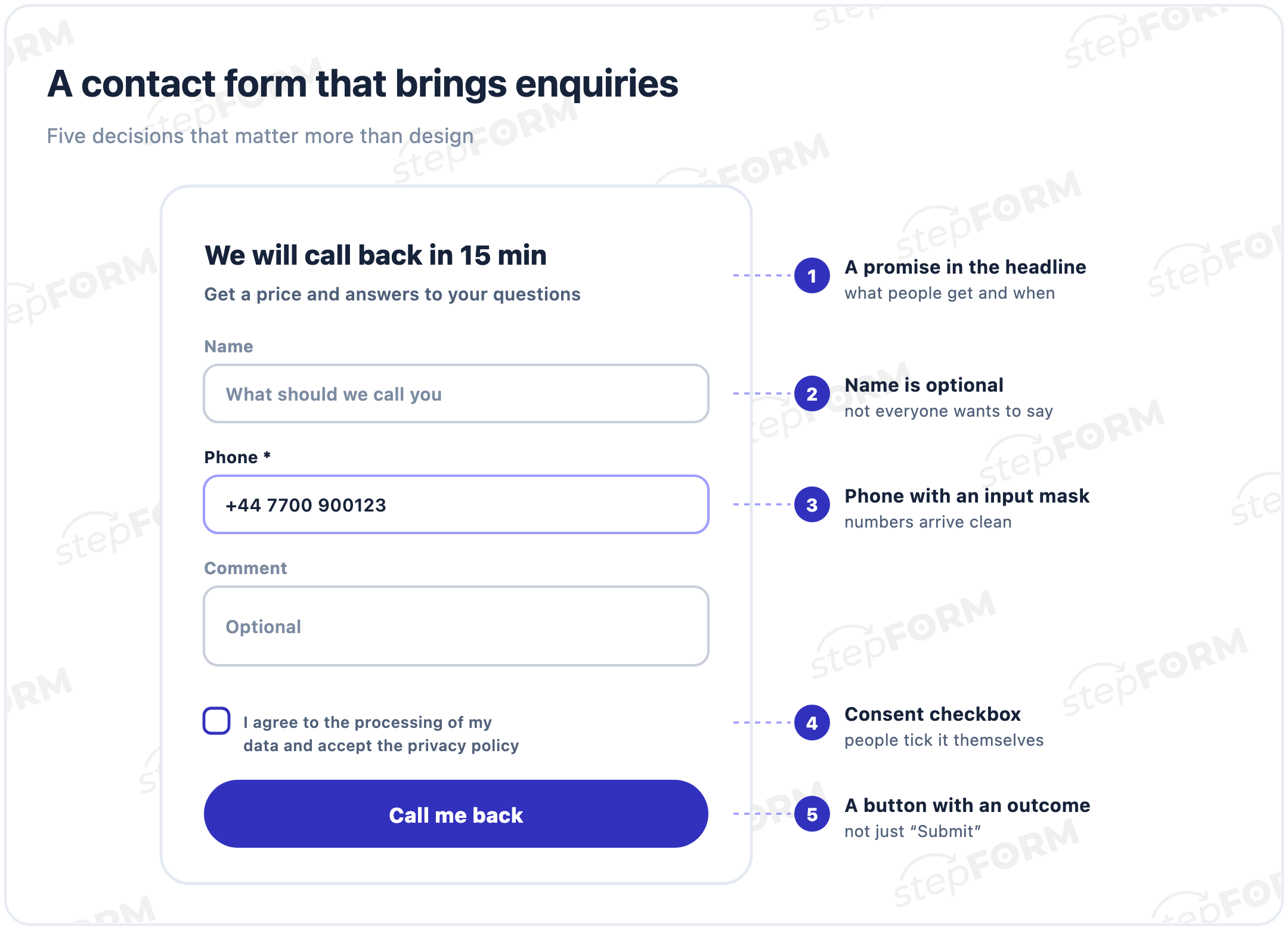
- Phone or email. The one required field, and without it the form is useless. For phone numbers, turn on an input mask so numbers arrive in one format with no missing digits.
- Name. Useful, but do not make it required: not everyone wants to introduce themselves to a company they do not know yet.
- Comment. An optional field for people who want to describe the task straight away. One in five stepFORM lead forms includes it.
- File upload. Needed when you cannot quote without a photo, drawing or brief. File uploads are available on paid plans, and you can limit the file types.
Which fields to use for common jobs:
| Job | Required | Optional | Button |
|---|---|---|---|
| Callback | Phone | Name, best time to call | Call me back |
| Question about a service | Phone or email | Name, comment | Ask a question |
| Price quote | Phone or email | Order details, comment | Get a quote |
| Consultation booking | Phone, date | Name, topic | Book a call |
| Request with a file | Email, file | Phone, comment | Send for review |
| Business enquiry | Email, company | Phone, order volume | Request a proposal |
Whether to ask for an email as well as a phone depends on how you reply. If you call back, a phone is enough: that is what 48% of stepFORM lead forms do. If you send a quote or a file, you need an email. 42% of forms ask for both, and 10% ask only for an email.
What to write: headline, button, small print
People take in a form at a glance, so there is no room for filler.
- A headline with a promise: "We will call back in 15 minutes", "Get a price by tomorrow"
- A subheading about what happens after sending: "we will answer your questions and give you a price"
- A button with an outcome: "Call me back", "Get a quote", "Ask a question"
- Hints inside the fields: an example number, "What should we call you", "Optional"
- A line under the button if you have something to promise: "We reply during working hours, no newsletters"
"Contact us" and "Get in touch" only name the form. People came for an answer, a call or a price, and the first screen should tell them they will get it.
Why your website form gets no leadsConsent and privacy
Names, phone numbers and emails are personal data. Depending on where your visitors are, data protection law, such as GDPR in the EU and UK, may require you to explain how you use the data and, for some uses, to get consent. The usual way to handle this in a form is a checkbox with a link to your privacy policy.
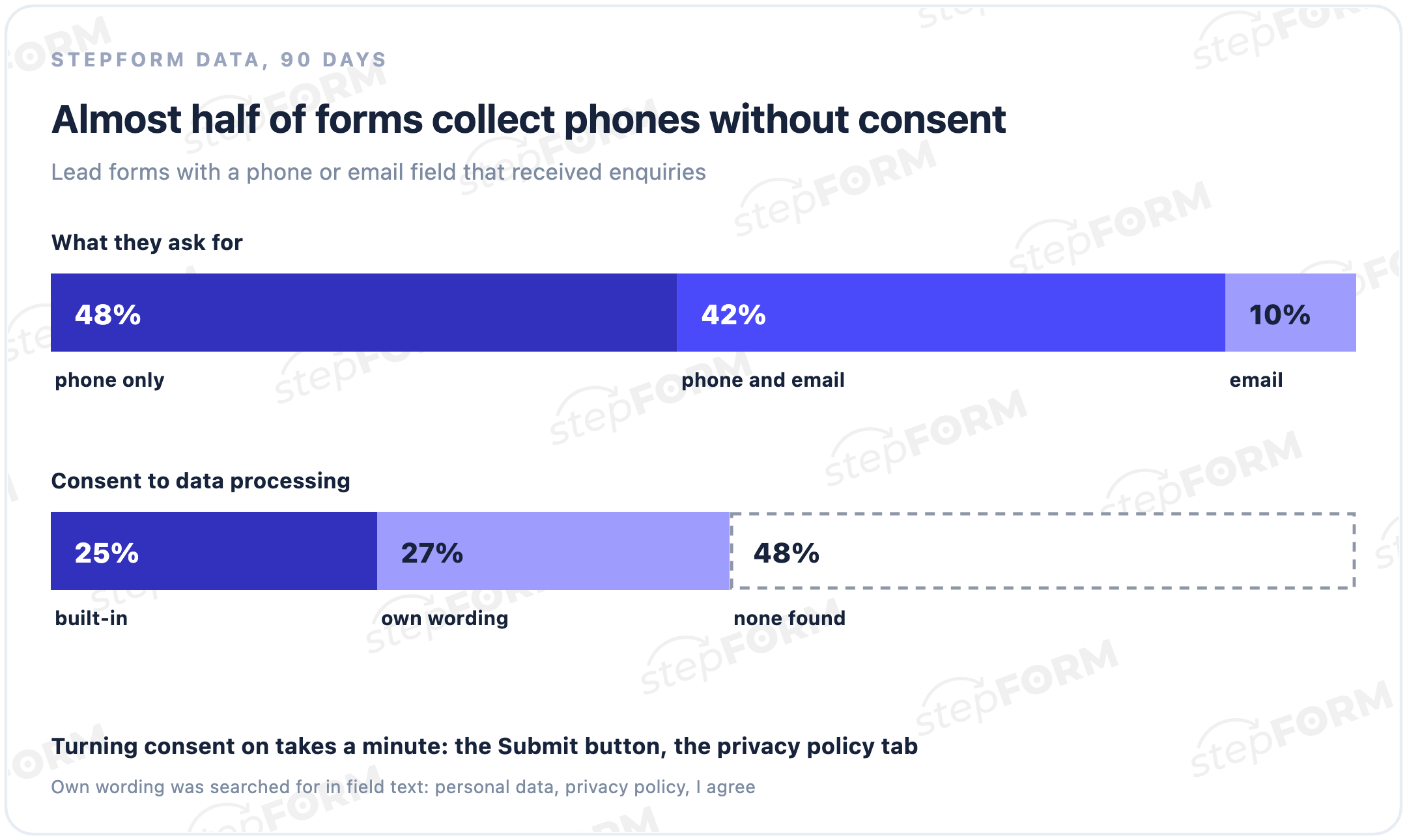
25% of stepFORM lead forms turn on the built-in consent. Roughly another quarter write their own consent wording in the fields. In the remaining 48% we found neither. That does not mean all of them break the law, since consent may be collected elsewhere on the page, but it is worth checking your own form.
Turning consent on takes a minute: open the settings of the submit button, go to the privacy policy tab and activate it. A line of text with a link to the document appears under the button, and you can edit the document. Check the wording with a lawyer, and leave the checkbox unticked so people tick it themselves.
Where to put the form on your site
You can show the same form in three ways, and they work together.
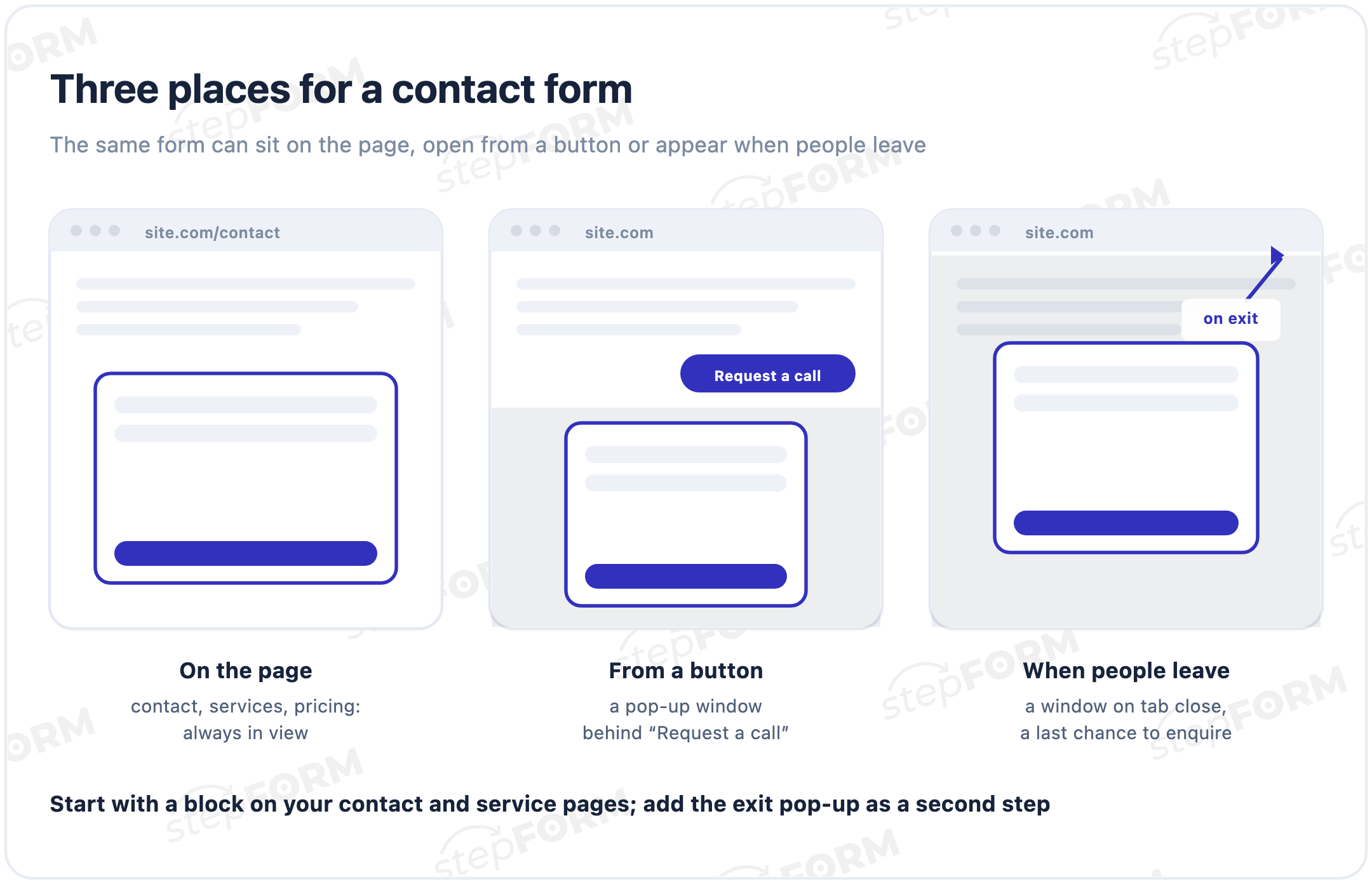
- On the page. Contact, service and pricing pages. The form is always in view and nobody has to look for it.
- From a button. A "Request a call" button in the header or next to a price opens the form in a pop-up. Handy when there is no room on the page.
- When people leave. A window appears when someone closes the tab. In stepFORM this is the pop-up publishing option, where you also set when and how often the form opens.
If you have no website, share the form as a direct link: on social media, in messengers or as a QR code on a business card. For a standalone page built around a quiz, see our guide to quiz landing pages.
How to build a contact form in stepFORM, step by step
- Create a form from a template or from scratch in the form builder.
- Add the fields: phone or email, name and comment. Make only the contact field required and turn on the input mask for phone numbers.
- Write the headline and button text using the rules above: a promise instead of "Contact us", an outcome instead of "Submit".
- Turn on consent in the submit button settings, on the privacy policy tab.
- Set up the screen after sending: a confirmation, a reply time and one next step, as described in our guide to thank-you pages.
- Switch on notifications in the Settings tab: enter your email, confirm it with the code from the message and enable it. A confirmed address can then be used in other forms too.
- Protect against spam if bots start sending enquiries: in Settings, the anti-spam block turns on a CAPTCHA, standard or reCAPTCHA.
- Publish. In the Publication tab, choose how to show the form: embed code for a page, a pop-up or a direct link.
How to add the code on popular platforms:
- WordPress. Install the stepFORM plugin from the plugin directory, link your account and pick the form with a button in the page editor. See the WordPress guide.
- Wix, Webflow, Shopify, Squarespace. Paste the embed code into an HTML or custom code block. There are step-by-step guides for Wix, Webflow, Shopify and Squarespace.
- Any other site. The code works in any builder or CMS that accepts HTML. For a pop-up, the code goes before the closing body tag.
Where enquiries go
A form without notifications piles enquiries up in the dashboard until the owner happens to look. In our data a third of lead forms work like that. More on this in our guide to building a sales funnel.
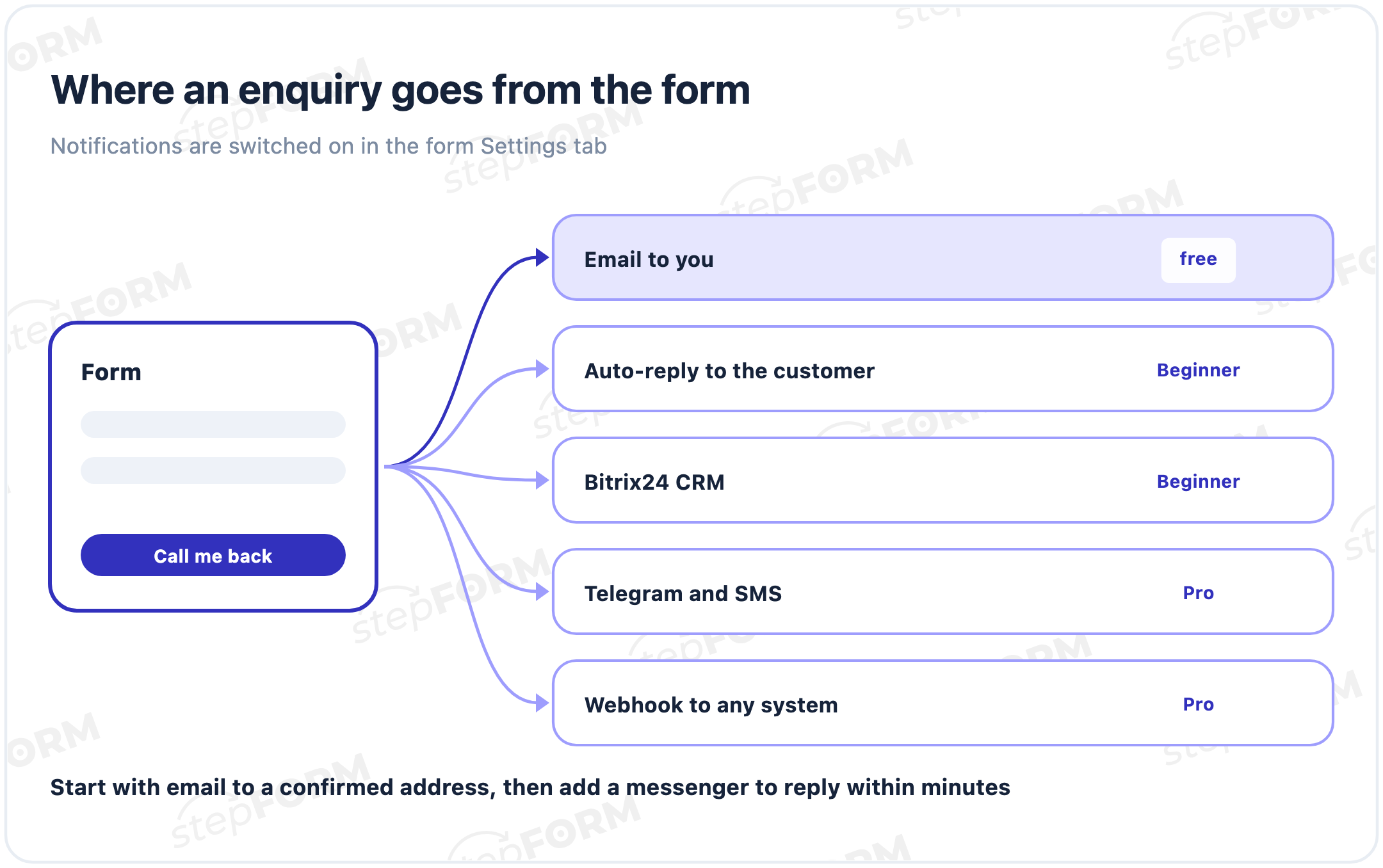
- Email. Enquiry emails work on the Free plan, and Beginner lets you add up to three addresses.
- Auto-reply to the customer. An email with their answers to the person who filled in the form. It works on paid plans and takes the address from the email field. Setup is described in sending results to respondents.
- Bitrix24. The enquiry becomes a lead or a deal straight away, from the Beginner plan.
- Telegram, SMS and webhooks. For fast replies and passing data to any system, on the Pro plan.
Plan limits and prices are on the pricing page. The Free plan is enough to start: 5 forms and 50 responses a month.
A callback form
A callback form is a special case of a contact form with one required field: the phone number. To make the call convenient, add a question such as "When is a good time to call?" with options like "now", "within an hour" and "in the evening". Name the button "Call me back", and on the screen after sending say exactly when you will call.
This kind of form works best behind a "Request a call" button in the site header. It takes up almost no room on the page and can be filled in with two taps on a phone.
Check the form before launch
The check takes about five minutes. Send yourself a test enquiry from a phone and go through the list:
- The whole form fits on a phone screen and the button does not slide off the edge
- The phone mask accepts a number without errors and does not get in the way
- The consent link opens your privacy policy
- After sending, a thank-you screen with a reply time appears
- The email arrived, and not in the spam folder
- If you connected Telegram or a CRM, the enquiry shows up there too
Repeat the check after any change to the form, and once a month for no reason at all. Notifications sometimes stop because an email address changes or an employee leaves, and nobody notices until a customer complains that they never got a call back.
Common mistakes
- Too many required fields. City, job title and "how did you hear about us" can wait for the conversation.
- A "Submit" button. It gives no hint of what people get once they click.
- No consent. One minute of setup versus legal risk and awkward questions from customers.
- Notifications left off. Enquiries sit in the dashboard while the customer is already calling a competitor.
- An unconfirmed email address. Messages do not arrive until the address is confirmed with the code.
- Never tested on a phone. A field slides off the screen, and the button is hidden below the fold.
- A CAPTCHA you do not need. It stops bots but adds a step for people too. Turn it on once spam actually appears.
Frequently asked questions
How do I add a contact form to my website without a developer?
Build the form in a form builder: add a phone or email field, a name and a comment, then turn on consent and notifications. Copy the code from the Publication tab and paste it into your site. In stepFORM it takes 15 to 20 minutes.
Which fields should a contact form have?
Only one required field: a phone number or an email, depending on how you reply. Make the name and comment optional. Everything else can be clarified in the conversation.
How do I get contact form submissions by email?
In the form's Settings tab, turn on email, enter your address and confirm it with the code from the message. Once confirmed, enquiries arrive in your inbox, and the address can be reused in other forms.
Does a contact form need a consent checkbox?
It depends on your visitors' location and how you use the data. Under laws such as GDPR you must explain how personal data is used and, for some uses, get consent; a checkbox with a link to your privacy policy is the usual solution. In stepFORM it is turned on in the submit button settings.
How do I protect a contact form from spam?
Turn on a CAPTCHA in the form's Settings, in the anti-spam block. stepFORM offers a standard CAPTCHA or reCAPTCHA, and you can choose whether the check lasts for the whole browser session or until the page reloads.
How do I add a contact form to WordPress?
Install the stepFORM plugin from the WordPress plugin directory, link your account and choose the form with the stepFORM button in the page editor.
What is the difference between a callback form and a contact form?
A callback form is a simplified contact form with one required field, the phone number. It helps to add a question about the best time to call and to open it from a "Request a call" button.
Can I make a contact form for free?
Yes. The stepFORM Free plan includes 5 forms and 50 responses a month, enquiry emails and consent. File uploads, auto-replies and CRM integration are on paid plans.