What is a lead magnet and how to make one
What a lead magnet is, the main types and how to make your own: a checklist, quiz, test or calculator. How to deliver it at once and handle newsletter consent.
Guides  Daria Lisovenko
30 September 2026
Reading time ≈ 13 min.
Daria Lisovenko
30 September 2026
Reading time ≈ 13 min.

A lead magnet is something useful people get in exchange for their contact details: a checklist, a shortlist, a price estimate, a test result or a discount. The business gets a phone number or email from someone who has already shown what they are interested in. A lead magnet works when it answers a specific question and arrives at once, while the interest is still there.
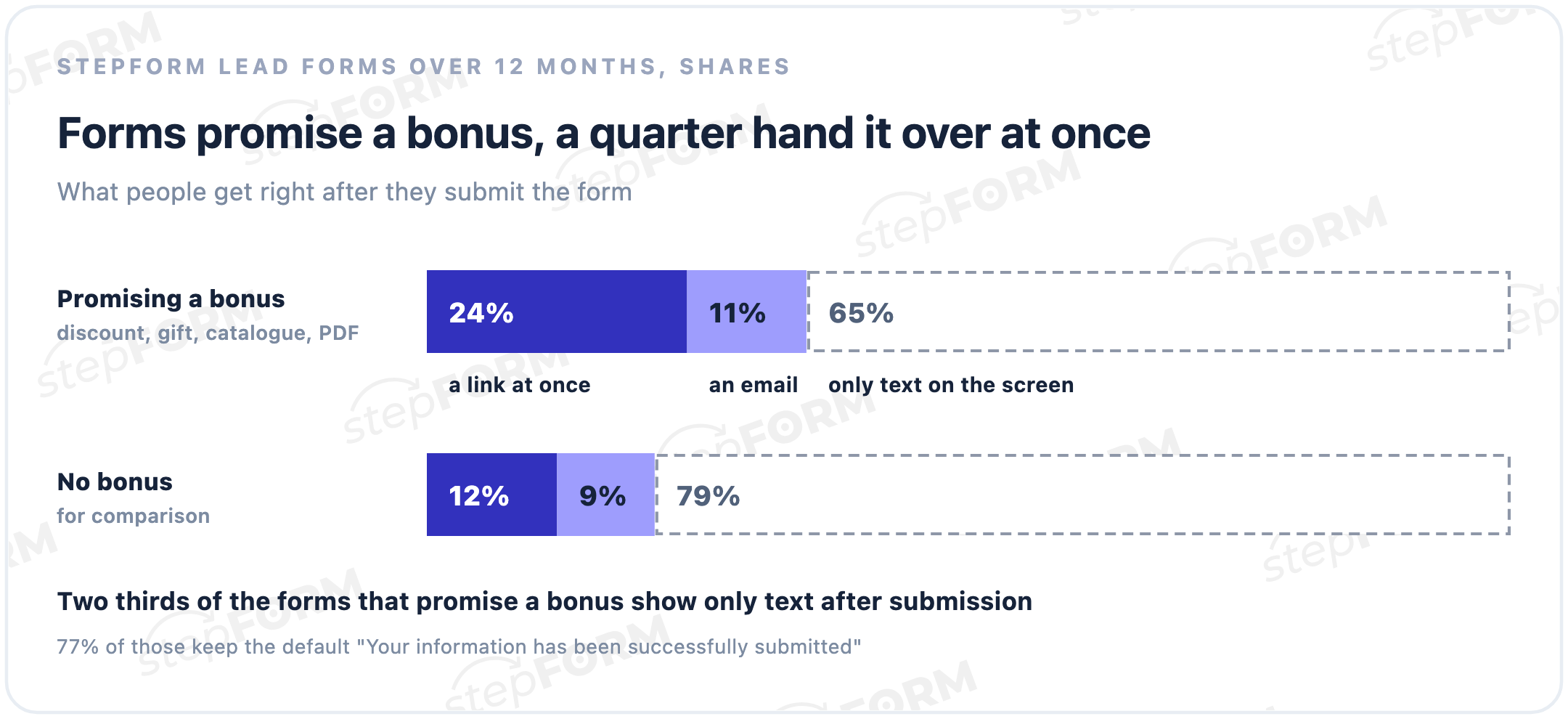
That second part is where many forms fail. We looked at stepFORM customers' lead forms over the last year: 9% of them promise a discount, a gift, a catalogue or a PDF. Two thirds of those forms show only text after submission, most often the default "Your information has been successfully submitted". 24% hand over a link at once, and roughly one in ten sends an email.
What a lead magnet is, in plain words
People come to a website with a question: how much will the renovation cost, what is my level of English, which kitchen should I choose. A lead magnet answers that question, or part of it, and asks for a phone number or email in return. For the business it is a first contact with someone who has already said what they want.
Sometimes it is called a sign-up bonus or an opt-in incentive. The contact details themselves are collected by a lead form, while the lead magnet is the reason to fill it in.
Types of lead magnets
| Type | Example | Who it suits | How to deliver it |
|---|---|---|---|
| Checklist or guide | "12 things to check before a renovation" | Services with a long decision, B2B | A link to a PDF right after the form |
| Shortlist or catalogue | "5 kitchen designs with prices" | Furniture, real estate, travel | A link at once, or a manager sends it |
| Price estimate | "Get your renovation price in a minute" | Renovation, windows, building | A calculator shows the total on screen |
| Test result | "Find out your English level" | Schools, courses, training | A result screen based on the score |
| Discount or promo code | "10% off your first order" | Shops, services | A code on the thank-you screen |
| Trial lesson or consultation | "A free 20-minute consultation" | Schools, experts, agencies | A booking confirmed by a manager |
More than half of the stepFORM forms that promise a bonus offer a discount. It is the easiest one to come up with, but people only benefit after they buy. A checklist, an estimate or a test result is useful straight away, even if the person never buys from you: they get something back for their contact details right now.
Lead magnet examples for different niches
A good lead magnet leads to the next step the business wants from it. A few combinations to start from:
| Niche | Lead magnet | Format | Next step |
|---|---|---|---|
| Home renovation | An estimate based on area and type of work | Calculator | A site survey |
| Fitted kitchens | 5 designs for the kitchen's size | Quiz with a shortlist | A design project |
| Online school | Your English level in 10 minutes | Test | A trial lesson |
| Accounting and legal | 10 documents to check before a tax audit | PDF checklist | A consultation |
| Travel agency | 3 trips that fit the budget and dates | Quiz | A call from an agent |
| Online shop | A first-order discount | Code on screen | A purchase |
Interactive lead magnets: quizzes, tests, calculators
A PDF has to be written, designed and stored somewhere. A quiz, test or calculator produces the result by itself: people answer a few questions and immediately see a price, their level or the option that suits them. The result is personal, about their bathroom or their English, and that is worth more than a generic brochure.
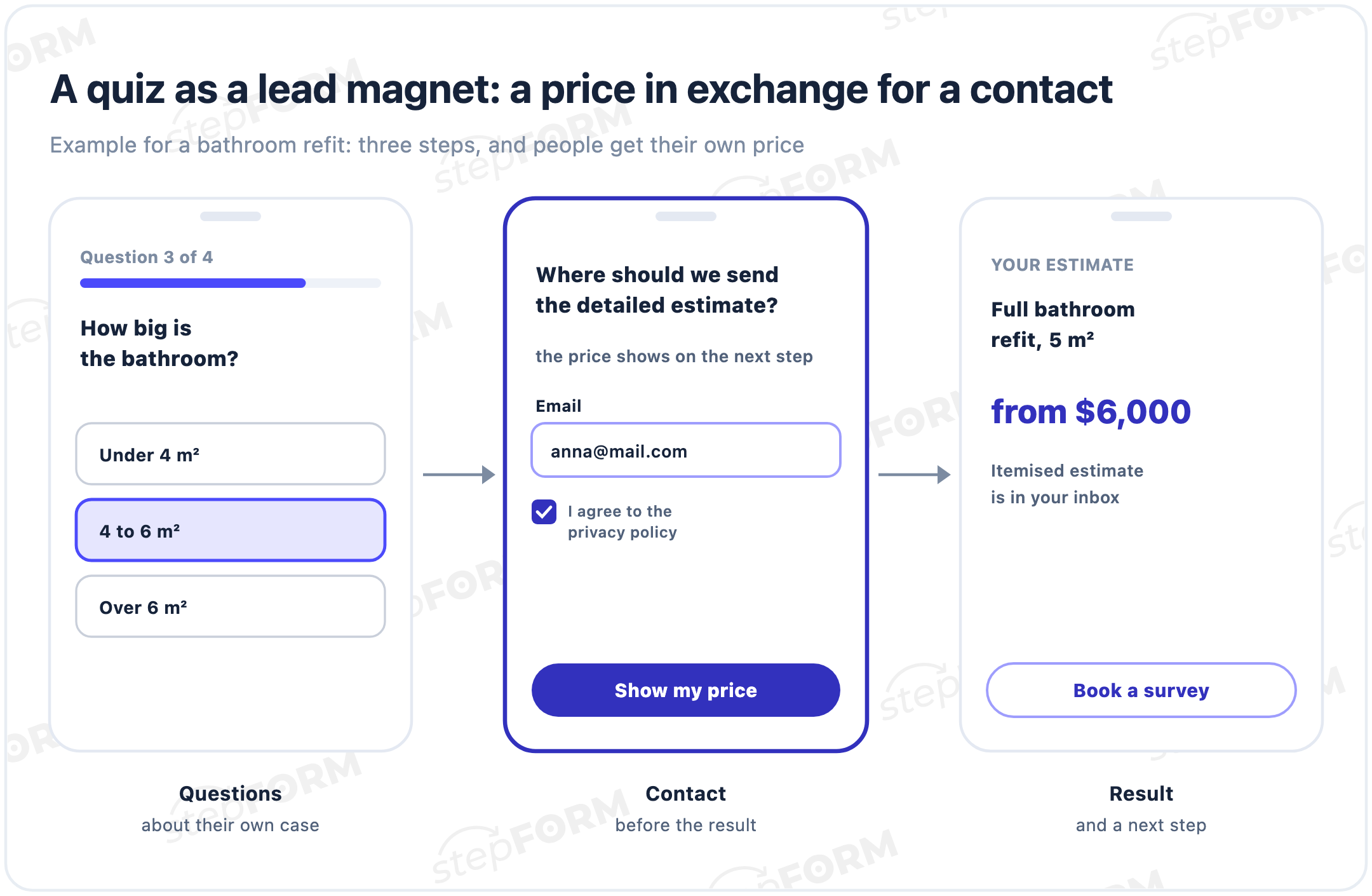
In this setup you ask for the contact just before the result: "Where should we send the estimate?". Still show the price on screen, and send the detailed estimate by email. Otherwise people feel they went through the quiz only to hand over their number.
Tests work the same way: the points add up by themselves, and each score range sends the person to their own result screen. That screen is the place to explain what the result means and offer a next step, such as a trial lesson at their level.
We covered how to build these separately: a quiz landing page, a test that brings leads and a website price calculator. Ready-made examples are on the lead generation quizzes page.
How to make a lead magnet in five steps
- Find the question people come with. Ask your sales team how first calls start: "how much does it cost", "how long does it take", "which one should I choose". The answer to that question becomes your lead magnet.
- Pick a format that fits the question. A price turns into a calculator, a choice into a quiz or a shortlist, "where do I start" into a checklist, a knowledge check into a test.
- Make the material itself. A one-page checklist gets read, while a 30-page guide gets saved for later and never opened. The title should say what people get: "Pre-renovation checklist: 12 checks that save money" is clearer than "A useful guide".
- Build the form. An offer, one or two fields and consent to data processing. An email is enough for a checklist, and the phone number can wait.
- Set up delivery and a next step. A link on the thank-you screen, an email with a copy, and a button like "Book a consultation" for those who want more.
How to deliver a lead magnet at once
Someone left their email for a checklist and sees "Your information has been successfully submitted". They do not know whether the file will come or when, and an hour later they will not remember where they left their details. Two thirds of the forms that promise a bonus work this way, and 77% of them show exactly that default line.
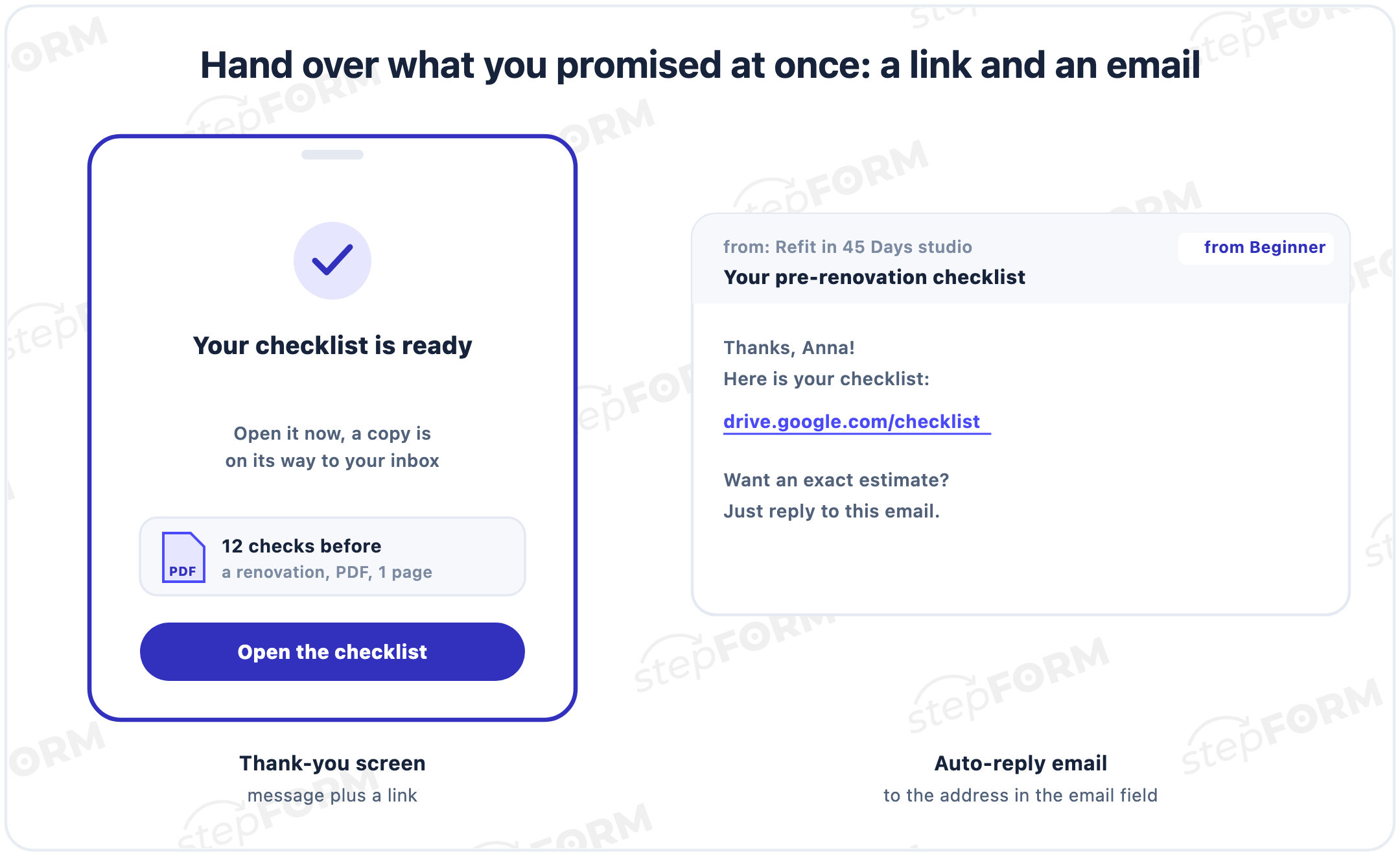
In stepFORM you can hand over what you promised in three ways, and they combine easily:
- A link on the thank-you screen. In the submit button settings, choose to show a message and open a link, or to open a link straight away, and the link can open in a new tab. Put the file on Google Drive, Dropbox or your own site and share it by link.
- An auto-reply email. The email goes to the address from the email field, and you can write your own text with a link in it. Auto-replies come with the Beginner plan, and HTML email design with Pro.
- A result on screen. Quizzes, tests and calculators show the result themselves and need no separate delivery.
Where to show a lead magnet
- At the end of an article or service page. A form block where people have finished reading and wonder what to do next.
- In an exit pop-up. A good way to make sure people do not leave empty-handed. We explained how to set one up in our guide to pop-up forms.
- As a page of its own. A quiz or test at a direct link that you can put in ads, a newsletter or a social media bio.
- At events and in print. A direct link to the form turns easily into a QR code for a stand, a business card or packaging.
Consent to data processing and to a newsletter
Any lead form needs a way to handle consent to data processing, usually a checkbox with a link to your privacy policy. A lead magnet adds a second question: will you send marketing emails afterwards? Rules differ by country, and in many of them, including the EU and the UK, marketing emails to individuals generally need their prior consent. Check the rules that apply to you with a lawyer.
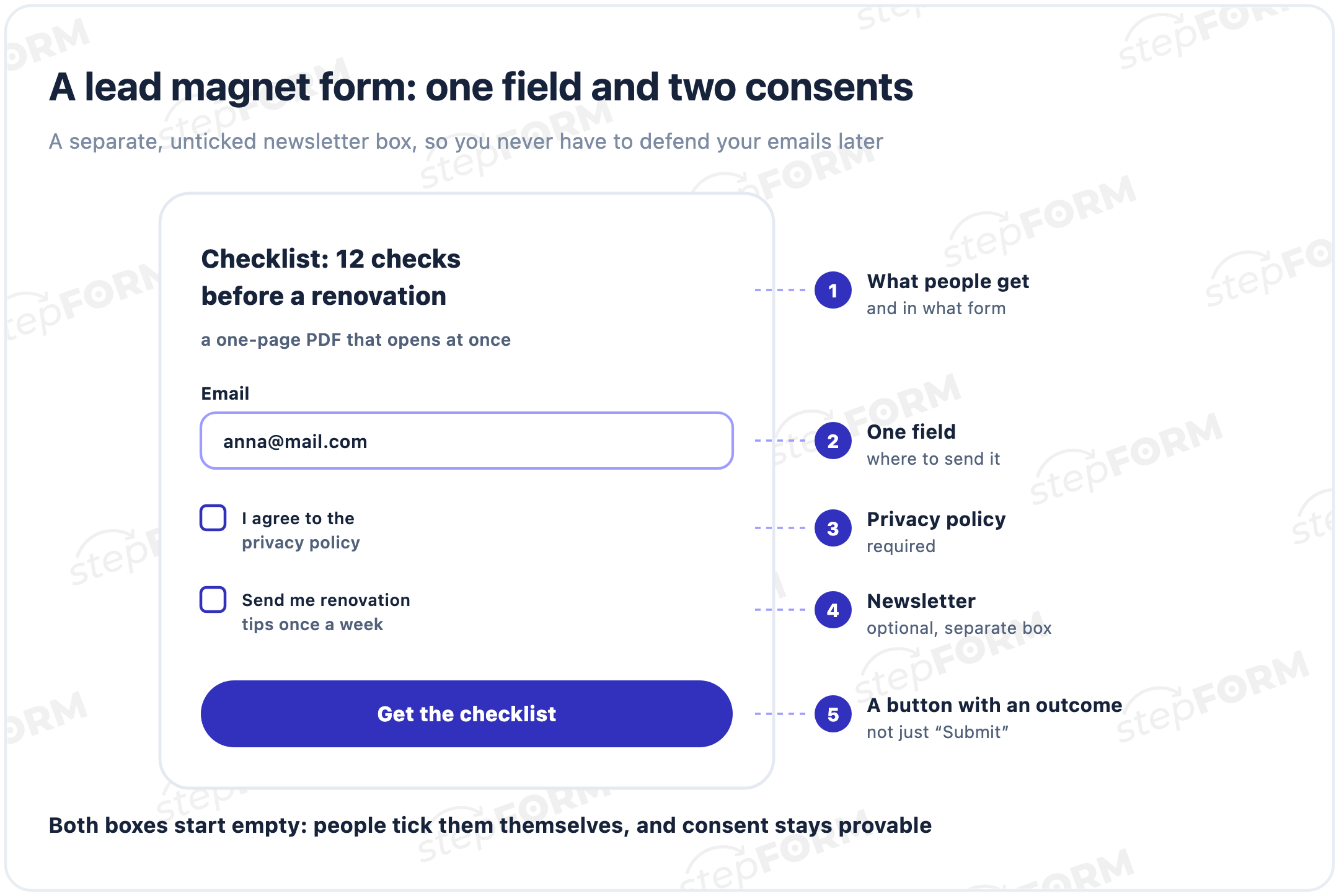
The simplest approach is two checkboxes. The first, for the privacy policy, is required, and you turn it on in the submit button settings. The second, for the newsletter, is optional and added as an ordinary checkbox field. Leave both unticked so people tick them themselves.
What to do with the contacts next
Someone who downloaded a checklist is not a customer yet. If nobody writes to them within a week, they will forget where the file came from. So pass the contact on at once to wherever you work with it.
- To your sales team in Telegram. On Pro, the notification arrives in the messenger, so someone can call while the person is still reading your material.
- To a CRM or an email platform. A webhook on Pro sends responses to any system, including your email tool, if the person agreed to the newsletter.
- By email to the team. Notifications about new responses reach your inbox on every plan.
How much a lead magnet costs
Most of the cost is time: writing the checklist or thinking through the quiz questions. For your first lead magnet you do not have to pay for the tool. The stepFORM Free plan includes 5 forms and 50 responses a month, and scoring, formulas and a link on the thank-you screen work on it. Beginner at $14 a month adds the auto-reply email and Google Analytics, and Pro at $26 adds Telegram and webhooks. Annual billing brings the prices down to $11.20 and $20.80, and all the details are on the pricing page.
How to tell whether a lead magnet works
The first number is the share of people who opened the form and left their details. A form submission goal in Google Analytics shows it, and the integration comes with Beginner. The second number matters more: how many of the people who got the lead magnet became customers. In the Responses tab you can give responses your own statuses, so mark "bought" for those who closed a deal, and a month later you will see which lead magnet brings buyers and which one only collects emails.
If you get plenty of contacts and no customers, the lead magnet is too far from what you sell. A checklist called "10 ideas for your next holiday" collects emails from everyone who dreams of a holiday, but few of them will book a trip. A shortlist of "3 beach trips for two under $2,000 in October" collects fewer contacts, and the people who download it are already choosing a trip.
What to put on a thank-you pageCommon mistakes
- A lead magnet about nothing. "Useful resources" and "Subscribe to our news" promise nothing, and nobody leaves their details for them.
- Thirty pages instead of one. The guide gets downloaded, never opened and leaves no impression of you at all.
- "We will send it later", then silence. A bonus people had to wait for feels like a bait and switch, even if it arrives the next day.
- A discount with no terms. It is unclear where to use it and how long it lasts. Put the code and the expiry date right on the screen.
- Five fields for a checklist. An email is enough for a one-page file.
- A pre-ticked newsletter box. Consent like that is hard to call freely given.
- No next step. People got the material and left, although they were ready to book a consultation.
Frequently asked questions
What is a lead magnet in simple terms?
Something useful people get in exchange for a phone number or email: a checklist, a shortlist, a price estimate, a test result or a discount. The business gets the contact details of someone interested in the topic.
What types of lead magnets are there?
Checklists and guides, shortlists and catalogues, price estimates from a calculator, quiz or test results, discounts and promo codes, trial lessons and free consultations. Interactive formats deliver the result at once, without a separate file.
How can I make a lead magnet for free?
Build a quiz, a test or a form offering a checklist on the stepFORM Free plan, which includes 5 forms and 50 responses a month. Put the file on Google Drive or Dropbox and share the link on the thank-you screen.
How do I deliver a lead magnet after someone fills in a form?
In the submit button settings, choose to show a message and open a link, or to open a link straight away, and enter the file's address. You can also send a copy with an auto-reply to the address from the email field, which comes with the Beginner plan.
What is the difference between a lead magnet and a lead form?
A lead form collects the contact details, and a lead magnet gives people a reason to share them. A form without an offer gives people little reason to fill it in, and an offer without a form has nowhere to go, so you build them together.
Do I need consent to email people who downloaded a lead magnet?
It depends on the country, and in many places, including the EU and the UK, marketing emails to individuals generally need their prior consent. A separate, unticked newsletter checkbox next to the privacy policy consent covers this.
Where should I put a lead magnet on my website?
At the end of articles and service pages, in an exit pop-up, or as a standalone quiz or test at a direct link that you can share in ads, newsletters and social media.
Which lead magnet works best?
The one that answers your customers' main question. For services priced by parameters it is a price estimate, for education a level test, for complex B2B services a checklist or a set of case studies. Judge it by how many contacts become customers, not by the number of contacts.