How to build a test that brings you leads
How to build a test that brings leads: questions that qualify, scoring and formulas, a result screen that sells and a lead that reaches your CRM.
Guides  Dmitry Molchanov
15 September 2026
Reading time ≈ 12 min.
Dmitry Molchanov
15 September 2026
Reading time ≈ 12 min.
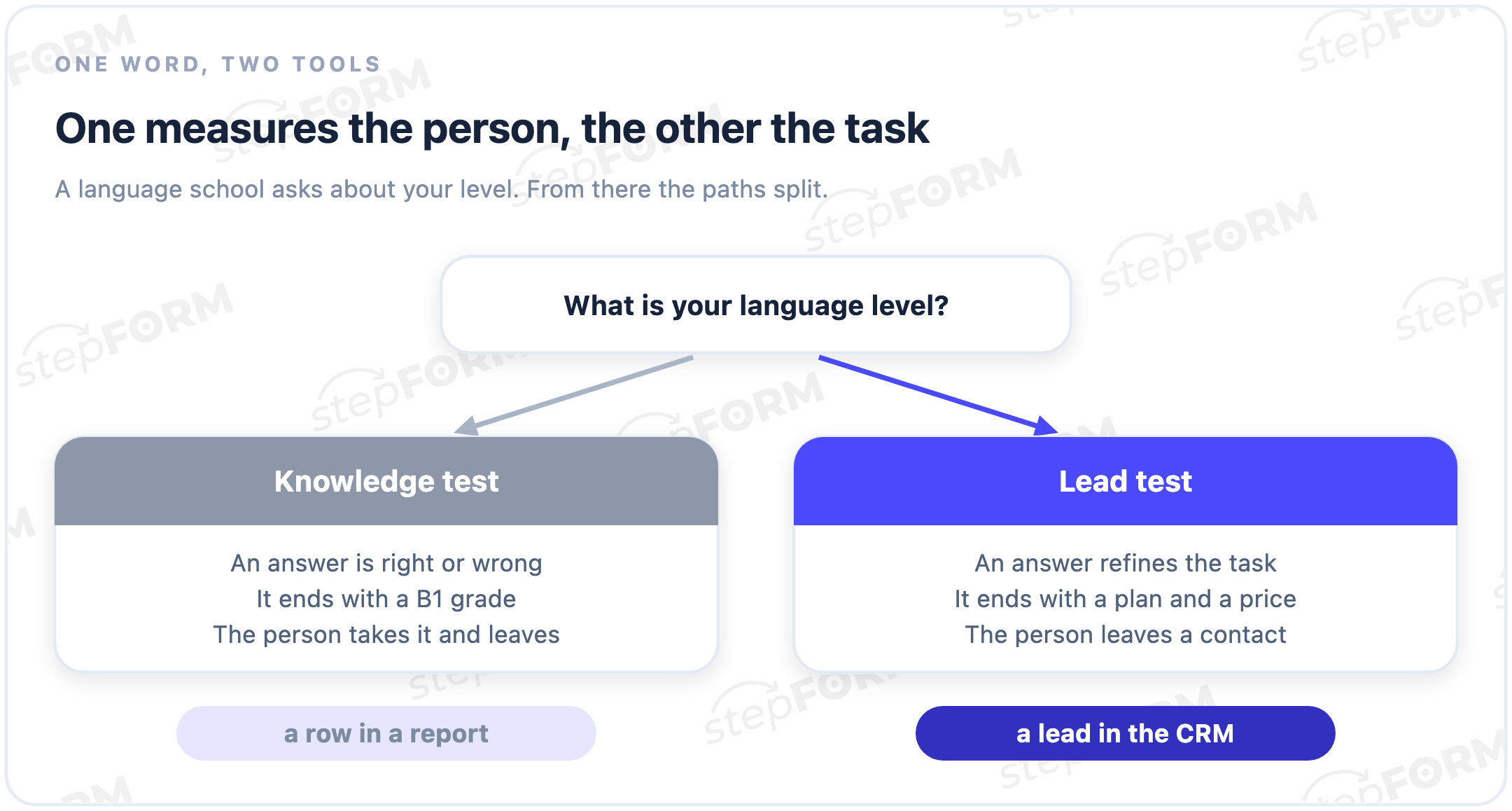
The word "test" covers two different things. The first checks knowledge: a school exam, staff certification, a task at an interview. The second walks a person towards a purchase: it picks a solution for their situation, calculates a price, works out the right plan and finally asks for a contact so it can send the result. This article is about the second kind, the one that sits at the top of a sales funnel and behaves like a sales assistant rather than an examiner.
The difference is not cosmetic. It decides which questions you ask, how you calculate the outcome and what the person sees at the end.
A knowledge test and a lead test are not the same tool
Search for "create a test online" and the results split into two camps. In one sit tools for teachers: right answers, anti-cheating, a grade book. In the other sit tools for business, where the point is not to grade someone but to understand them and get their contact.
A knowledge test measures the person. A question has a correct answer, the answer earns a point, at the end a number appears and the person leaves. A lead test works the other way round: no answer is wrong, every answer refines the customer's task, and the final screen shows a personal recommendation rather than a score.
Take a language school. A knowledge test would hand someone a B1 and stop there. A lead test asks about the goal (work, relocation, an exam), about free time, about budget, and finishes with: "an intensive course on Tuesdays and Thursdays suits you, the first lesson is free, leave a phone number and a coordinator will pick a teacher". The first test collects statistics. The second collects leads.
What a selling test is made of
Five parts, each with its own job.
The opening. The first screen explains what the person gets and how long it takes. "Answer 6 questions in a minute and see the exact price of your kitchen renovation." Without a clear reward nobody starts.
Questions that surface the task. Each one narrows the funnel and tells you what the customer needs: area, materials, deadlines, city. This is data for the calculation and for the sales call, not curiosity.
Branching logic. Answers send people down different paths. "Apartment" and "studio" lead to one set of follow-up questions, "detached house" to another. Irrelevant questions never appear and the test feels short.
Scoring and the result. Answers turn into a number or a segment: a price, a plan, a customer type. That is what the personal result is built on.
The contact capture. The result is given in exchange for a phone number or an email, and the lead with all the answers goes to the manager and into the CRM.
Asking questions that surface the task, not erudition
The classic mistake made by people who come from school tests: they ask what can be verified. A selling test asks what helps to sell.
A good question does one of three things. It qualifies (budget, deadline, scale), it segments (personal or business, beginner or experienced) or it engages (an easy first question so the person makes the first click). A question that does none of these just makes the test longer.
- Open with an easy image choice: clicking is easier than typing
- Move heavy questions, budget and contacts, towards the end
- Keep five to eight questions
- One screen, one question
- Questions whose answer changes nothing
- Data you can work out yourself, like city or device
In stepFORM there are 17 question types behind this: single and multiple choice, number and text input, file upload, image choice. Number inputs matter most for calculations, which is the next section.
How to build a price calculatorScores and formulas: turning answers into a result
This is the line between a simple quiz and a test that genuinely calculates. There are two ways to turn answers into an outcome.
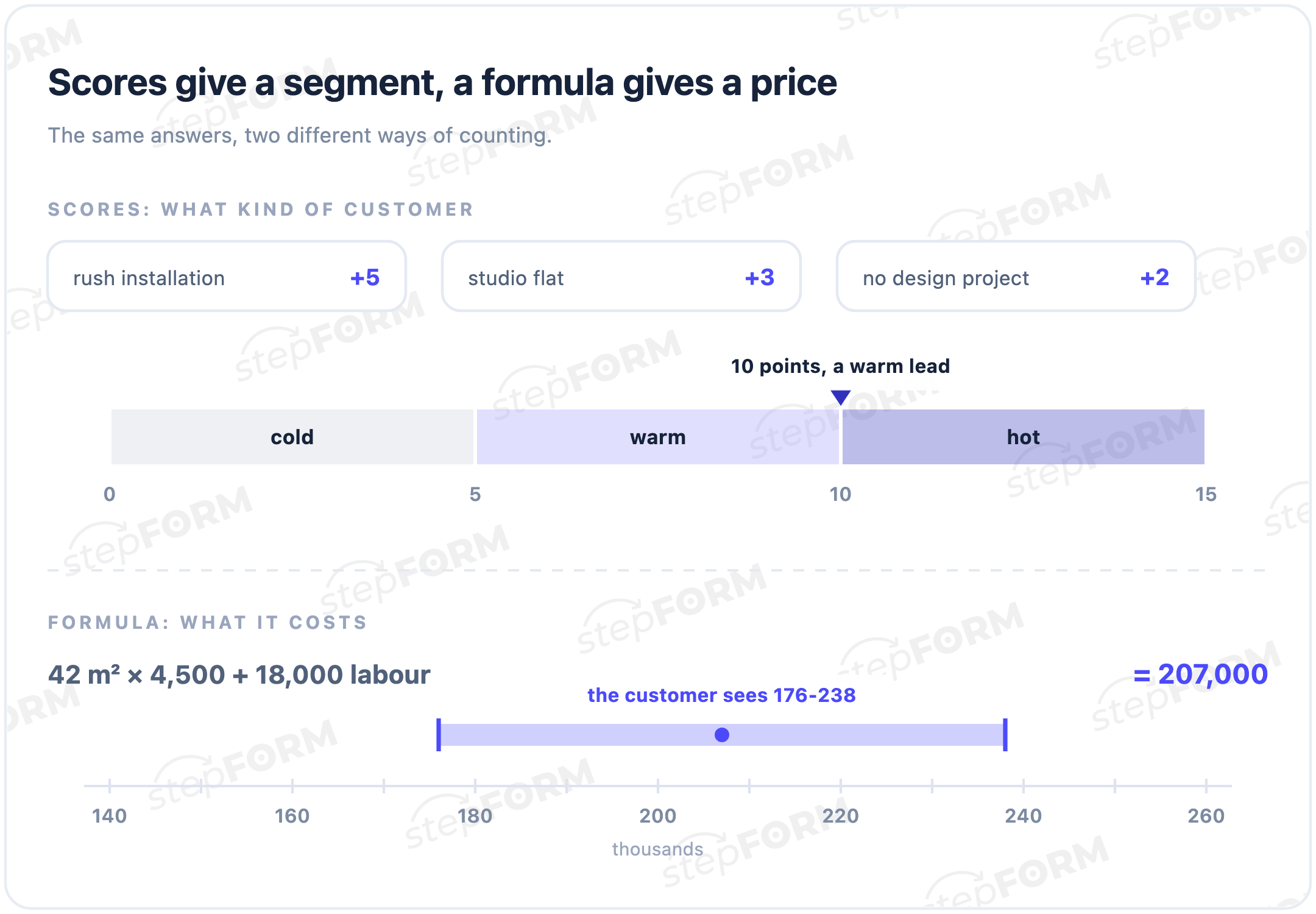
Scores. Every option carries a weight, the weights add up, and the total drops the person into one of the result bands. Handy for working out a customer type or how ready they are to buy. A test called "is your house ready for insulation" awards points for the state of the walls, windows and heating, and ends with three scenarios from "all fine" to "you need an audit now", each with its own offer.
Formulas. When you need a number rather than a category, the answers go into a formula. Area times the material rate, plus labour and delivery, minus a discount. The person sees a concrete sum. In stepFORM formulas support almost any mathematical function and can be as complex as you need, so a renovation quote or an insurance premium is built without a developer.
In practice: scores answer "what kind of customer is this", formulas answer "how much does it cost". Often one test uses both.
The result screen is where the offer lives
Most articles about tests dissect the questions and say almost nothing about the final screen. Yet that is what turns a completed test into a lead. The result is not a grade, it is your offer assembled for one specific person.
A weak result reads like this: "Your score: 8 out of 10. Thanks for taking part." There is nothing to do with that, so the tab gets closed.
A strong result does three things at once. It names the person's situation in their own words ("judging by your answers, speed matters more to you than price"). It gives a concrete solution ("the Express plan suits you, installation in two days"). And it explains why to leave a contact right now ("leave a phone number, we will hold this price for a week and send the estimate").
A useful move for expensive services: show a range rather than a final figure, and promise the exact number after a consultation. The person understands the order of magnitude without taking fright, and the manager keeps a reason to call.
Where the test leads after the button
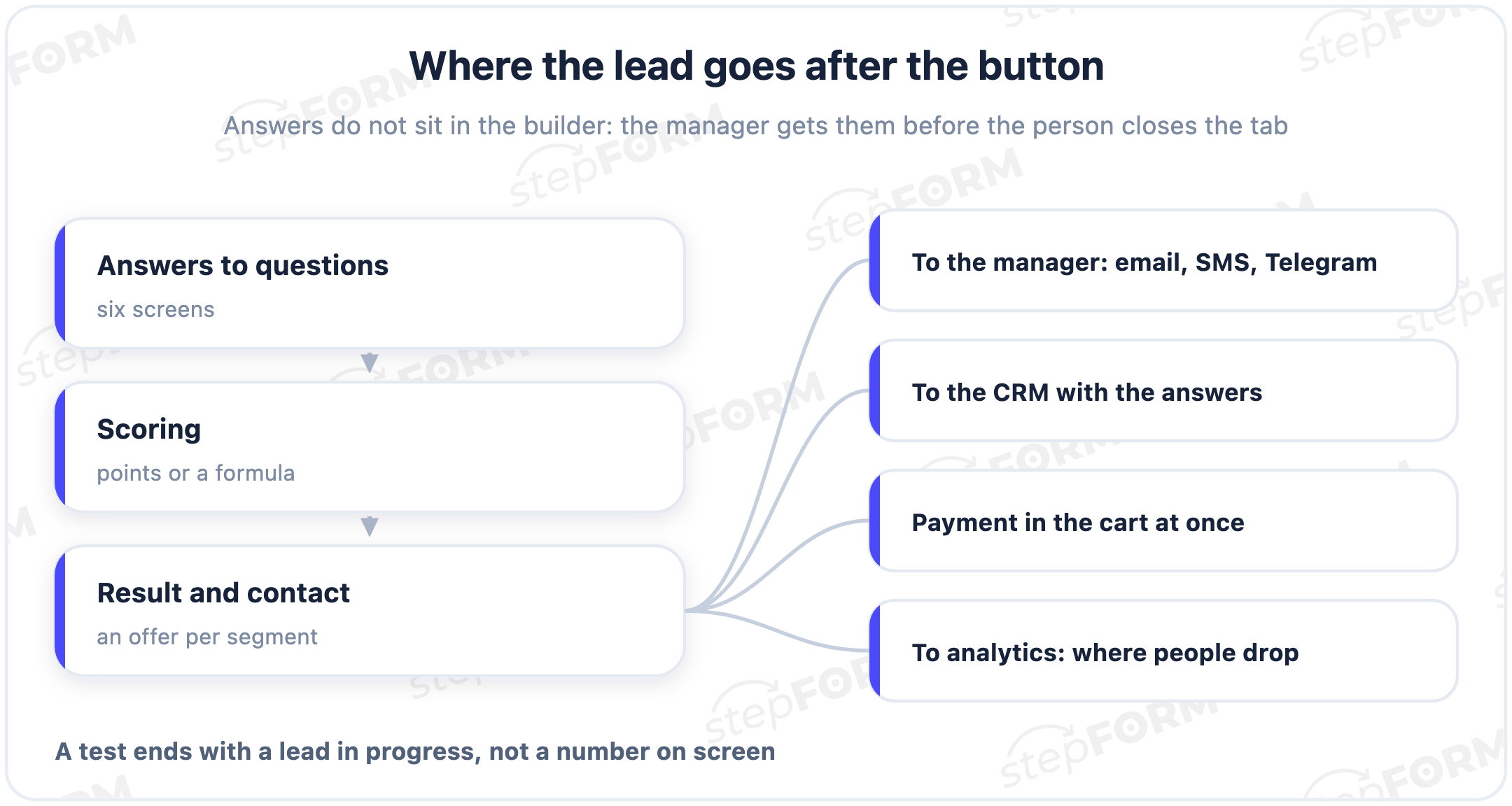
A lead that stays inside the builder is useless. It has to land where people work with it.
In stepFORM the result and every answer travel several ways at once. A notification reaches the manager by email, SMS, Telegram or webhook, so they can call while the person is still warm. The lead goes into the CRM with the customer's answers, so the manager sees the budget, the deadline and the city instead of dialling blind. For goods and services with a fixed price you can skip the lead entirely and put a cart with online payment inside the test: the person finishes, sees the price and pays by card or QR without leaving.
That last part is what separates stepFORM from most quiz builders, which can only collect a contact. A test that takes payment stops being a lead-generation tool and becomes a small point of sale.
Test, quiz or form: what to use when
These three get mixed up constantly, and the choice moves conversion.
A short lead form. It surfaces nothing and engages nobody, but it does not get in the way either: all that is left is to leave the details.
A test or a quiz with logic and a result. Slower, but you learn the task and filter out the people who were never going to buy.
A quiz leads towards a recommendation or a calculation. A test additionally grades and segments: it counts scores and returns a level, a type, a diagnosis of the situation. In practice the line is blurry, and in stepFORM all three are built in the same editor.
The numbers that show a test is working
A test without analytics is a blind bet. Four figures are worth watching.
Completion. How many of those who started reached the result. If people abandon en masse at one question, it is heavy or unnecessary; move it or drop it.
Contact conversion. Of those who reached the end, how many left a phone number or an email. If they finish but do not leave anything, the result card is to blame: the offer is weak or it is unclear why a contact is needed at all.
Cost per lead. Ad budget divided by the number of leads. A test usually lowers it, because it engages and filters out the casual visitors.
Lead quality. Managers feel this one first: how many contacts reach a deal. Sometimes a test brings a pile of leads and half of them are empty. A qualifying question fixes that.
One more thing that only shows up over time: read these numbers in pairs. High completion with low contact conversion means the test is interesting but the final screen does not convince. Low completion with high conversion is the opposite: only the most motivated get through, and the middle of the test needs lightening. One metric without the other almost always sends you into the wrong edit.
Five mistakes that kill a good test
The mechanics can be right and the leads still absent. These five come up most often.
Asking what can be verified instead of what helps you sell. A hangover from school tests: the author invents questions with correct answers. In a selling test there are no correct answers; every question either refines the task or splits people into segments.
Score bands not checked at the edges. Bands usually get set by eye, and then a value in the middle is left uncovered or two bands overlap. Add up the minimums and maximums across all questions and make sure the boundaries run consecutively.
A result with no next step. A screen with a grade and the word "thanks" closes the conversation. There is always an action on the final screen and a reason to take it now.
The lead waits until morning. The test worked, the contact is captured, and the manager will see it tomorrow. By then the person is talking to a competitor.
The test never changes after launch. The first version is almost never the best one. A test is not a poster, it is an instrument that gets edited against completion numbers.
How this is built in stepFORM
Full disclosure: this is our product. Everything above stands on what it actually does, so here are the steps.
- Assemble the questions in the visual editor. 17 types, one question per screen, order changeable, images allowed.
- Set up the branching. Conditions decide which answer leads to which question or result. Built with the mouse, no code.
- Define the scoring. Weights for segments or a formula for an exact price. Formulas support almost any mathematics.
- Write the result cards. Each segment or price band gets its own text and its own offer with a reason to leave a contact.
- Connect where leads go. Email, SMS, Telegram or webhook, handover to a CRM, and a cart with online payment when you need one.
- Publish. Embed it on a site, open it at a direct link, share it in messengers. It adapts to mobile on its own.
You can try it free: the zero plan includes 5 forms and 50 responses a month, enough to build a first test and check the idea. Paid plans start below a thousand roubles a month on annual billing and open up CRM handover and payments; current figures are on the pricing page.
Frequently asked questions
How is a test different from a quiz and a lead form?
A form simply collects details from a ready customer. A quiz leads towards a recommendation or a calculation and engages. A test additionally grades and segments: it counts scores and returns a level or a type. In stepFORM all three are built the same way, the difference is in the mechanics of the questions and the result.
Do I need to code to build a test with scoring?
No. Branching logic and formulas are set up in a visual editor. You define conditions and answer weights with the mouse, and code is not needed even for a price calculation.
Can I build a test for free?
Yes. The zero plan includes 5 forms and 50 responses a month, enough to build a test and see whether it brings leads. Payment acceptance and CRM integration come with paid plans.
How does a lead from a test reach the CRM?
stepFORM passes the result and all the customer's answers into the CRM and at the same time notifies the manager by email, SMS, Telegram or webhook. The manager sees the answers and calls prepared.
How many questions should a test have?
Five to eight. More questions give better data, but fewer people reach the end. Put heavy questions like budget near the finish and easy ones at the start.
Can I take payment inside the test?
Yes. For goods and services with a fixed price a cart with online payment is embedded in the test, and the customer pays by card or QR straight after the result without going to another site.
 Daria Lisovenko