How to make a trivia quiz online and know the winner straight away
How to make a trivia quiz online: questions with one right answer, automatic scoring, picking a winner and a tie-breaker. Includes a ready holiday quiz for an office party.
Guides  Daria Lisovenko
6 November 2026
Reading time ≈ 14 min.

An online trivia quiz has three parts: questions with one right answer, a score, and a result that tells you who won. Players open a link on their phones and answer at their own pace, and the host sees each person's score in the responses. In stepFORM you build it mainly from Radio button, Choose images and Formula elements. A 10-question quiz fits the free plan as long as no more than 50 people play in a month.
The article follows one example all the way through: a 10-question holiday quiz for an office party. You can copy the questions and answers below as they are. The players and their scores in the example are made up to show how the scoring works.
Which kind of quiz you need
"Quiz" covers three different formats, and each needs a different tool. They are easy to mix up, and you find out at the party, when it is too late to switch.
| Format | How it runs | What to use |
|---|---|---|
| Live game on a screen | The host shows a question on a big screen, everyone answers at once, a leaderboard appears after each question | Live game services such as Kahoot |
| Quiz by link | Each person plays alone on their own phone, scores add up automatically, the host sees the results | A form and test builder, for example stepFORM |
| Quiz on slides | Questions on slides, people shout answers or write them on paper, the host counts the points | PowerPoint or another presentation tool |
This article is about the second format. It suits a party where guests sit at different tables, some of the team joins from another city, or the host has no time to count points by hand. stepFORM has no per-question timer and no on-screen leaderboard. If you need those, use a live game service.
How to write the questions
Questions make or break a quiz. A nice background will not save one with two right answers. A few rules that prevent arguments when you announce the results:
- One right answer. If a guest can argue that a second option also fits, you will have a dispute. Read every question once more with that in mind before you launch.
- Believable wrong options. "Paris, Rome, Madrid, Vienna" works. "Paris, the Moon, a banana" gives the point away.
- The right option does not stand out. It is not longer than the others and not the only one with a note in brackets.
- Mixed difficulty. A couple of easy questions first so nobody gives up, then harder ones.
- Facts you can check. Dates and numbers especially: a wrong answer key at an office party will be remembered.
Ten questions go quickly enough that the game does not drag. If AI helps you write them, check the key using the steps in our article on generating a test with AI: models sometimes put two correct options in one question.
Prepare a tie-breaker as well. Its answer is a number that is almost impossible to guess exactly, for example "How many sweets are in the jar on the host's table?" The closest number wins. The tie-breaker earns no points.
A ready holiday quiz: 10 questions with answers
We picked questions whose answers you can check, so there is nothing to argue about. Shuffle the options in the form with the random order setting described below.
| No. | Question | Options | Right answer |
|---|---|---|---|
| 1 | In which country does New Year arrive before anywhere else on Earth? | Kiribati, Japan, New Zealand, Australia | Kiribati |
| 2 | Who wrote the words of "Auld Lang Syne" as it is sung today? | Robert Burns, Walter Scott, William Wordsworth, Lord Byron | Robert Burns |
| 3 | Which month is named after the Roman god Janus? | January, June, March, May | January |
| 4 | Hogmanay is the New Year celebration of which country? | Scotland, Ireland, Wales, Iceland | Scotland |
| 5 | In which city does the Times Square ball drop? | New York, Chicago, Boston, Philadelphia | New York |
| 6 | In "Home Alone", which city is the McCallister family flying to? | Paris, London, Rome, Madrid | Paris |
| 7 | Which reindeer has a red nose? | Rudolph, Dasher, Comet, Blitzen | Rudolph |
| 8 | On which date is Boxing Day? | 26 December, 24 December, 31 December, 2 January | 26 December |
| 9 | How many points does a snowflake have? (options as pictures) | 4, 5, 6, 8 | 6 |
| 10 | How many days will 2028 have? | 364, 365, 366, 367 | 366, it is a leap year |
Tie-breaker: "How many sweets are in the jar on the host's table?" Players type a number. The host counts the sweets beforehand and tells nobody.
How to build the quiz in stepFORM
The quiz takes three pages: questions on the first two, the score on the third. That keeps it within the free plan's limit.
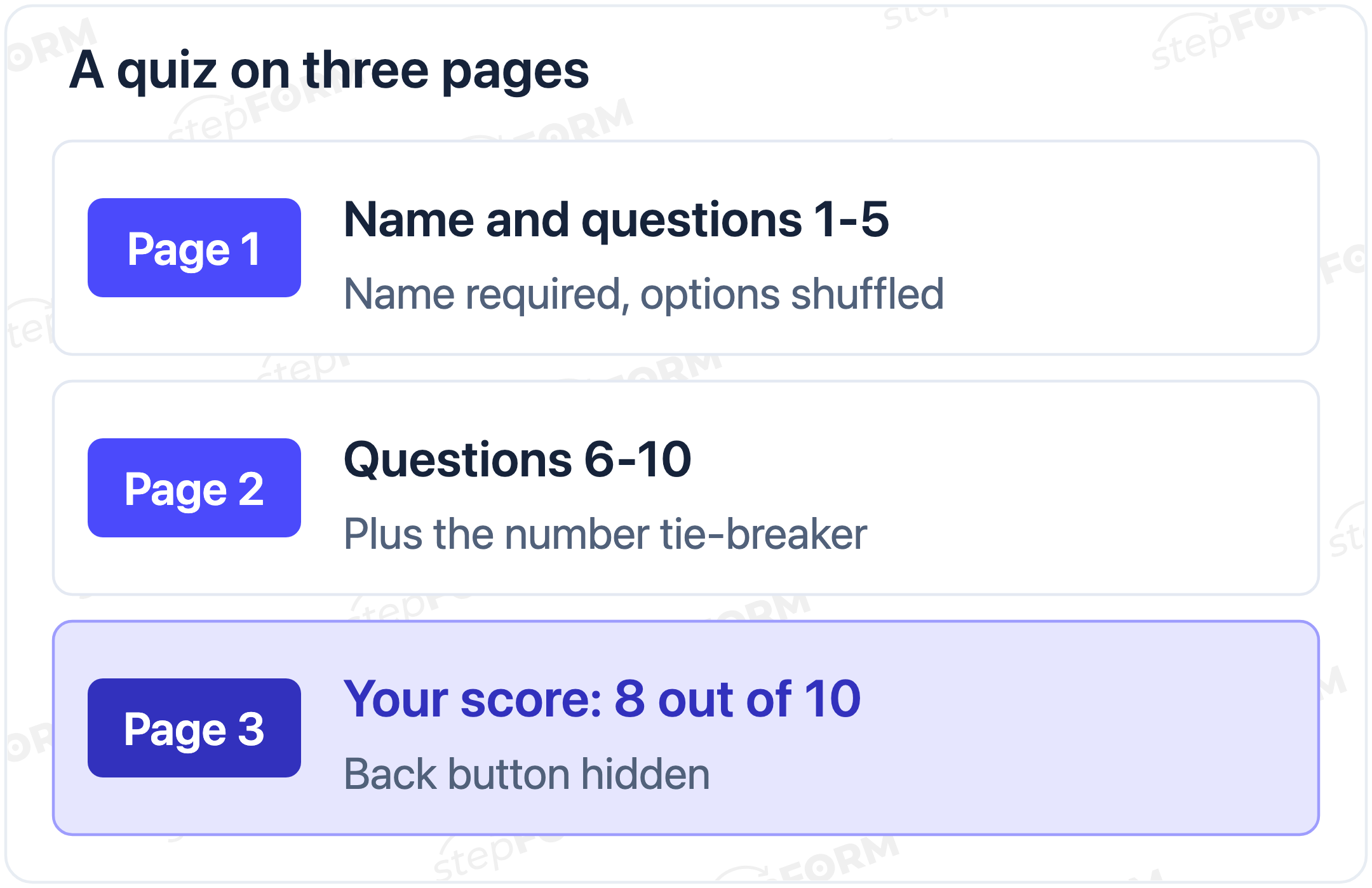
- Player name. Create a form and make Text input the first element, with the question "What is your name?". Turn on Required field in its validation. Without a name you cannot find the winner.
- Questions 1-5. On the same page add five Radio button elements, one per question. In the general settings of each, turn on random order for the options. They will shuffle every time the form opens, so the person next to you cannot whisper "the second one down".
- Questions 6-10. Add a second page with five more questions. For the snowflake question use Choose images: its options are pictures, and you can show or hide their captions.
- Tie-breaker. At the end of the second page add Digital input with the sweets question. Leave it out of the formula.
- Score page and points. Create a third page and add a Formula element to it. In its settings, in the Field Values block, give the right option of each question 1 when active and 0 when inactive, and give the wrong options 0. In the Formulas block add up the variables of all ten questions. The help article on setting up a formula walks through the editor.
- How the score looks. In the formula's customisation set the prefix to "Your score: " and the postfix to " out of 10". In the button block at the bottom of the third page turn on Hide "Back" button, otherwise players will go back and fix their answers. The submit button (Send by default) stays below the score: the response reaches you only when the player presses it.
- Test it. Open the preview in phone mode and play the quiz three times: all right, all wrong, and a mix. The score should be 10, 0 and however many you got right.
- The link. In the Publish section copy the direct link from the Link block. For the room, turn it into a QR code with any free generator.
Why does the formula sit on its own page? Next to the questions, the score would change with every tap and give the right answers away. On the third page a player sees the total only after answering everything.
How to pick the winner
Every submitted quiz lands in the Responses tab. Along with the name and the chosen options, it stores the formula value, which is the total score. You can view responses on any plan. Filtering, sorting and CSV or XLSX export start on the Beginner plan, so on Free you simply scroll through up to 50 responses.
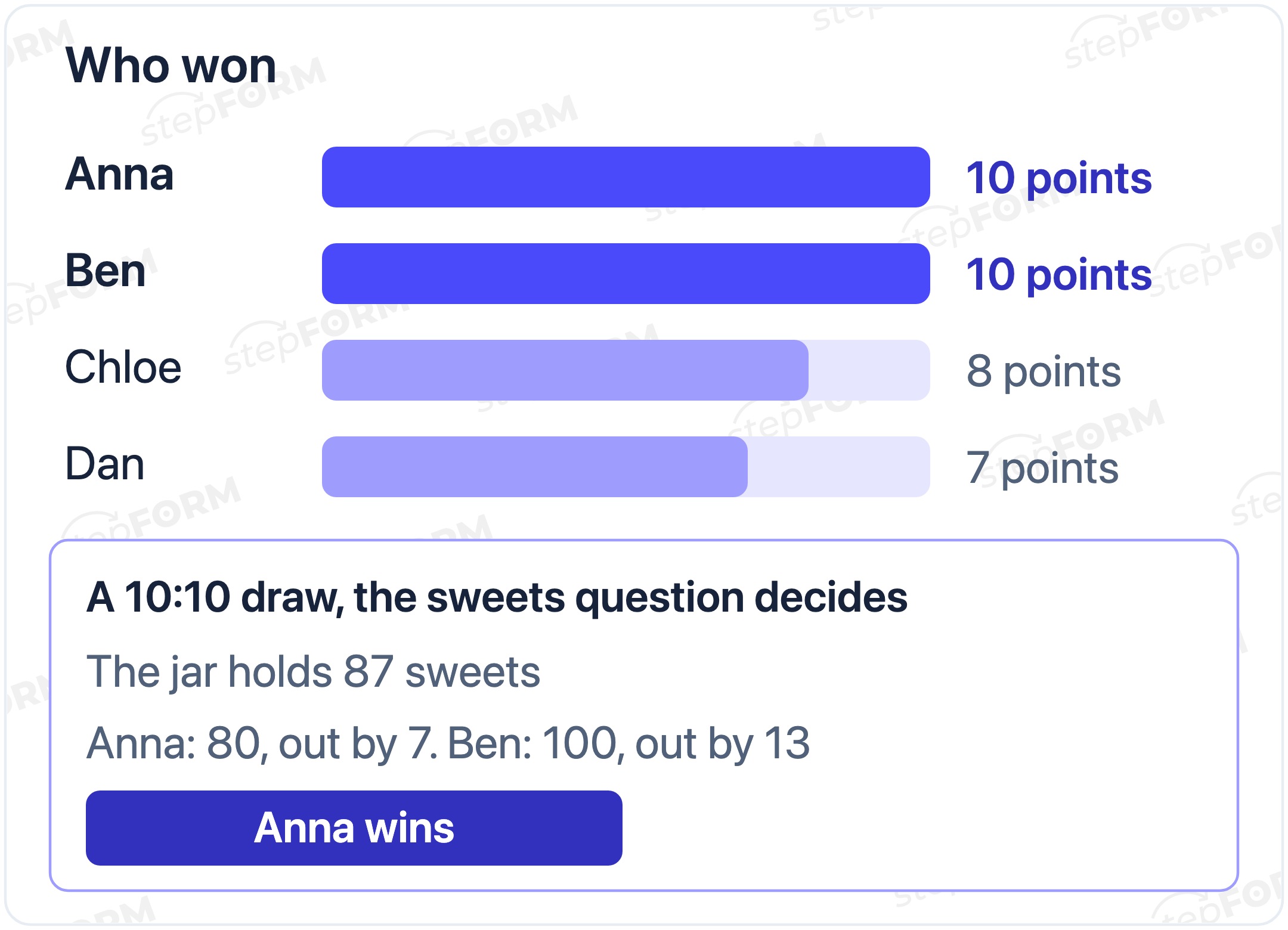
An example. Anna and Ben scored 10 each, Chloe 8, Dan 7. The jar holds 87 sweets. Anna guessed 80, Ben 100. Anna was 7 out, Ben 13, so Anna wins. If the gap is the same too, settle it with one more question asked aloud or share the prize.
Anyone can open the link again and replay the quiz, with the options reshuffled. So set the rule in advance: only the first submission under each name counts.
Announce the results right after the responses stop coming in. To stop late entries from changing the outcome, close the quiz after the game: in the Settings tab turn on Hide form, and the link will show a placeholder instead.
How to run the quiz at a party
Building the form is the easy part. Plan the game itself in advance and you will have fewer hiccups:
- Beforehand. Ask a colleague who has not seen the quiz to play it. If a question trips them up, rewrite it now: you cannot explain it from the stage.
- Before you start. Say out loud how many questions there are, whether there is a tie-breaker and when answers close. For example: "ten questions, you have ten minutes, press Send after you see your score, and only your first go counts".
- During the game. The link is in the chat, QR codes are on the tables. The host keeps the Responses tab open and sees how many people have submitted.
- Afterwards. Close the form, find the top score, and in a draw open the jar and count the sweets in front of everyone. A public count settles suspicions better than any explanation.
A team game works the same way. Ask for the team name instead of a personal name, and have each table submit one response from one phone. Teams then argue before they submit, and the free plan keeps spare responses for the next game.
Different result screens for different scores
Instead of a bare "8 out of 10" you can show a screen with a message: "Excellent" for 9-10 points, "Good" for 6-8, "Room to grow" for 0-5. You set this up with Logic Jumps: a condition on the formula value sends the player to the right page.
That option has a cost: each result screen is a separate page. Two question pages plus three screens make five pages, and the free plan allows three. So with this layout, result screens with messages need the Beginner plan.
What it costs
| Plan | Price per month | What it gives your quiz |
|---|---|---|
| Free | $0 | 3 pages, 30 elements, 50 responses a month. Enough for the example quiz with the score on the last page |
| Beginner | $11.20 billed annually, $14 billed monthly | 10 pages, 100 elements, 200 responses. Result screens with messages, response export |
| Pro | $20.80 billed annually, $26 billed monthly | 50 pages, 300 elements, 1,000 responses. For large events and several games a month |
Prices and limits were checked against the pricing page on 6 November 2026. The response limit is monthly, and test runs use it up too: if 70 people work at your company and all of them play, the free plan will not be enough. An email to the player with their result also needs a paid plan, while notifications to the form owner work on any plan.
A quiz for school and training
Teachers can use the same setup: a quiz on the lesson topic, picture questions, a score in points. Two things change. Ask for the name and class instead of just the name, and make the result screens point to the topic worth revising. How the builder works for teachers is covered on our page about quizzes at school. If you need a strict test with a pass mark, see our article on creating an online test for free.
What breaks a quiz
- A score on the question page. The formula recalculates with every tap and hints at the right answers.
- A Back button on the score page. A player sees "6 out of 10", goes back and changes answers until they reach 10.
- No name field. You have scores but no idea whose they are.
- Score seen, never sent. A player closes the tab on the score page, and their result never reaches Responses. Remind everyone about the submit button before you start.
- No tie-breaker. Three people on 10 points and one prize.
- Nobody tried it on a phone. Three columns of pictures in Choose images look fine on a laptop and can turn tiny on a phone. You set the number of columns in the element's customisation.
Checklist before you launch
- Every question has one right answer, and the key is checked against a source.
- Random order is on in every question.
- The first field is required and asks for the player's name.
- Right options are worth 1, wrong ones 0, and the formula adds up ten questions.
- The formula is on the last page, and the Back button there is hidden.
- The tie-breaker exists and is not part of the formula.
- Three test runs gave 10, 0 and the expected score in between.
- The link and QR code work on a phone, and test responses are deleted or marked.
- Players know to press Send after the score, and that only the first go counts.
Frequently asked questions
Can I make a trivia quiz online for free?
Yes. The Free plan gives you 3 pages per form, 30 elements and 50 responses a month. That covers 10 questions, a tie-breaker and a score page. For result screens with messages or bigger groups you need a paid plan.
How do players see their own score?
Put a Formula element on the last page and set a prefix and postfix, for example "Your score: " and " out of 10". Players see the total after the last question. Hide the Back button on the score page and remind players to press the submit button after their score, or the response is not saved.
How do I find out who won?
In the Responses tab: each response stores the name, the chosen options and the total from the formula. If several players have the top score, the number tie-breaker decides.
Can I add a timer to each question?
No, stepFORM has no timer for a question or for the whole quiz. If speed matters and everyone plays at once on a big screen, use a live game service. You can close the answer window by hand: after the game turn on Hide form in the settings.
Can the questions use pictures?
Yes, use the Choose images element: its options are pictures, and their captions can be shown or hidden. You set point values for it the same way as for a regular choice.
How do I share the quiz with guests at a party?
Copy the direct link in the Publish section and post it in the team chat, or turn it into a QR code with any free generator and put it on the tables. The quiz opens in the phone's browser, no app needed.
How many questions should a quiz have?
For an office party or a lesson, 8-12 works well. The free plan's three pages hold 10 questions, a name field, a tie-breaker and the score: 13 elements out of the 30 available.
 Dmitry Molchanov