Design brief: the questions to ask your client
A design brief for interior and graphic designers: client questions by section, what designers forget to ask, and how to build an online brief with branching and a budget slider.
Guides  Daria Lisovenko
11 November 2026
Reading time ≈ 13 min.
A design brief is what the client fills in before the first meeting. It covers the task, the space or the places the design will appear, their taste, budget, deadlines and constraints. For an interior that means the property, who lives there, how they use it, the style and the money for the fit-out. For graphic design it means the company, its customers, where the logo will live and which examples they like. Below are two ready sets of questions and an online brief in stepFORM that sends each client down the right branch: interiors or graphics.
What a brief is in general, and how it differs from a technical specification, is covered in our glossary: client brief explained. This article sticks to the questions for designers and building the form.
Why send a brief when you could just call
On a call, the client answers off the top of their head and forgets things: the size of the kitchen, who will be living in the flat a year from now, the sofa that is coming from the old place. With a brief they sit down with a tape measure and the floor plan, ask the rest of the household and dig out the photos they saved months ago. The call after the brief is short and focused: the basics are already settled, and you talk about the answers.
The brief also works as a filter. A completed one screens out some unsuitable projects before you meet: the budget does not match the deadline, the job is not your kind of work, or the client has not made up their mind yet.
Interior design brief: questions by section
The seven sections below cover a flat or a house. For an office or a café, replace "Who lives there" with "Who works there and how many visitors come".
| Section | Questions | stepFORM field |
|---|---|---|
| 1. The property | Flat, house or commercial space. Town and address. Floor area in m². Number of rooms. New build or existing home. Current state: shell, first fix, lived in | Radio button, Text input, Digital input |
| 2. Who lives there | How many people, any children or pets. Does anyone work from home. How often do guests stay | Digital input, Checkbox |
| 3. Rooms and routines | Which zones you need: study, walk-in wardrobe, nursery. What matters in each room. Where you are short of storage now | Checkbox, Text input with a large field |
| 4. Style | Which interiors you like. What you definitely dislike. Links to your own mood boards | Choose images with multiple selection (from Beginner) or Checkbox with style names, Text input |
| 5. What stays | Which furniture and appliances move into the new interior | Text input |
| 6. Budget and timing | Budget for works and furniture. When you need the design. When you plan to move in | Range, Date and time |
| 7. Scope of work | What you need: layout, visualisations, working drawings, furniture and material selection, site supervision | Checkbox |
Section 2 feels personal, but without it you cannot plan storage or lighting. A family with two children and a dog lives in a different flat from a couple who both work from home. Section 7 removes the biggest misunderstanding: to one client a "design project" means three renders, to another a full set of drawings.
Graphic design brief: logo and brand identity
| Section | Questions |
|---|---|
| 1. The company | Name and what it does. What it sells and to whom. How it differs from competitors |
| 2. Customers | Who buys: age, occupation, where they first come across the company |
| 3. The task | What you need: logo, brand identity, packaging, social media templates. A new brand or a refresh |
| 4. Where it appears | Website, shop sign, packaging, staff uniforms, app icon. Will it be used in one colour or very small |
| 5. Competitors | Three to five companies you will be compared with |
| 6. Taste | Examples you like and dislike, and why. Colours that are required or ruled out |
| 7. What already exists | An old logo, fonts, colours that must stay |
| 8. Timing, budget, sign-off | When you need the result. Budget. Who approves the work |
Section 4 decides whether a logo survives. A mark that looks great on a banner can fall apart as a 32-pixel icon or in single-colour print. If the client mentions embroidery on uniforms at the start, that changes the whole job.
Questions designers forget to ask
These are easy to miss, and they are exactly where disputes come from later:
- Who makes the decision. One person fills in the brief and another signs off. Better to find out before the first presentation.
- What they definitely dislike. Anti-examples are more useful than examples: "no dark wood" rules out half the options at once.
- Budget as a range. "What is your budget?" puts people off, while picking from ranges feels easy.
- How many rounds of changes they expect. If your price covers two rounds and the client expects endless tweaks, have that conversation before the contract.
- What counts as the result. Which file formats, a PDF album or a printed one, whether source files are handed over.
How to word questions so clients answer them
The same question can be asked in a way the client answers in a minute, or in a way that makes them put the brief off for a week. The whole difference is in the wording:
| Weaker | Better | Why |
|---|---|---|
| Describe the style you want | Pick the interiors you like (pictures) | Recognising your taste is easier than putting it into words |
| Your budget? | A slider or ranges: under $20k, $20-50k, over $50k | Choosing an option is easier than naming a number |
| Any wishes? | What must not be in the interior? | A specific question gets a specific answer |
| Describe your target audience | Who is your typical customer and where do they first see you? | The client talks about people, not jargon |
| Deadline? | By what date do you need it, and is it tied to an event? | A date with a reason shows how firm it is |
Open questions have their place, but keep them few and near the end, once the client is invested. Start with the easy ones: type of property, floor area, number of rooms.
How to ask a client to fill in the brief
A brief sent as a bare link tends to sit unanswered. A couple of lines of explanation change that. For example:
"So we don't spend the meeting on general questions, please fill in this brief: [link]. It takes about fifteen minutes, and the floor plan and a few photos will help. If you don't know an answer, skip it and we'll go through it together. I'll call you within two working days of receiving it."
The message covers three things: why the brief helps the client, how long it takes and what happens next. Put in your own time estimate after filling the brief in yourself.
How to build an online brief in stepFORM
One brief, interiors or graphics, fits on three pages with about 25 of the 30 elements, which is within the free plan, with one caveat: picking a style from pictures is not available on it. Both briefs in one form come to five pages and more than 40 elements, while Free allows 3 and 30, so that needs Beginner.
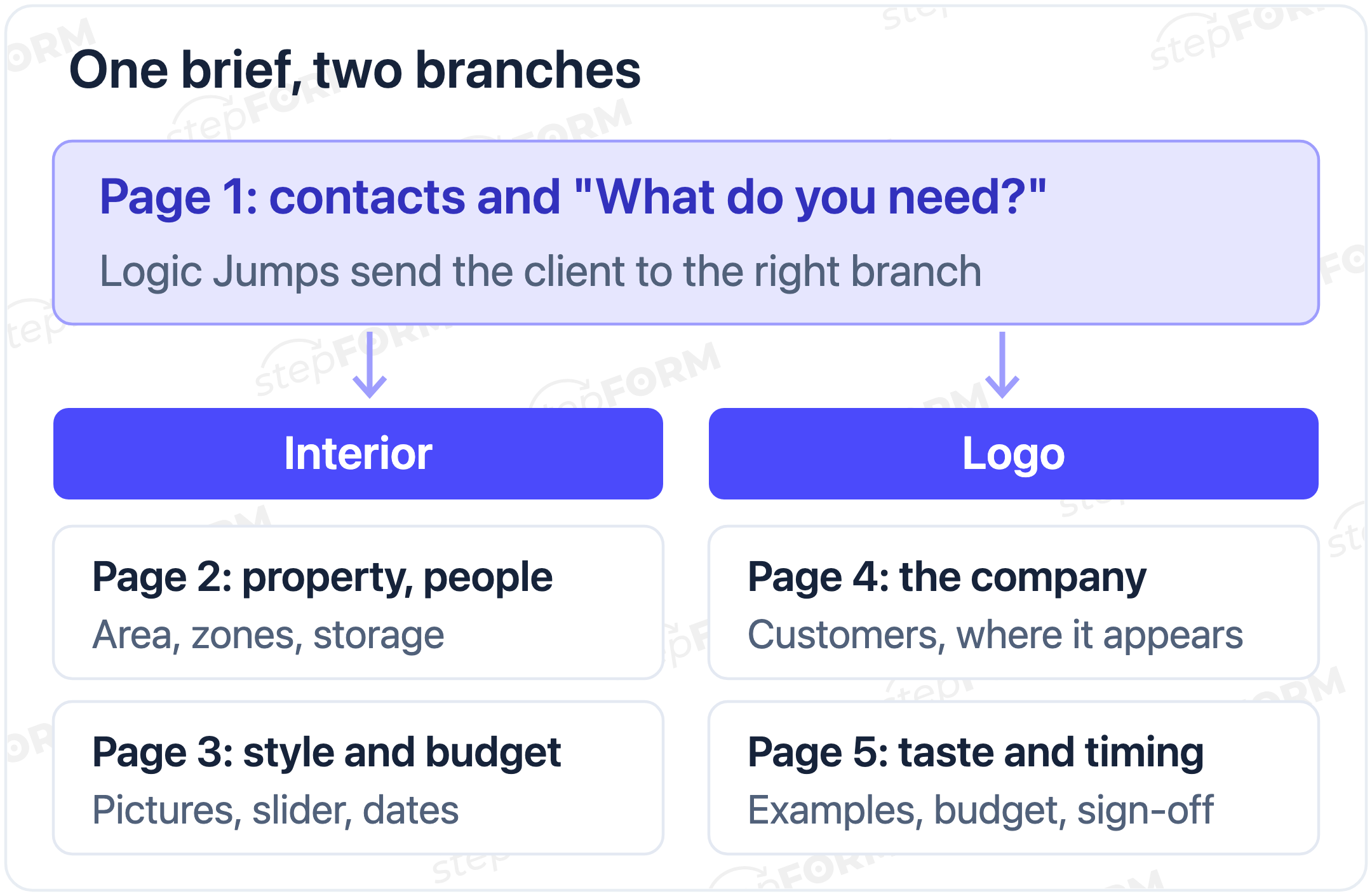
- First page. Create a form. Add Text input for the name, Mobile, Email and a Radio button asking "What do you need?" with the options "Interior design" and "Logo and brand identity". In the general settings of the first question, turn on the description and say when you will reply: "I'll review the brief and call you within two working days".
- Branching. Add pages for each branch. The pages run in order: two interior pages, then two graphics pages. In Logic Jumps set a condition on the first page: "Interior design" goes to the first interior page, "Logo and brand identity" to the first graphics page. On the last interior page, under In other cases, choose Submit a form, or the client will run on into the logo questions after the interior ones. The help article on Logic Jumps walks through the setup.
- Style as pictures. For taste, use Choose images, which is available from the Beginner plan: turn on multiple selection and captions. Upload photos from your own projects or images you have the rights to. Do not use other people's shots from image search. In the element's Customization settings choose two columns so the photos do not shrink on a phone. On the free plan, ask about style with a Checkbox listing style names (Scandi, industrial, classic, minimalist) and ask for a link to a mood board.
- Area and budget. Ask for floor area with Digital input. Budget works better as a Range: set the limits and the step, for example $5,000 to $100,000 in steps of $5,000. Ask about dates with Date and time.
- Plans, photos and references. The File Upload element works only on paid plans: up to 10 MB per file and 100 MB in total on Beginner, 30 MB and 300 MB on Pro. Deleting files does not free the space. It is easier to ask for a link to a cloud folder or a Pinterest board with an ordinary Text input, and then the brief works on the free plan too.
- A rough price, if you want one. If you publish a rate per m², add a Formula to the last interior page: floor area times your rate, with the prefix "Approx. $". That figure prices one fixed package, for example a design project without site supervision, and ignores the scope ticked in section 7, so say so next to it. The client sees the ballpark before the call. Keep the rate in the formula the same as on your website, or the conversation starts with distrust.
- Privacy. The brief collects a name, phone number and, for interiors, the property address. Link to your privacy notice from the form. How to add a privacy line and an optional checkbox is covered in our article on the GDPR consent checkbox.
- Notifications and publishing. In the Settings tab turn on email to your address: it works on every plan. Telegram notifications are only on Pro, and an autoresponder to the client starts on Beginner. In the Publish section copy the link for messages and social media, or embed the brief on your portfolio site.
What to do with a completed brief
Answers land in the Responses tab. Set up your own statuses, for example New brief, Call booked, Proposal sent, In progress, and leave comments after each conversation. Filtering, sorting and CSV or XLSX export start on Beginner.
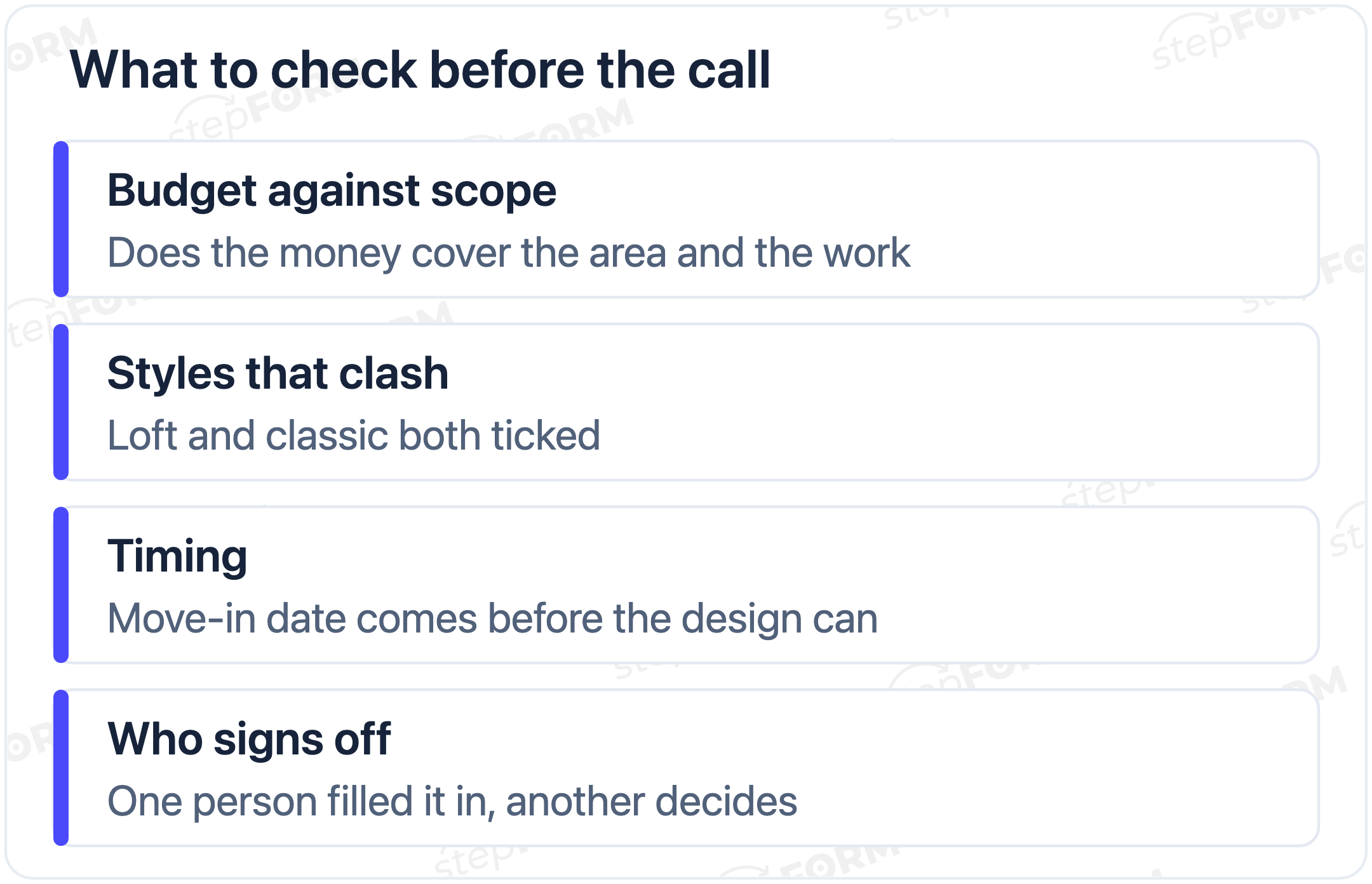
A brief is not the final specification. Before the call, mark the contradictions: the budget does not match the area and scope, both loft and classic styles are ticked, the floor area does not match the plan. After the call, put together a proposal as described in our article on business proposals, and send the client their answers along with your understanding of the task.
Which plan you need
| Plan | Price per month | What it gives your brief |
|---|---|---|
| Free | $0 | 3 pages, 30 elements, 50 responses a month, email notifications. One brief, style as a list, photos as links |
| Beginner | $11.20 billed annually, $14 billed monthly | 10 pages, 100 elements, 200 responses. Both briefs in one form, style as pictures, files up to 10 MB (100 MB disk), autoresponder, export |
| Pro | $20.80 billed annually, $26 billed monthly | 50 pages, 300 elements, 1,000 responses, files up to 30 MB (300 MB disk), Telegram notifications |
Prices and limits were checked against the pricing page on 11 November 2026.
Common mistakes in design briefs
- An 80-question brief. The client gives up halfway or answers "don't know" everywhere. Keep what you need to price the work and ask the rest at the meeting.
- Only open questions. "Describe the style you want" leaves the client stuck. Pictures and answer options are faster and more accurate.
- No budget question. You prepare a concept for $100k and the client has $30k.
- Nobody discusses the brief. You read the answers but never play your understanding back to the client. A month later it turns out "a bright living room" meant different things to each of you.
Frequently asked questions
What should an interior design brief include?
The property and its floor area, who lives there and how they use the rooms, the zones and storage they need, style with examples and anti-examples, which furniture stays, budget and timing, and the scope: layout, visualisations, drawings, furniture selection, site supervision.
How does a logo brief differ from an interior brief?
A logo brief has no property or residents. Instead it covers the company, its customers, competitors and where the mark will appear, at what size and in what colours. Both share the same core: taste, budget, timing and who signs off.
How many questions should a design brief have?
As many as you need to price the work. The samples above have seven or eight sections of two to five questions each. If your brief is much longer, move some questions to the meeting.
Can I make an online design brief for free?
Yes. The Free plan gives you 3 pages per form, 30 elements and 50 responses a month, which is enough for one brief. On it you ask about style with a list of names, because Choose images starts on Beginner, and clients send photos and plans as links, because file upload is also paid-only.
How do I ask about budget so clients actually answer?
Offer a choice instead of an empty box: a slider or a few ranges. Naming a number from scratch is harder than picking "$20-50k" from a list.
When should I send the brief to a client?
After the first short contact and before the meeting: the person already sees you might be a fit but has not spent an hour talking yet. If the brief sits on your website, it can replace the first call, so say in the first question's description when you will get back to them.
Does a design brief need a privacy notice?
The brief collects a name, phone number and, for interiors, the property address. That is personal data, so link to your privacy notice from the form, as described in our article on the GDPR consent checkbox.
 Dmitry Molchanov