
Online test makers compared: which platform fits your job
We compared six online test makers: Google Forms, Microsoft Forms, Typeform, Jotform, ClassMarker and stepFORM. Prices as of September 2026 and what fits which job.
Guides  Daria Lisovenko
24 September 2026
Reading time ≈ 11 min.
Daria Lisovenko
24 September 2026
Reading time ≈ 11 min.
Pick a test platform by what should happen after the last question. If you need a score and a results table, free Google Forms or Microsoft Forms will do. For certified exams with proctoring, look at ClassMarker. And if the test should bring customers, you need a tool that asks for contact details after the result and passes the lead to your sales team.
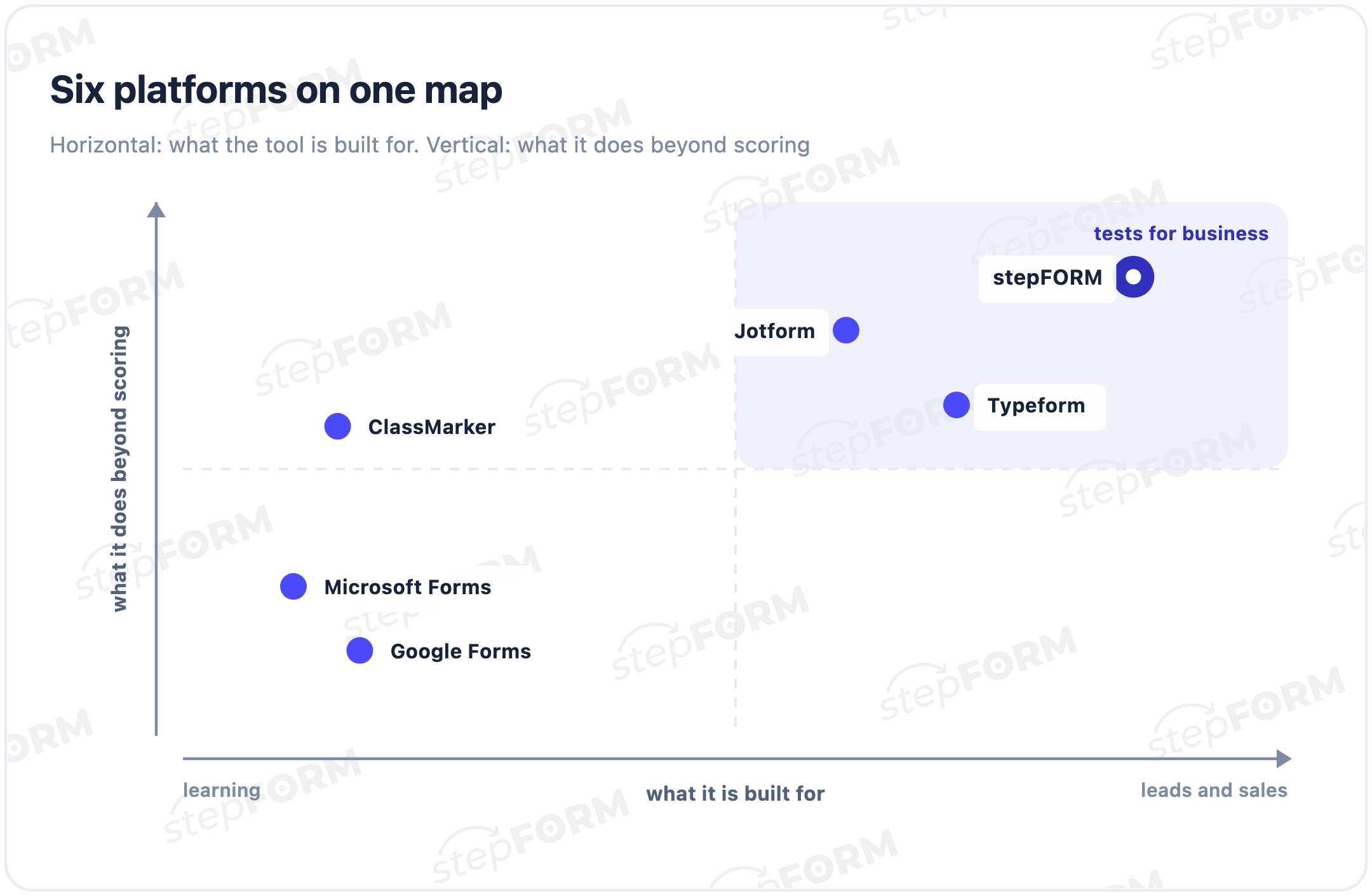
This review covers six platforms from three camps: free form tools, exam software and form builders for business. We start with our own, stepFORM, because we know it best, and we say plainly where it loses. The others are described from their official websites.
The comparison in one table
"Paid from" is the first paid plan per month, billed monthly. Everything was checked on the vendors' websites on 24 September 2026 and may change over time.
| Platform | Built for | Free | Paid from | Strength |
|---|---|---|---|---|
| stepFORM | Tests and quizzes that bring leads | 5 forms, 50 responses a month | $14 | Score-based results, contact capture, CRM, payments |
| Google Forms | Schools, quick checks | Fully, with a Google account | No need to pay | Answer key and auto-grading |
| Microsoft Forms | Schools and Microsoft 365 teams | With a Microsoft account | No need to pay | Auto-grading, export to Excel |
| Typeform | Design-first quizzes and forms | Yes, limited responses | $39 | Different endings by score |
| Jotform | Forms, quizzes and payments | 5 forms, 100 submissions a month | $39 | Quiz grading, templates, widgets |
| ClassMarker | Exams and certification | 30-day trial | Plans priced in test credits | AI proctoring, certificates |
How we compared
Questions, options and points exist everywhere. The difference starts where the test ends. So we looked at five things:
- What the person sees at the end: just a score, a review of answers, or a different message for each score range
- What the author gets: a results table, a certificate record or a lead with contact details
- Where the test lives: at a link, embedded on a website or inside exam software
- Where the responses go: email, a messenger, a CRM, a spreadsheet export
- What the first paid plan costs and what it includes
1. stepFORM: a test that brings leads
stepFORM is a builder for forms, quizzes, tests and calculators for websites. A test uses 17 question types: single and multiple choice, number and text input, picture choice, file upload. Each answer can carry points, and branching logic sends the person to one of several result screens based on the total. When you need an exact figure such as a price or a timeline, you write a formula instead of points.
What sets it apart is the last screen. A school test ends with a grade. A stepFORM test can end with an offer: "you are at B1, we will send a study plan for that group", with a phone field right next to it. The lead, with the result attached, goes to email, Bitrix24, Telegram or any system through a webhook. On the Pro plan you can add payment to the test, so the person pays a deposit straight away.
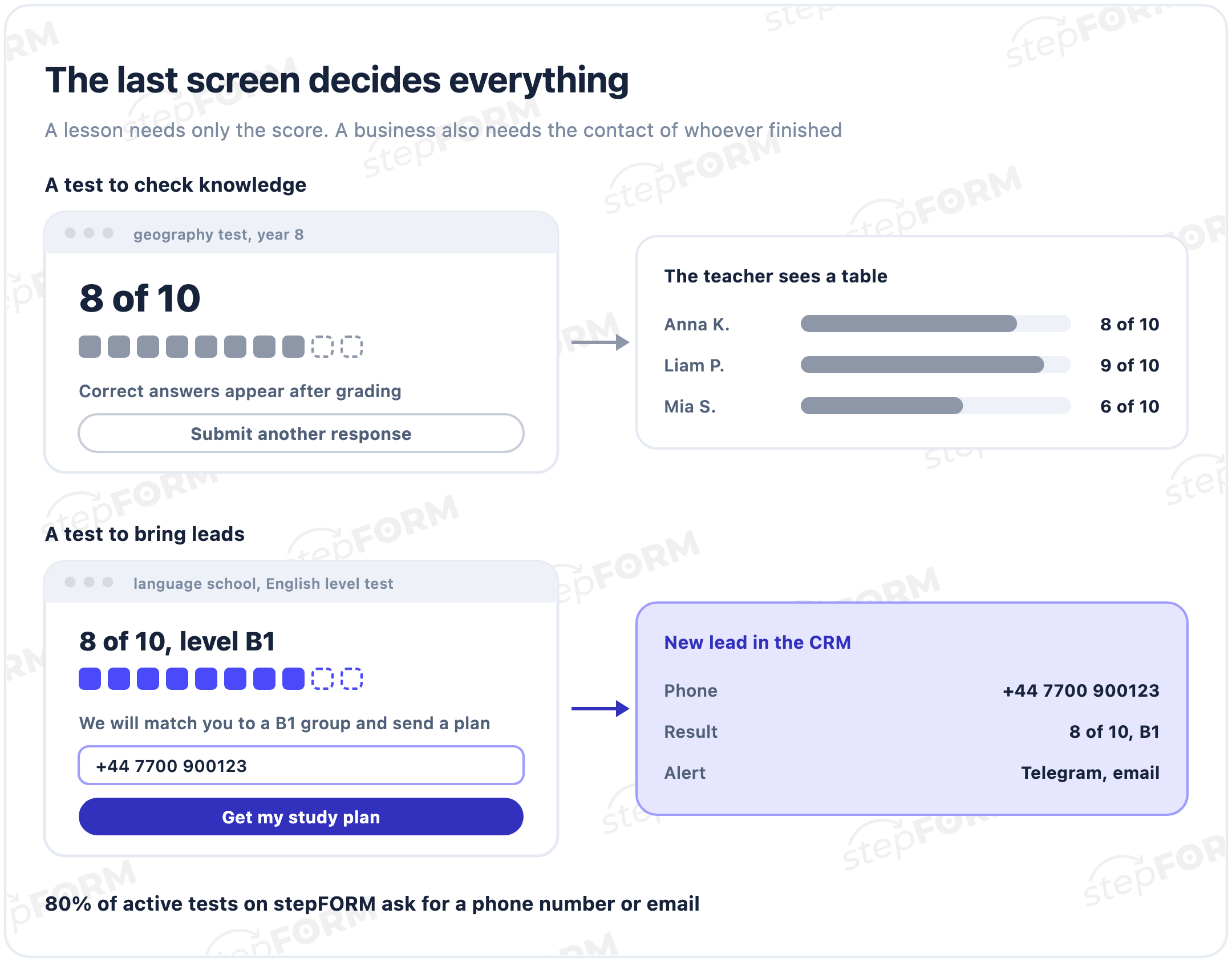
That is how stepFORM gets used. We took the active forms that calculate a result with a formula, meaning calculators and scored tests that received responses in the last 90 days. 80% of them ask for a phone number or email. Half of these forms have 12 questions or fewer, and 42% fit into ten.
Pricing. The Free plan gives 5 forms, 50 responses a month and up to three pages per form. Scoring, formulas, branching and several result screens already work on it. Beginner costs $14 a month: 20 forms, 200 responses, ten pages, auto-replies, Bitrix24 and Google Analytics. Pro at $26 adds Telegram, webhooks, SMS and payments. Annual billing brings the prices down to $11.20 and $20.80, and every new account gets seven days of Beginner.
Where it loses. For a classroom, the free plan is tight: 50 responses a month is one or two quizzes for a class, and with only three pages you will group several questions per screen. Emailing results to the respondent needs a paid plan. For lessons, the free tools below fit better.
How to build a test that brings you leads2. Google Forms: free and familiar
A regular Google Form becomes a quiz with one toggle in the settings. You set points and the correct answer for each question, and grading is automatic. Scores can be released right after submission or later, once the teacher has reviewed open answers by hand. The setup is described in Google's help centre.
It is all free with a Google account. The downsides come from simplicity. There is no built-in timer. The result is shown as a total score, and you cannot set a different message for different score ranges. It works for leads too, but without add-ons the responses go no further than email and a spreadsheet.
3. Microsoft Forms: the Microsoft 365 option
Microsoft Forms works much like Google Forms: points, correct answers and automatic grading. Teachers get real-time analytics with a summary and results for each student, and the results can be exported to Excel. A free Microsoft account is enough, and in schools and companies on Microsoft 365 it is already at hand. The steps are in Microsoft's guide.
The purpose is similar too: checking what people know. For a class or an internal quiz in an organisation that already runs on Microsoft, it is the natural choice.
4. Typeform: design first
Typeform shows one question at a time and is known for its polished look. For tests it has scoring: each answer adds points, and you can show different endings depending on the total. Conditional logic, webhooks and integrations are included from the Basic plan.
There is a free plan with a limited number of responses. Basic costs $39 a month billed monthly, or $28 billed yearly, and includes 100 responses a month. Removing Typeform branding takes Plus at $79 a month with 1,000 responses. Current prices are on the Typeform pricing page.
5. Jotform: forms plus quizzes
Jotform is a general form builder. Even the free plan includes its form templates, payment integrations and widgets, and any form can become a quiz with automatic grading. That makes it handy when the same account also collects registrations, orders and applications.
The free Starter plan allows 5 forms and 100 submissions a month. Bronze costs $39 a month billed monthly and raises the limits to 25 forms and 1,000 submissions. Schools and nonprofits get 50% off the paid plans. See the Jotform pricing page.
6. ClassMarker: exams with proctoring
ClassMarker is exam software for businesses and schools. It grades automatically, issues custom certificates and offers AI exam proctoring on its business plans. Pricing works in credits: plans include up to 400 or up to 1,000 credits a month, which ClassMarker equates to 4,800 or 12,000 tests graded a year.
There is a 30-day free trial, and yearly billing gives two months free. For a one-off quiz this is overkill. Regular certified testing is what it was built for. Plans and credits are listed in ClassMarker's business pricing.
What online test makers cost
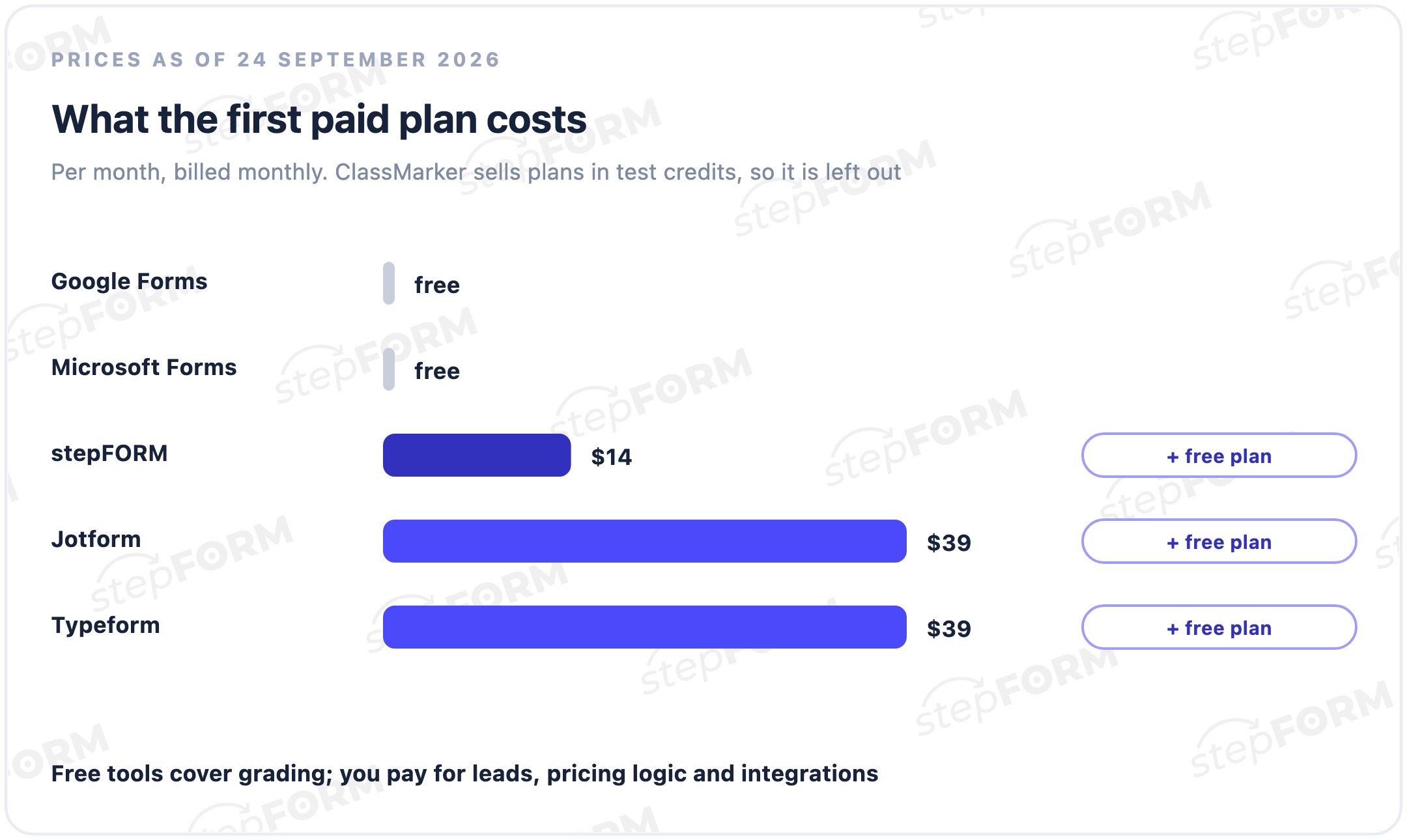
Checking knowledge is free: Google Forms and Microsoft Forms cover it at no cost. Money comes in when the test has to sell or certify.
Look at what each price includes. For $14 stepFORM gives 20 forms and 200 responses a month. Typeform's $39 Basic includes 100 responses, while Jotform's $39 Bronze includes 1,000 submissions. ClassMarker counts the tests people take, so estimate how many candidates will sit your test each month.
Which platform to choose
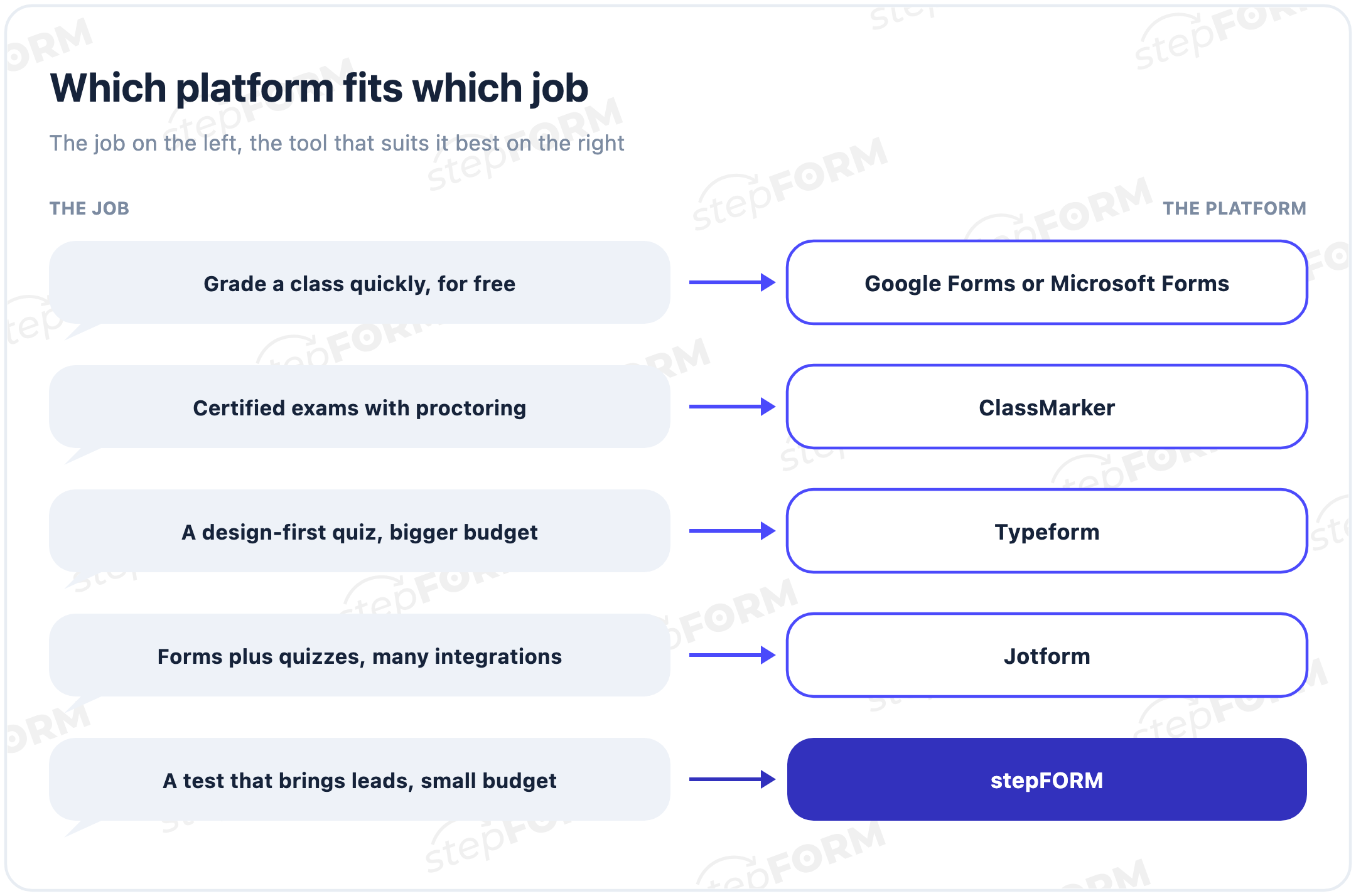
- A classroom quiz. Google Forms or Microsoft Forms: free, auto-graded, with a results table.
- Certified exams. ClassMarker: proctoring, certificates and results for each candidate.
- A design-first quiz. Typeform: one question per screen and endings by score, from $39 a month.
- Forms and quizzes in one account. Jotform: quizzes, payments and widgets, with 5 forms free.
- A test that brings leads on a small budget. stepFORM: score-based results, contact capture on the last screen, leads to your CRM, plus price calculation and payments when you need them.
How to build a lead test in stepFORM
- Start with the results. Decide which three or four outcomes a person can get and what you will offer in each.
- Add questions with points. Each answer adds its number to the total. If you need a price or a timeline, use a formula.
- Split the total into ranges. Branching logic sends each person to their own result screen.
- Put the contact field next to the result. A phone or email field and a button with a clear benefit: "Get my plan", "See my price".
- Set where the lead goes. Email works on the free plan, Bitrix24 from Beginner, Telegram and webhooks from Pro.
- Publish. At a direct link, on social media or as a block on your website.
You can build your first test for free in the stepFORM test builder and compare plan limits on the pricing page.
Frequently asked questions
What is the best online test maker?
The one that fits the job. Google Forms and Microsoft Forms are enough for a classroom quiz, ClassMarker suits certified exams, Typeform suits design-first quizzes and Jotform suits accounts that mix forms and quizzes. If the test should bring customers, you need a builder that captures contact details on the last screen and passes the lead on, such as stepFORM.
Where can I create an online test for free?
Google Forms and Microsoft Forms are fully free with a personal account. Jotform's free plan allows 5 forms and 100 submissions a month, stepFORM's allows 5 forms and 50 responses a month, and Typeform has a free plan with a limited number of responses.
Which platform is best for student quizzes?
Google Forms and Microsoft Forms: points, correct answers, automatic grading and a results table for the class. Microsoft Forms also exports results to Excel.
Can I show different results based on the score?
Yes. Typeform shows different endings depending on the total score, and in stepFORM branching logic sends each score range to its own result screen. In stepFORM this works on the free plan too. Google Forms shows the total score only.
Can I embed a test on my website?
Yes. A stepFORM test can be embedded as a block on a page or opened at a direct link. Google Forms, Typeform and Jotform also give you embed code.
How is a lead test different from a regular test?
By its last screen. A regular test shows the score and the correct answers. A lead test explains the result, offers a next step and asks for contact details, and the lead with the result attached goes to your sales team.
How much does an online test maker cost?
As of 24 September 2026, the first paid plan billed monthly costs $14 at stepFORM, $39 at Typeform and $39 at Jotform. Google Forms and Microsoft Forms are free, and ClassMarker prices its plans in test credits.
Do I need coding skills to build a test?
No. All six platforms in this review are visual builders: you add questions, set points and publish without writing code.

 Dmitry Molchanov