
How to test employees online: questions, pass marks and results
How to run employee testing online: when to test, how to write questions and set a pass mark, and where to see results. Step by step in the stepFORM test builder.
Tests  Daria Lisovenko
29 September 2026
Reading time ≈ 16 min.
Daria Lisovenko
29 September 2026
Reading time ≈ 16 min.

Employee testing online means checking what people know with a test they open from a link. They take it on a phone or a computer, the score adds itself up, and the manager sees the whole team's results in one place. It works for new hires a couple of weeks in, for a team after training or a policy change, and for candidates before an interview. A test of 15 to 20 questions takes an hour or two to build in a form builder, with no developer and no learning management system.
Setting the test up is the easy part. The questions take the thinking, because a test checks exactly what it asks. So start by writing down what the person has to be able to do at work, and build the questions, points and pass mark around that list.
When to test employees
A test answers one question: does this person know what they need to do the job? There are only a few good moments to ask it:
- After onboarding. One or two weeks in: products, prices, procedures, who to go to when something goes wrong.
- After training. A week after a workshop shows what stuck and which section needs another pass.
- When the rules change. New prices, a new product line, a different returns process. Five questions quickly show who read the update.
- Before a promotion. A shift lead or senior associate needs to know more than in their previous role.
- Before an interview. Candidates take the test from a link in the job ad, and you invite the ones who know the basics.
A test is weakest at things with no single right answer: how someone handles an angry customer, how they come across in a negotiation, whether they want the job at all. You see those in a conversation or on a shift next to an experienced colleague. Personality tests are a field of their own. Specialists build and interpret them, and a homemade version in a form builder is best avoided.
If a test result will affect pay, promotion or dismissal, agree the process with HR or a lawyer before you run it. The same goes for mandatory safety training: regulated checks follow their own rules, and a test from a form builder can help people prepare without replacing them.
Types of employee tests
The question format depends on what you are checking. The closer a question is to a real work situation, the more the answer tells you about the person.
| What you check | Format | Example | How it is scored |
|---|---|---|---|
| Product knowledge | One answer from several | "How long is the warranty on built-in appliances?" | Automatically, a point for the right answer |
| Procedures | A situation with a choice of action | "A customer asks for a discount because they found it cheaper. What do you do?" | Automatically |
| Several correct steps | Several answers | "Which documents do you need to set up a payment plan?" | Automatically, a point for each correct option |
| Calculations | Number input | "What does a $42 item cost with a 15% discount?" | A formula with a condition gives a point for the right number |
| Explaining to a customer | Open answer | "How would you explain the difference between our two plans?" | By hand, the manager reads it |
| Practical task | File upload | "Take a photo of the display set up to standard" | By hand, file uploads come with paid plans |
Open questions and file tasks do not score themselves, so someone has to check them. In return they show something a multiple choice cannot: how the person thinks. A handy mix for one test is 12 to 15 auto-scored questions with one or two open ones at the end.
How to run employee testing in seven steps
- Decide what happens after the test. A pass clears the person to work on their own, a fail sends them back to a section with a retake a week later. A test with no consequences soon turns into a formality.
- List what the person has to know. Ten to twenty things they would get wrong with a customer or with money. A whole training manual will not fit into one test anyway.
- Write one question for each item. Wrong options have to look plausible, or people will guess the right one.
- Set the points and the pass mark before you see any results. Otherwise the pass mark quietly drifts to fit the team.
- Try the test on an experienced colleague. If they miss the pass mark, the questions are the problem: an ambiguous wording or two answers that both fit.
- Send the link with a deadline. In the team chat or by email: "please complete by Friday, it takes about fifteen minutes". Without a deadline, the test sits in the chat for weeks.
- Go through the results. If half the team got the same question wrong, the gap is in the training or in the question, and you close it with everyone at once.
How to write test questions for employees
A good question checks what the person would do at work. A textbook definition can be learned in an evening and forgotten in a week.
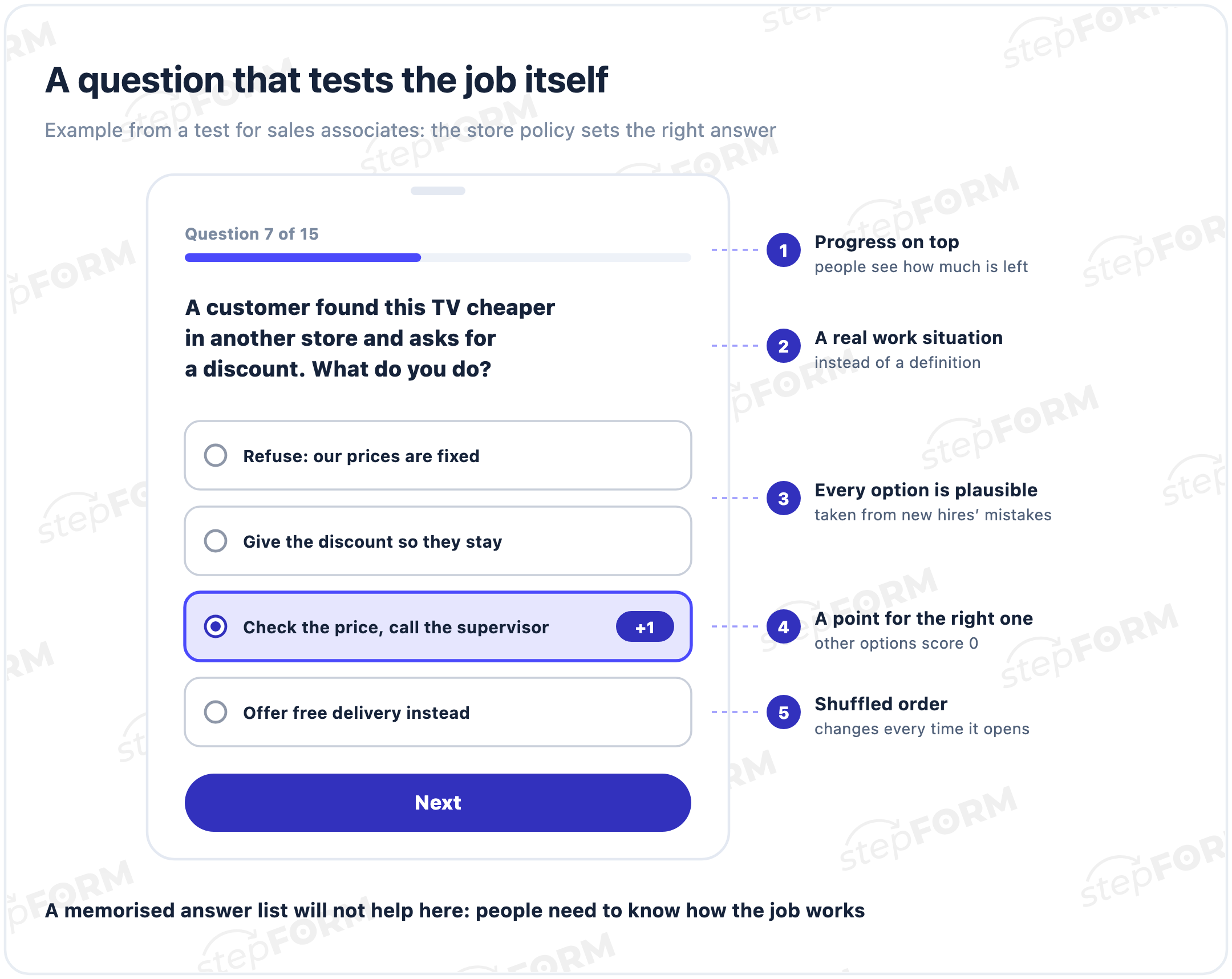
- One thing per question. "How long is the warranty and can it be extended?" is two questions, and the answer will not tell you which part went wrong.
- A situation instead of a definition. "A customer asks you to hold an item until the evening. What do you say?" says more about an employee than "What is a product reservation?".
- Plausible wrong options. Real mistakes new hires make are the best source. An obviously silly option just gives the answer away.
- No "all of the above" and no double negatives. The first is easy to guess, the second trips up even people who know the answer.
- Options of similar length. If the right one is clearly longer and more detailed, people pick it by length.
- Random order. In stepFORM you turn it on in the question settings, and the options change places every time the test opens. A colleague's tip that "it's the third one" stops working.
Sample questions for different roles:
| Role | Question | What it checks |
|---|---|---|
| Sales associate | A customer wants to return a working item ten days after buying it. What do you say? | Returns policy |
| Call centre agent | A customer is calling for the third time about the same problem. Who do you pass it to? | Escalation |
| Sales manager | A client asks for 20% off and your limit is 10%. What do you do? | Authority and approvals |
| Waiter | A guest mentions a nut allergy. What do you check before the food goes out? | Safety standards |
| Warehouse clerk | Two boxes on the delivery note are missing at intake. What do you do first? | Goods-in procedure |
| Courier | The customer is not at the address and does not answer the phone. How long do you wait, and who do you tell? | Delivery procedure |
Your own procedures set the right answers. That is why good questions come from the complaints, returns and mistakes of the last few months: they already show where people get confused.
Pass mark and result screens
The simplest approach is one point per correct answer. Questions where a mistake costs money or puts someone at risk can carry more weight, two or three points instead of one. There is a stricter option too, a stop question: a wrong answer takes the person straight to the fail screen. You set this up with logic jumps on the answer to that question.
Pick the pass mark by the cost of a mistake. For product knowledge, 70 to 80% correct answers is reasonable. For cash handling and health and safety, raise the bar, up to requiring the right answer on the questions that matter most.
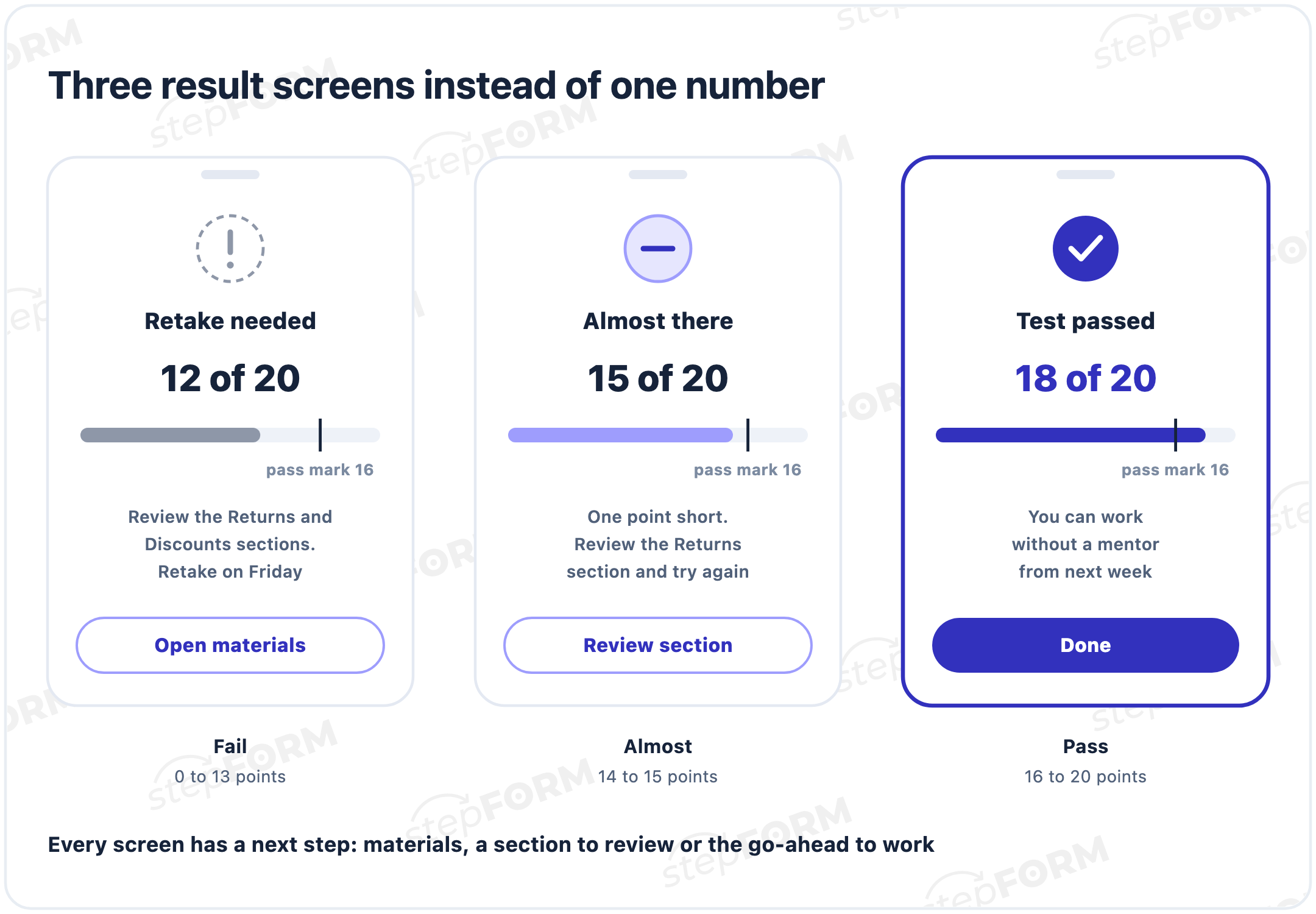
Three result screens work well. Pass says what comes next: working without a mentor or the next module. Almost names the section to review and links to the material. For Fail, the retake date is enough. A screen with only a number leaves people guessing where they went wrong, with nothing to learn from.
The screens use logic jumps too: a condition on the total score sends each person to their own page, as shown in the help article on online tests. If you want people to keep their result, turn on the auto-reply, which emails it to the address from the email field. Sending results to respondents works on paid plans.
Where to see the results
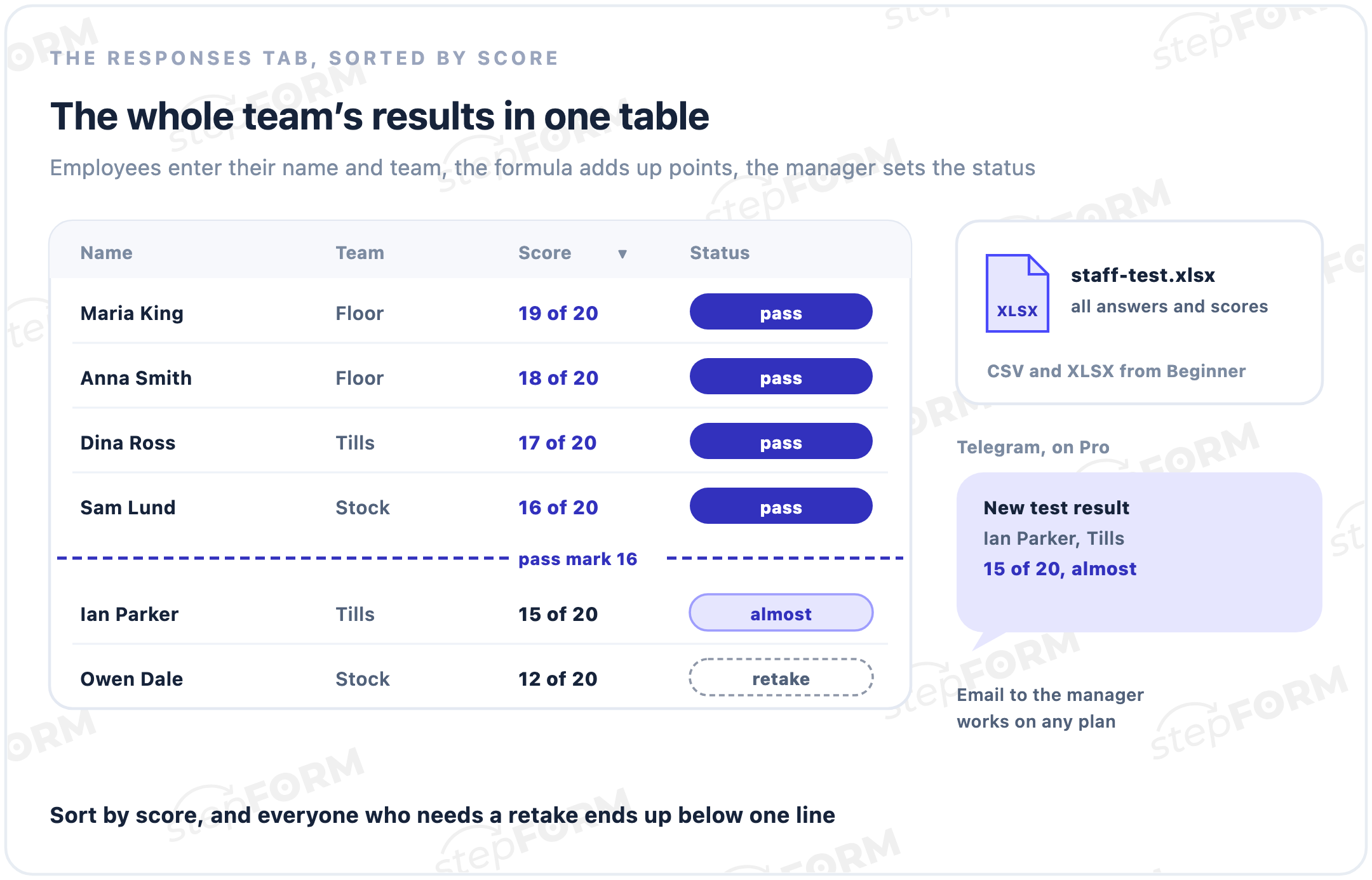
Every attempt lands in the form's Responses tab. You can filter and sort them, give each one a status such as pass or retake, add comments and print them. From the Beginner plan you can export responses to CSV and XLSX, which makes it easy to work out the average score per team and find the questions people miss most. The tab is described in receiving responses.
To know who is who, put Name and Team fields at the start of the test. Make Team a drop-down list, or the spreadsheet will end up with "Sales", "sales dept" and "SD" all mixed together.
Each attempt can reach the manager by email, even on the Free plan. On Pro you can also get notifications in Telegram or send results to another system with a webhook.
Online test makers comparedTesting candidates before the interview
When you hire sales associates, call centre agents or couriers in volume, interviewing everyone who applies takes days. A short test linked from the job ad filters out people who do not know the basics, and your time goes to the rest.
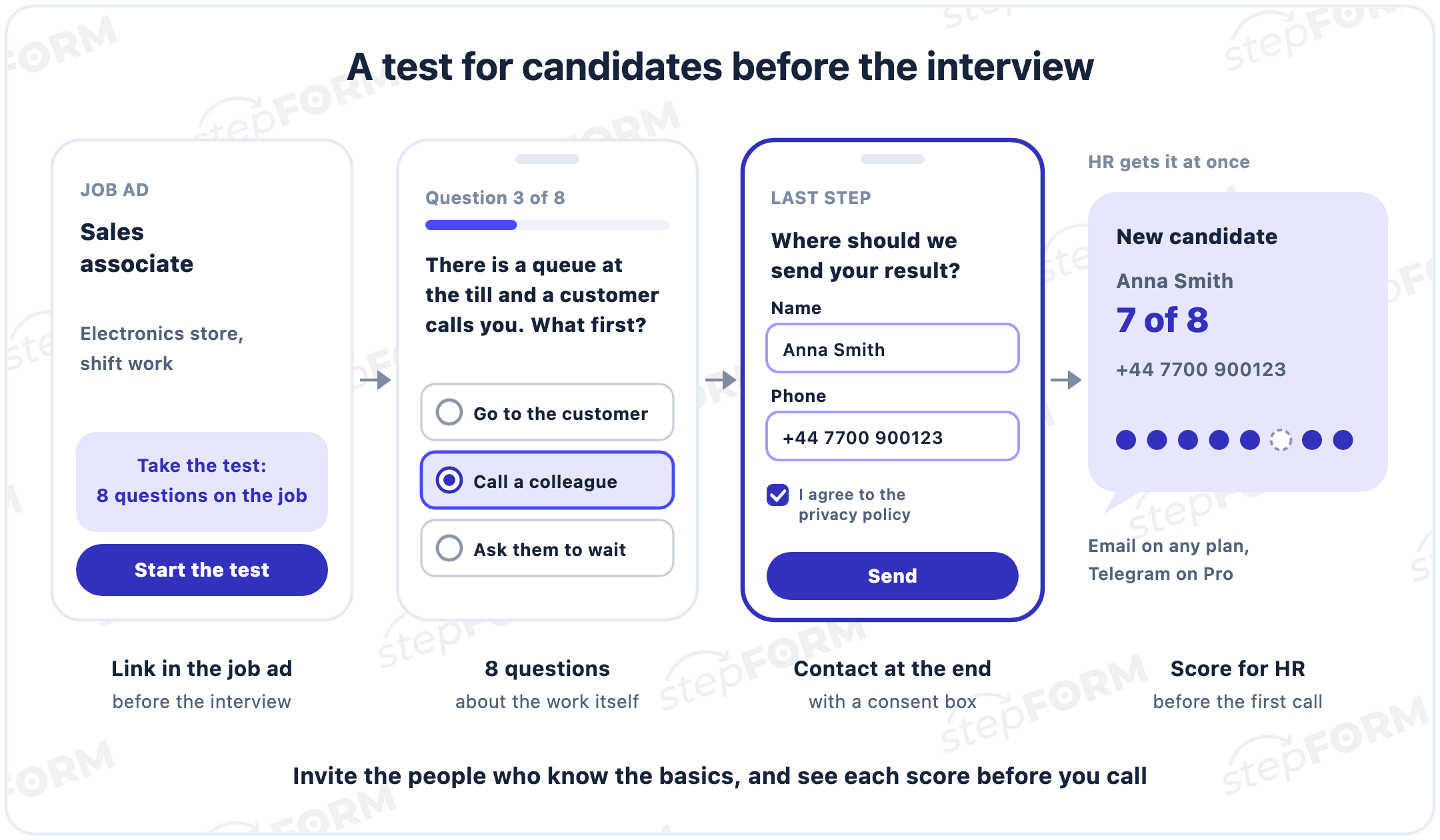
- Five to ten questions. Candidates owe you nothing yet, and they may drop a long test halfway through.
- Contact details at the end. Name, phone and a privacy policy checkbox. In stepFORM the checkbox is turned on in the submit button settings.
- An alert for HR. The email with the score and contact details arrives at once, and on Pro it can go to Telegram too. A strong candidate can be invited the same day.
- What happens next. On the last screen, say what comes next and when: "We will review your answers and call you within two working days". You do not have to show the score.
Keep every question about the job the person applied for. Questions about family, health or plans for children have no place in such a test. Ready-made hiring forms, such as a job application form, are in the HR templates.
How to build an employee test in stepFORM
- Create a form from scratch or from a template in the test builder.
- Put required Name and Team fields on the first page.
- Add questions: single or multiple choice, number input, text. Turn on random order of options in each question's settings.
- Set the points in the formula editor. In the Field Values block every option has a value: the right one gets a point, the others get zero, and the formula adds them up.
- In Logic Jumps, set conditions on the total score. Each one leads to its own page: pass, almost or fail.
- In the Settings tab, turn on email notifications for the manager and, on paid plans, the auto-reply for the employee.
- Publish the test at a direct link and share it in the team chat. You can also embed it on an intranet page with the embed code.
- When the deadline passes, turn on the Hide form toggle in the Settings tab. People will see a notice instead of the test, and the responses stay in your account.
Plan limits matter more for a test than for an ordinary form, because a test has more questions and pages. The Free plan gives 50 responses a month, three pages and 30 elements per form. A 15 question test with name and team fields fits into those elements comfortably, and three pages leave room for the questions and two result screens. For three screens and one section per page you need Beginner at $14 a month: 200 responses, 10 pages, 100 elements and export to Excel. Pro at $26 adds 1,000 responses, 50 pages and Telegram. Annual billing brings the prices down to $11.20 and $20.80 a month, and all the details are on the pricing page.
What the builder cannot do
For a quick knowledge check the builder is enough. It will not replace a learning management system, and here is where you notice:
- No timer. You cannot limit the time for an attempt with built-in tools. The deadline can only be set in days: open the test on Monday, hide it on Friday.
- No certificates. A pass certificate has to be made separately.
- No courses or learning history. Each test keeps its own table, so a year-long view per employee means combining exports.
- Basic protection against cheating. Random order of options and a deadline. There is no screen monitoring of the kind exam software offers.
If you have hundreds of employees and training runs as courses with a gradebook, a learning management system such as Moodle fits better. For certified exams with proctoring, look at ClassMarker. We compared it with Google Forms, Microsoft Forms, Typeform and Jotform in our review of online test makers.
Common mistakes
- Questions about trivia. "What year was the company founded?" says nothing about how a person works.
- Forty questions in a row. Attention fades towards the end, and the last answers say more about fatigue. Two tests on separate topics work better.
- A pass mark invented after the results. Then passing depends on the manager's mood.
- Only the manager sees the result. The employee does not know what they got wrong and has nothing to review.
- The test as punishment. If a fail means a fine, people start collecting answers from colleagues, and the results stop meaning anything.
- Nobody tried it on an experienced colleague. An ambiguous question surfaces only after half the team has got it wrong.
- The same test for years. The answers spread around the team. Refresh some of the questions at least once a quarter.
Frequently asked questions
How do you test employees online?
Write down what the employee needs to know and write one question for each item. Build the test in a form builder, set the points, the pass mark and the result screens, then send the link with a deadline. Check the results in the Responses tab and go through the mistakes with the whole team.
How many questions should an employee test have?
Ten to twenty questions are enough for one topic. If there are several topics, a separate test for each works better than one test of forty questions, because attention fades towards the end of a long test.
What pass mark should I set?
It depends on the cost of a mistake. For product knowledge, 70 to 80% correct answers is reasonable. For questions about money and safety, raise the bar, up to requiring the right answer on the questions that matter most. Set the pass mark before you see the results.
Can I test employees for free?
Yes. The stepFORM Free plan includes 5 forms, 50 responses a month, three pages and 30 elements per form, and scoring and logic jumps work on it. Export to Excel and emailing the result to the employee come with the Beginner plan.
How do I see each employee's results?
In the form's Responses tab: every attempt is there, with filters, sorting, statuses and comments. From the Beginner plan you can export responses to CSV and XLSX. To tell employees apart, add Name and Team fields to the test.
Can I add a timer to the test?
stepFORM has no built-in timer. You can set a deadline in days by publishing the test and hiding it later with the Hide form toggle. Time limits are available in Moodle quizzes.
How do I stop employees from cheating?
Turn on random order of options so a tip like "it's the third one" does not work. Ask about work situations instead of facts that are easy to pass around, keep the deadline short and refresh some questions at least once a quarter.
Do I need consent to collect candidates' data?
It depends on where your candidates are and how you use the data. Laws such as GDPR may require you to explain how personal data is used and, in some cases, to get consent. In stepFORM a privacy policy checkbox is turned on in the submit button settings.

 Dmitry Molchanov