Consent checkboxes on website forms under the GDPR
When a website form needs a GDPR consent checkbox, when a privacy notice is enough, why pre-ticked boxes don't count and how to set it all up in stepFORM.
Guides  Daria Lisovenko
30 September 2026
Reading time ≈ 12 min.
Daria Lisovenko
30 September 2026
Reading time ≈ 12 min.
A website form does not always need a consent checkbox. Under the GDPR, consent is one of six lawful bases for using personal data. When someone asks you for a quote or a call back, you can use their details to answer on a different basis: steps taken at their request before a contract. What every form does need is a short privacy notice where the data is collected, saying who you are, why you want the details and where to read more. Consent comes in when you want to do something the person did not ask for, such as sending them marketing emails. Then it needs its own box that they tick themselves.
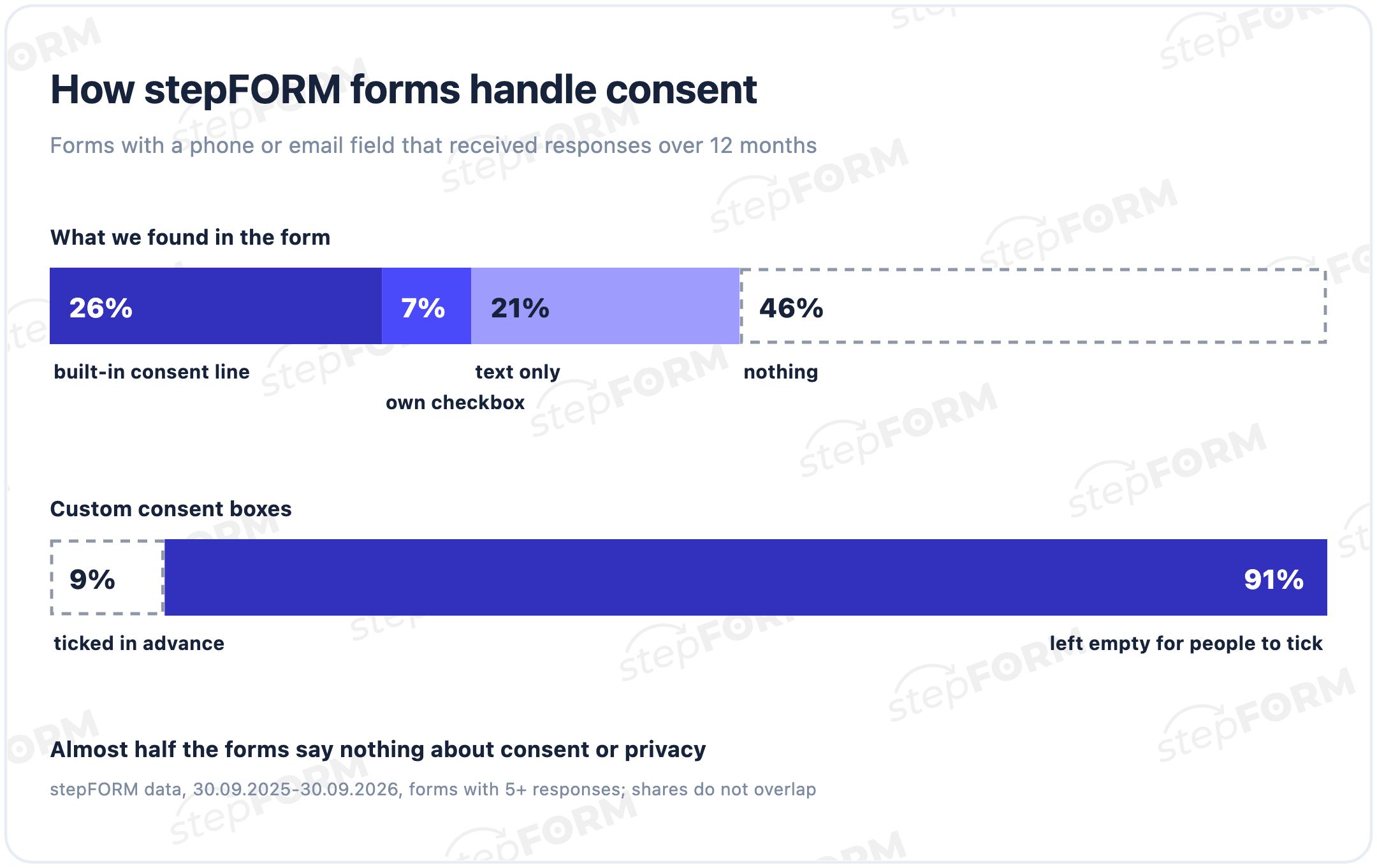
We looked at stepFORM forms that ask for a phone number or email and received responses over the last 12 months. Almost all of them come from Russian-language accounts rather than GDPR markets, but the gaps look familiar. 26% use the built-in consent line under the submit button, 7% have their own consent checkbox, and 21% mention consent or a privacy policy only in the form's text. In 46% we found nothing at all. Among the forms with their own checkbox, 9% had it ticked in advance.
Does your form need consent?
Personal data under the GDPR is any information relating to a person who can be identified, directly or indirectly (Article 4 of the regulation). A name with an email address or phone number qualifies. So does a CV uploaded through a careers form. The business that decides why the form exists and what it collects is the controller. That stays true when a form builder stores the answers: the builder becomes one of the recipients you name in your privacy notice.
Article 6 lists six lawful bases, and three of them come up with forms: consent, a contract (including steps taken at the person's request before one) and legitimate interests. Which one fits depends on what the form is for.
| Form | A basis that can fit | Consent checkbox? |
|---|---|---|
| Quote or call-back request | Steps at the person's request before a contract, Art. 6(1)(b) | Not needed. Show a privacy notice |
| Booking or event registration | The contract itself | Not needed for the booking. Marketing gets a separate opt-in |
| Newsletter sign-up | Consent | The sign-up can be the opt-in if the form says clearly what people sign up for |
| Download in exchange for an email | Contract or legitimate interests for sending the download | Adding people to your mailing list needs a separate opt-in |
| Job application | Steps before an employment contract | Not needed. Say how long you keep CVs |
The choice is yours to make, and to write down in the privacy notice. If you are unsure, the UK regulator's guidance on consent has a section on when consent is appropriate and when another basis suits better.
What makes consent valid
If you do rely on consent, the bar is high. Article 4(11) asks for a "freely given, specific, informed and unambiguous" indication, given by a statement or "a clear affirmative action". Recital 32 spells out what that means on a website: "Silence, pre-ticked boxes or inactivity should not therefore constitute consent." Article 7 then adds four rules that change how a form looks.
- You can prove it. The controller has to be able to show that the person consented (Art. 7(1)), so keep the record of when and how the box was ticked.
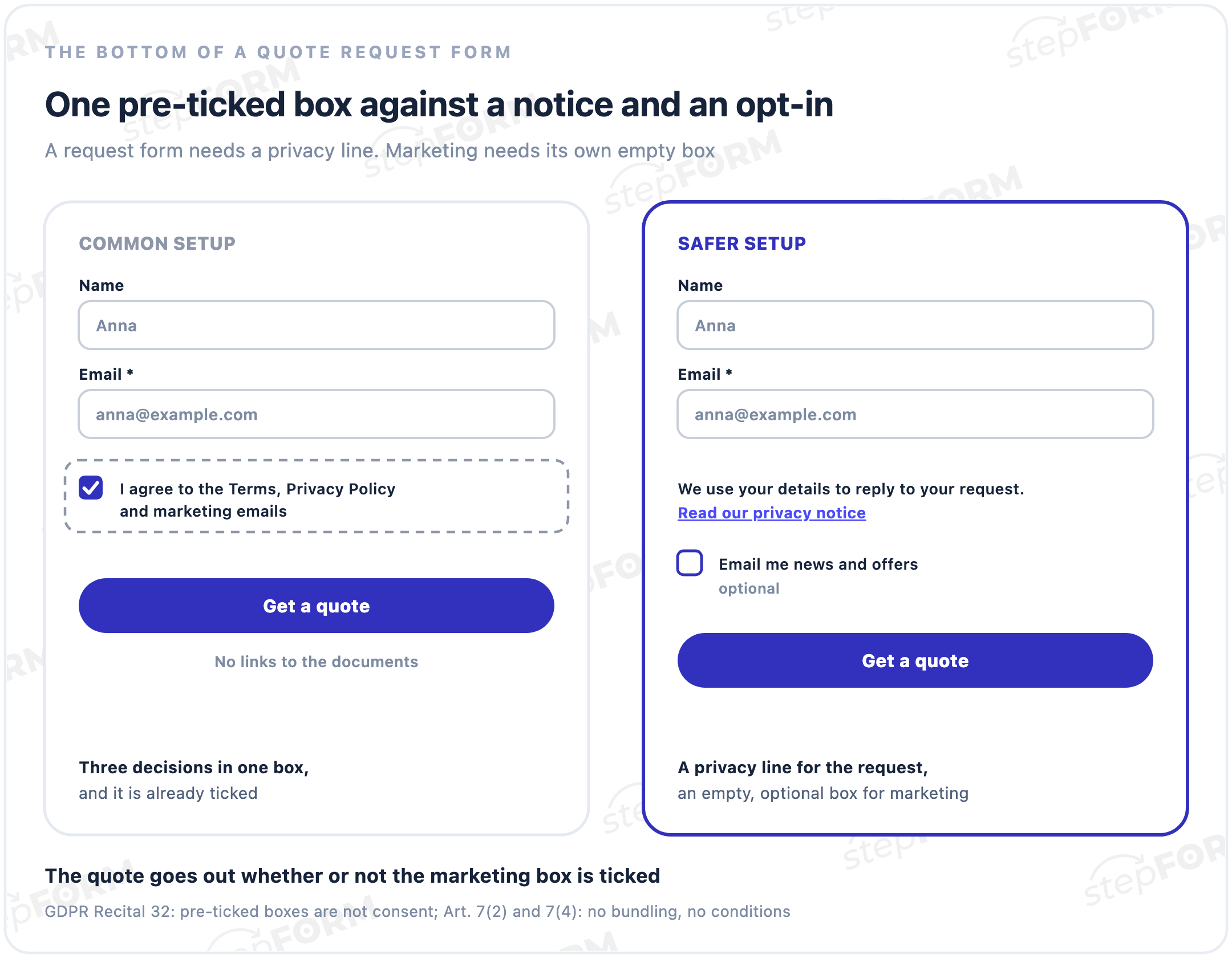
- It stands apart. A consent request inside a declaration that covers other matters must be clearly distinguishable from them (Art. 7(2)). One box for your terms, your privacy policy and your newsletter fails here.
- Withdrawing is as easy as agreeing. If opting in took one click, opting out should not take a letter (Art. 7(3)).
- The service does not hang on it. A form that will not send until people accept marketing makes that consent hard to call freely given (Art. 7(4)).
| Setup you see on forms | What goes wrong | Fix |
|---|---|---|
| A pre-ticked "Send me offers" box | Pre-ticked boxes are not consent (Recital 32) | Leave it empty |
| One box: "I agree to the Terms, Privacy Policy and marketing" | Consent is bundled with other matters (Art. 7(2)) | A privacy line with a link, plus a separate box for marketing |
| The form will not send until the marketing box is ticked | The service depends on consent it does not need (Art. 7(4)) | Make the box optional |
| "By submitting, you agree to receive marketing" | No separate action for marketing | An unticked opt-in box |
| No way to unsubscribe | Withdrawing is harder than agreeing (Art. 7(3)) | An unsubscribe link in every email |
What the privacy notice next to the form should say
Article 13 lists what people must be told at the moment you collect their data. The full list lives in your privacy notice, and the form carries a short line with a link to it. The notice covers:
- Who you are and how to reach you, plus your data protection officer if you have one.
- Why you collect the data and on what basis. If the basis is legitimate interests, say what those interests are.
- Who receives it: the form builder, your CRM, a call centre, and any transfer to another country.
- How long you keep it, or how you decide.
- People's rights: access, correction, erasure, restriction, objection and portability, the right to withdraw consent where you rely on it, and the right to complain to a supervisory authority.
- Whether they have to give the data and what happens if they don't.
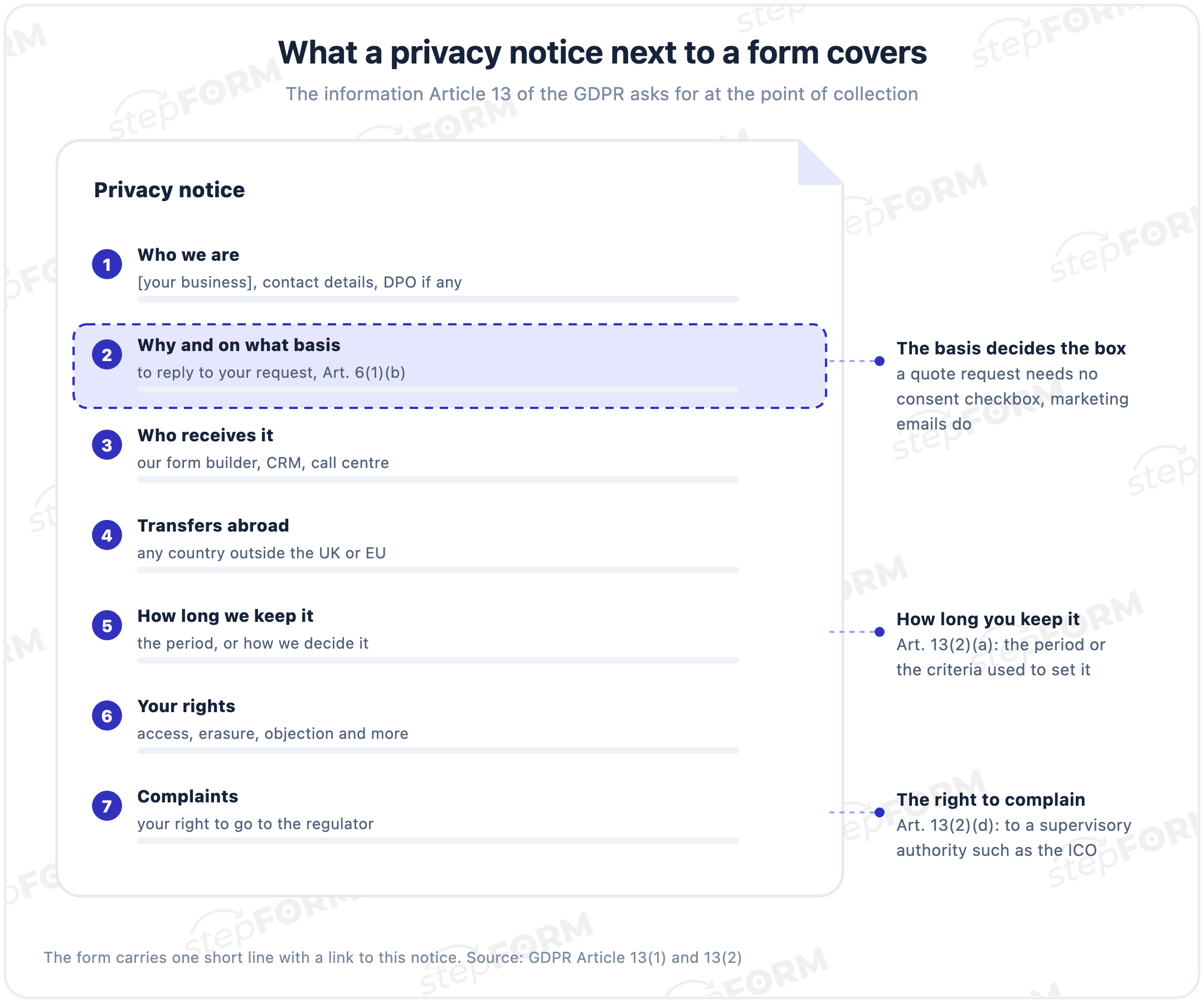
The line under the form can be as short as "We'll use your details to reply to your request. Read our privacy notice." Link the last words to the full notice on your site. If the form opens from a direct stepFORM link rather than on your site, there is no site footer next to it, so the link has to be inside the form itself.
Marketing emails need their own opt-in
Emails and texts that promote your business follow a second set of rules on top of the GDPR. In the UK that means PECR, the Privacy and Electronic Communications Regulations, and the ICO's summary is blunt: "You must not send marketing emails or texts to individuals without specific consent." There is a limited exception for your own previous customers, known as the soft opt-in. EU countries apply their own national rules under the ePrivacy Directive, so check the ones where your customers live.
On a form this means a separate box with specific wording, for example "Email me news and offers from [your business]". Leave it unticked and optional. People who skip it still get their quote, and the ones who tick it have actually asked for your emails.
How to set it up in stepFORM
Everything below works on every stepFORM plan, including Free.
- A privacy line for a request form. Add a Text element under the fields with your notice, for example "We'll use your details to reply to your request. Read our privacy notice." Select the words "privacy notice", click the link icon and paste the address of your privacy page.
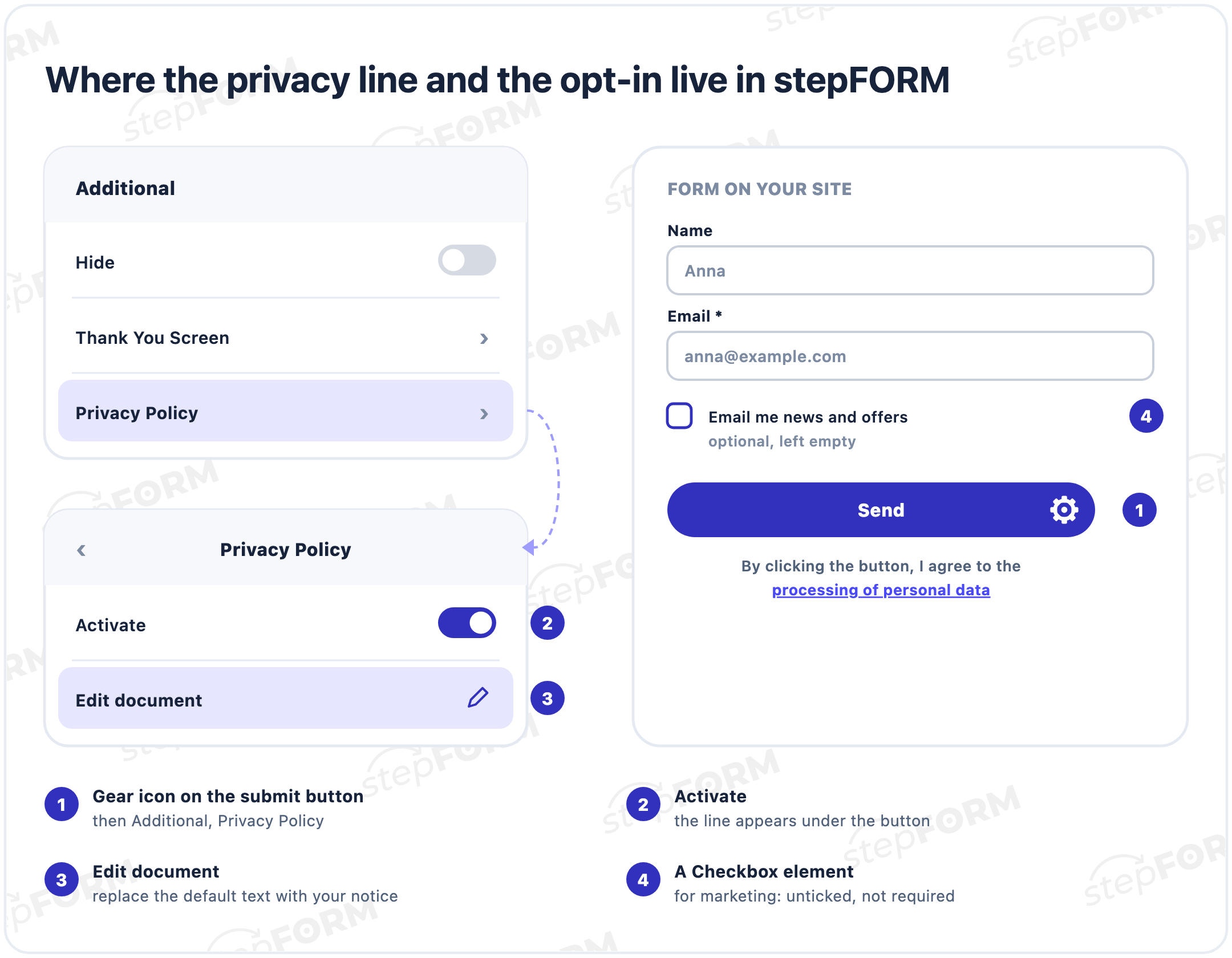
- Or the built-in line under the button. Click the gear icon on the submit button, open Privacy Policy under Additional and switch on Activate. A line appears under the button, "By clicking the button, I agree to the processing of personal data", and its last words open a document. Click Edit document and replace the default text with your own notice. Restore document brings the default back.
- A marketing opt-in. Add a Checkbox element with one option such as "Email me news and offers". Leave it unticked and keep Required selection switched off in its Validation settings.
- A test run. Send one test response with the box ticked and one without. Both should go through, and each response should show whether the box was ticked.
The built-in line talks about agreeing to processing. If your form relies on the request itself rather than consent, the Text element from step 1 describes what actually happens more honestly. Each response keeps the ticked option and the date it arrived, which is the kind of record you need to show consent later.
For the form itself, from fields to notifications, see our guide on how to add a contact form to your website. Plans and limits are on the pricing page.
GDPR fines
The top tier covers the basic principles, including the conditions for consent in Articles 5, 6, 7 and 9, and people's rights under Articles 12 to 22, which include the Article 13 information duties. It goes up to €20 million or 4% of the previous year's worldwide turnover, whichever is higher (Article 83(5)). A lower tier of up to €10 million or 2% covers other duties, such as records and security. The supervisory authority sets the actual amount case by case, weighing factors listed in Article 83(2), such as how serious the breach was and how long it lasted.
When someone withdraws consent
People can withdraw consent at any time, and withdrawing has to be as easy as giving it (Article 7(3)). Put an unsubscribe link in every marketing email and act on it. If consent was the only basis for holding someone's data, they can also ask you to erase it (Article 17(1)(b)). Remember the copies: the form response, the email notification, the CRM record, the spreadsheet export.
Before you publish the form
- A privacy line with a link sits on every form that collects contact details.
- Consent boxes start empty.
- Marketing has its own box, and the form sends without it.
- The notice is complete: who you are, purposes and basis, recipients, retention and rights.
- The words under the button match your basis. Don't write "I agree" if you are not relying on consent.
- Every marketing email carries an unsubscribe link.
Frequently asked questions
Do I need a consent checkbox on my contact form?
Not always. If you only use the details to reply to the request, you can rely on steps taken at the person's request before a contract (Art. 6(1)(b)) and show a privacy notice instead. You need a consent box for things they did not ask for, such as marketing emails.
Are pre-ticked checkboxes allowed under the GDPR?
Not for consent. Recital 32 says silence, pre-ticked boxes or inactivity should not constitute consent. Leave the box empty and let people tick it themselves.
Can I make the consent checkbox required?
Not for marketing. If the form will not send without consent it does not need, that consent is hard to call freely given (Art. 7(4)). Keep the marketing box optional.
Is "By submitting this form you agree to our privacy policy" enough?
A privacy policy is information, not something people have to agree to. Tell them how you use their data and link to the notice. If you need consent for something, ask for it with a separate box.
What should the privacy notice next to a form include?
Who you are and how to contact you, why you collect the data and on what basis, who receives it, how long you keep it, people's rights and the right to complain to a supervisory authority (Art. 13).
Do I need consent to email people who filled in my form?
For marketing emails in the UK, yes, unless the soft opt-in for existing customers applies (PECR). Replies about the person's own request are not marketing. In the EU, check the national rules under the ePrivacy Directive.
What are the GDPR fines for consent mistakes?
Up to €20 million or 4% of worldwide annual turnover, whichever is higher (Art. 83(5)). The supervisory authority sets the amount case by case.
How do I add a privacy notice and an opt-in in stepFORM?
Add a Text element with your notice and link it to your privacy page, or switch on Privacy Policy in the submit button's Additional settings. For marketing, add an unticked Checkbox without Required selection. This works on every plan, including Free.